Every Photoroom enterprise customer pays on usage-based pricing, where one yearly balance covers export and AI operation fees across the API and the apps. Teams that need every output to meet specific criteria can add the Enterprise Guarantee, an outcome-based add-on that charges only for the end result, which means the outputs that pass the fidelity criteria each team agrees on with Photoroom upfront. Photoroom doesn't publish a rate card. It negotiates the rates in each contract, because the price depends on the Visual Agents each customer chooses, whether packaged or tailored to their workflow.
Photoroom Enterprise is the yearly plan for marketplaces, retailers, and brands that need an end-to-end solution for product visuals, from automated production to quality and fidelity checks. The default plan for every enterprise customer uses usage-based pricing, and it gives you one yearly balance that pays for the images you export and the AI operations you use, including Visual Agents, across the API, web, and mobile.
Teams that need every output to meet a specific standard, such as image guidelines or a fidelity standard, can add the Enterprise Guarantee. The Guarantee is outcome-based pricing, so you pay only for outputs that pass the fidelity criteria agreed on with Photoroom upfront. The Guarantee covers food and fashion today, where those demands are most common.
This guide explains what the enterprise plan includes, what you pay for, whether you pay for images that fail, how to estimate a budget, how enterprise differs from self-serve, how Photoroom compares with general-purpose AI models, and how to get started.
Important: Photoroom negotiates enterprise rates in each contract, because your price depends on the Visual Agents you choose, whether packaged or tailored to your workflow. For a quote, contact our sales team.
What does Photoroom's enterprise plan include?
Photoroom Enterprise includes everything in the Ultra plan, plus the pricing, solutions, and support listed below.
Pricing models
Usage-based pricing: For all enterprise customers, you fund one annual balance in USD, EUR, or GBP and pay from it for the images you export and the AI operations you use, including Visual Agents.
Outcome-based pricing: If you need every output to meet a specific standard, you can add the Enterprise Guarantee and pay for the end result, which means only the outputs that pass the fidelity criteria you agree on with Photoroom upfront. The Guarantee covers food and fashion today.
Solutions
Visual Agents configured for your catalog: Each Visual Agents workflow handles one use case from start to finish, such as standardizing seller uploads, creating on-model fashion images, improving food photos, or producing product video. Each workflow includes:
Editing and generation tools: Each workflow uses the tools its use case needs, such as AI fashion models and Adjustable AI Shadows.
Product fidelity: Fidelity Raters score each output against your real product, so the image presents your products accurately. Fidelity Raters cover food and fashion today.
Quality checks and fixes: Visual QA checks the images you send in for quality, cropping, safety, and content problems. Visual Fix retries the outputs that miss the quality score and flags the ones that need human review.
API, web, and mobile access: Your team can connect your systems through the Photoroom API, work in the Photoroom apps, or do both, spending from the same annual balance. On the self-serve plans, the API and the apps need separate subscriptions.
Security and support
Security: SOC 2 Type 2 for the API, data handling that complies with the General Data Protection Regulation (GDPR), encryption in transit and at rest, and single sign-on (SSO) with Google.
Data handling: Photoroom doesn't train models on your enterprise data unless you agree to it in your contract.
Support: An enterprise service level agreement (SLA), a dedicated customer success manager (CSM) and solutions engineer (SE), structured onboarding, and early access to new enterprise features.
Photoroom Enterprise gives your team one plan, one balance, and Visual Agents configured for your catalog. Most of what you pay depends on the pricing model you're on.
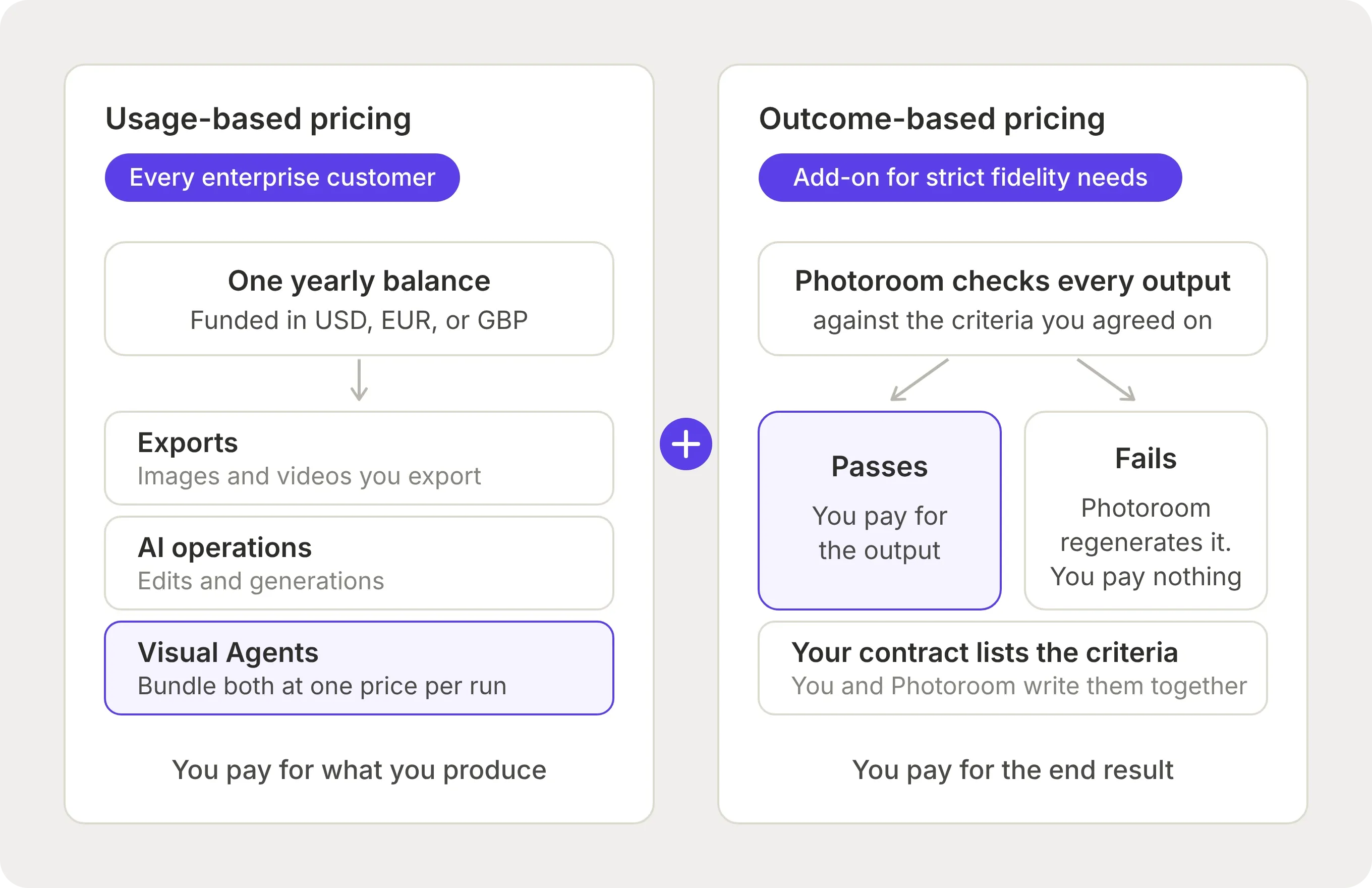 Every Photoroom enterprise customer is on usage-based pricing, and teams that need every output to meet a specific standard can add outcome-based pricing.
How does Photoroom's usage-based pricing work?
With usage-based pricing, you pay for what your team produces. You fund one balance for the year, and every export and AI operation draws from it, including the ones in your Visual Agents workflows.
The annual balance
You fund the balance at the start of your contract, in USD, EUR, or GBP. Your API, web, and mobile usage all spend from that one balance, so you don't split a budget between your developers and creative team. On the self-serve plans, you'd pay for an app subscription and an API subscription separately.
Your admins can see how much balance remains and a forecast of how long it will last. Reaching your balance doesn't interrupt production. If you use the full balance before the year ends, your workflows continue, so your team keeps producing while you add budget through your Photoroom account team. If you have balance left at renewal, your account team agrees on the next step with you.
What the balance pays for
Photoroom charges your balance for exports and AI operations:
Exports: An export is each API call that returns an image, or each image or video you save from the Photoroom apps. Two outputs from one input count as two exports.
AI operations: An AI operation is an edit or a generation. The export fee includes cleanup edits, which are background removal, basic shadows, retouching, resizing, and upscaling. Generative AI adds a generation fee, which varies by model and resolution. Each generation is its own AI operation, so if you regenerate an image three times, you pay three more generation fees.
Visual Agents use the same exports and AI operations. Photoroom bundles them into a workflow for your use case and agrees on one price per run with you in your contract. A run is each time the workflow processes a job.
Here's how each fee works:
| Fee | When you pay it | What it includes |
|---|---|---|
| Export fee | Each image the API returns, or each image or video you save from the apps | Cleanup edits |
| Generation fee | Each time you use generative AI without Visual Agents | One generation. The price varies by model and resolution |
Photoroom sets up the enterprise plan so that most of your spend goes to Visual Agents runs. The separate export and generation fees apply to the work your team does outside Visual Agents.
Visual Agents check outputs at catalog volume. One of the world's largest consumer marketplaces completed more than 1.5 million automated quality checks in three weeks with Visual Agents, and corrected more than 90,000 images where a check found a defect.
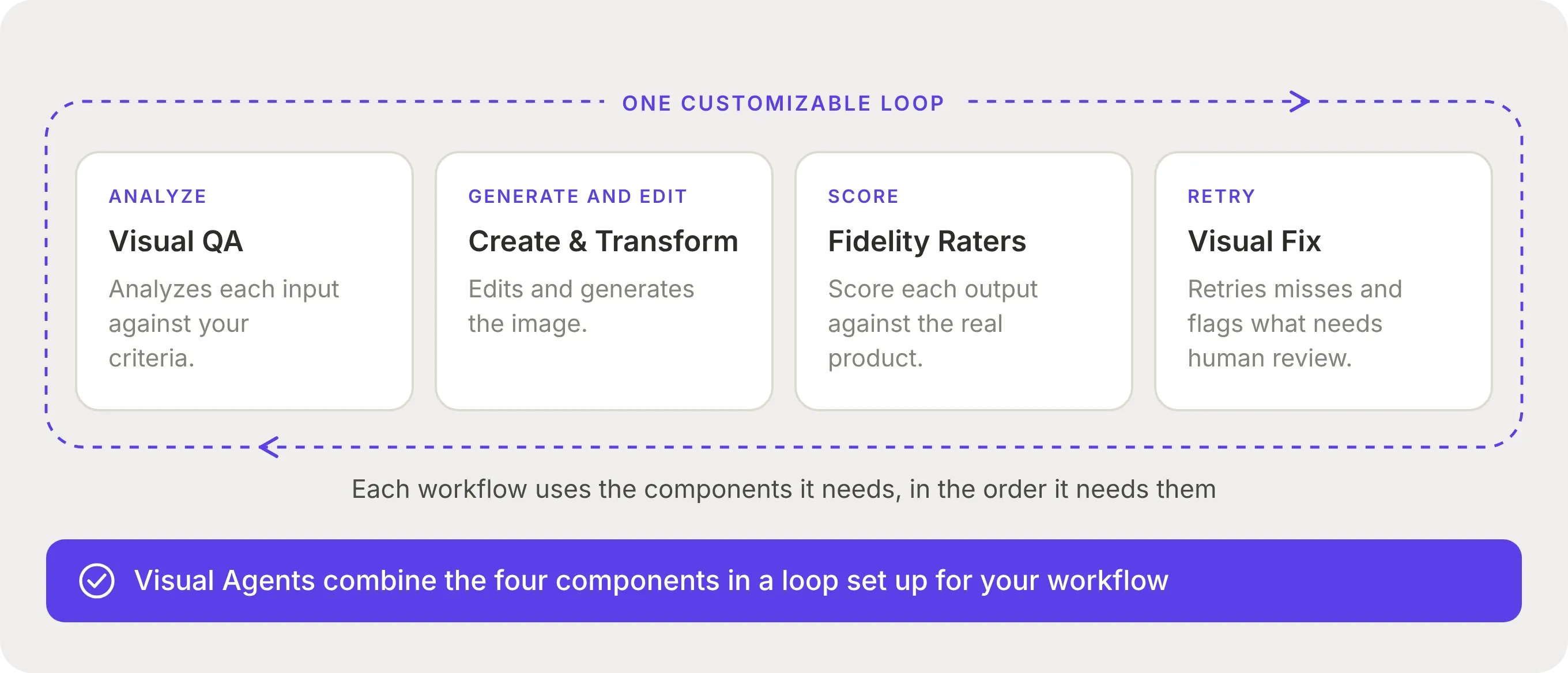 Photoroom's Visual Agents combine four components in a loop that Photoroom sets up for your workflow. Visual QA analyzes inputs, Create & Transform edits and generates, Fidelity Raters score outputs against the real product, and Visual Fix retries anything that misses. Each Visual Agents run has one agreed price.
Photoroom charges enterprise usage as exports and AI operations. On usage-based pricing, you pay for everything you produce. If you need every output to meet a specific standard, outcome-based pricing lets you pay only for the outputs that pass.
How does Photoroom’s outcome-based pricing work?
With outcome-based pricing, you pay for the end result. Photoroom charges you only for the outputs that pass the fidelity criteria you agree on with Photoroom upfront. Photoroom offers it as the Enterprise Guarantee, an add-on for teams that need every output to meet a specific standard, such as image guidelines or a fidelity standard. The Guarantee covers food and fashion today, where those demands are most common. Photoroom checks that the Guarantee can cover your requirements before you sign an annual contract.
Outcome-based pricing works in four steps:
Check feasibility: Send Photoroom a sample of your catalog before you sign. Photoroom tests it against your requirements and onboards you only if the results pass.
Agree on the criteria: You and Photoroom write the pass/fail criteria together. Those criteria are your brief, and Photoroom attaches the brief to your contract.
Check every output: Photoroom’s proprietary fidelity model checks each output against your brief and regenerates the ones that fail.
Pay for the end result: You pay only for the outputs that pass your brief. You don't pay for the failed outputs or for the retries.
Photoroom can contractually guarantee accurate outputs because we own our entire visual production stack, which includes our generation models, our proprietary fidelity model, and our agentic correction system. Owning the full stack lets us control quality end-to-end and stand behind image results, where a tool that relies only on third-party foundation models can't.
In our product fidelity benchmark, the best image editing model we tested preserved full product fidelity in only 29% of cases. The same model with Photoroom's Fidelity Layer reached a 38.2% pass rate.
Most generations in that benchmark had at least one product detail wrong, so getting an image that passes often takes several attempts. With the Enterprise Guarantee, Photoroom pays for those attempts, and you pay only for the image that passes.
What the Enterprise Guarantee covers and doesn't cover
The Enterprise Guarantee covers product fidelity errors, where the product in the output doesn't match your real product. It doesn't cover creative preferences or anything outside your brief.
Here's what the Enterprise Guarantee covers and what it doesn't:
| Situation | Covered? |
|---|---|
| The output shows the wrong product color, a missing or added product feature, or a distorted product shape | Covered. Photoroom regenerates the output |
| Images at 2K and 4K resolution | Covered |
| You'd have chosen a different background tone, plate shape, or pose | Not covered. These are creative preferences |
| The image you send in is low resolution, badly lit, or a placeholder | Not covered |
| Your products are outside food and fashion | Not covered at the moment. Contact the sales team about tailored solutions |
| Your brief doesn't list the error | Not covered |
| Video | Not covered. The Guarantee applies to images only today |
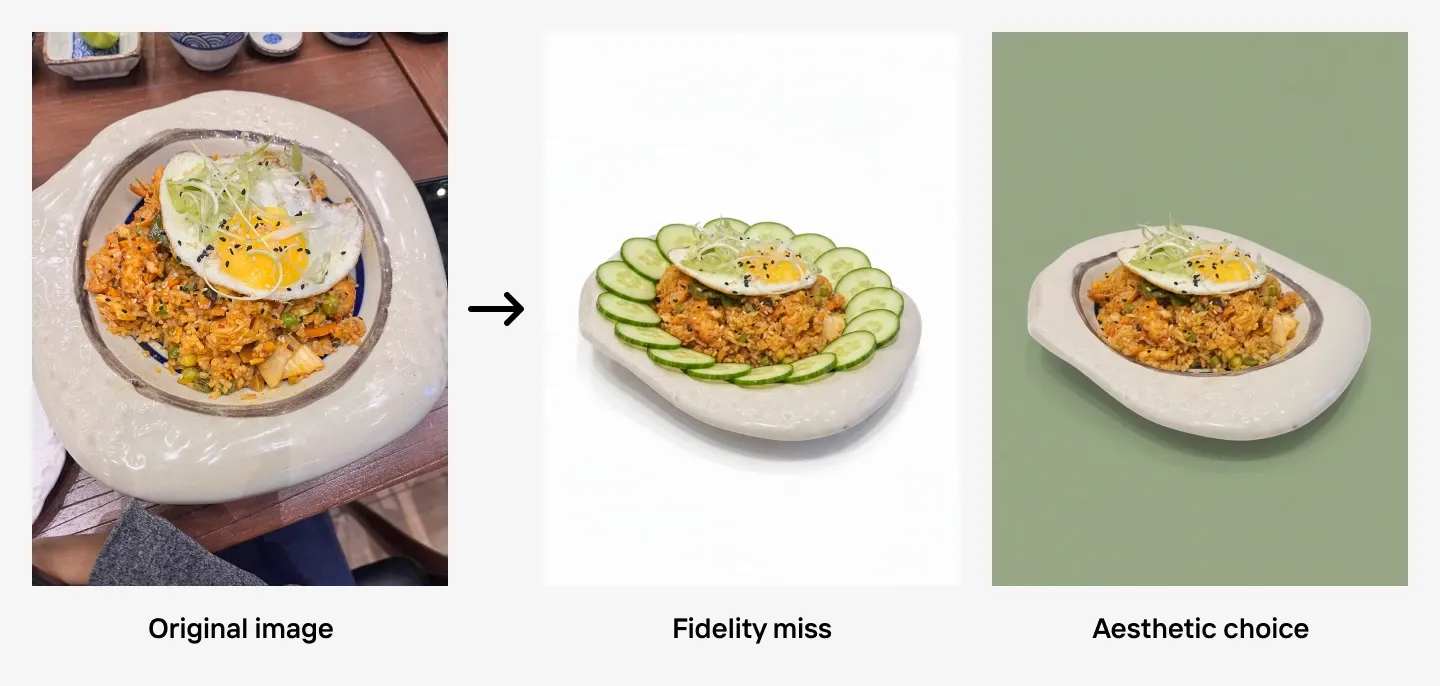 The Enterprise Guarantee covers errors in the product. Creative preferences fall outside it. The image shows three product images of a fried rice dish side by side. The added cucumber slices in the fidelity miss image change what the buyer thinks they're ordering, so the image qualifies for regeneration. The green background changes nothing about the product, so it doesn't.
You can still produce the work the Guarantee doesn't cover, such as video. Photoroom charges that work on usage-based pricing, from your balance. If your products are outside food and fashion, contact the sales team about tailored solutions.
You can add the Guarantee to a Visual Agents workflow on usage-based pricing. If you'd prefer to use outcome-based pricing alone, speak with the sales team. Photoroom's Enterprise Guarantee charges you only for the outputs that pass the fidelity criteria in your contract.
How do you estimate your budget without a rate card?
Photoroom doesn't publish enterprise rates, so you can't calculate an exact cost before you get a quote. However, you can work out how much you'll use. Your usage is the number of images you'll export and how many of them need generative AI, including the work your Visual Agents do. The Photoroom sales team applies your rates to those numbers to give you a price.
1. Check what changes your cost
Here's what determines how much you spend:
The terms of your contract: Photoroom agrees on the price of each Visual Agents run with you, based on the size of your contract.
The jobs your Visual Agents process: Each job is one Visual Agents run, and Photoroom charges it at the price in your contract. Most of your spend goes to Visual Agents runs.
The model and resolution you choose: Premium models and higher resolutions raise the generation fee. Photoroom prices video per second.
The images you produce without Visual Agents: You pay an export fee for each image, and a generation fee each time you use generative AI.
For example, here's what Photoroom charges for two jobs you do outside Visual Agents, one through the API and one in the app:
| Example | What you do | What Photoroom charges |
|---|---|---|
| API | You make one API call that removes the background, upscales the image, and generates one AI fashion model at 2K | 1 export fee + 1 generation fee |
| App | You download an edited image, generate three AI fashion models at 2K, and download one of them | 2 export fees + 3 generation fees |
In the API example, you pay one export fee because the call returns one image. Background removal and upscaling are cleanup edits, so that export fee includes them. You pay one generation fee for the AI fashion model.
In the app example, you pay two export fees because you download two images. You pay three generation fees because you generate three AI fashion models, including the two you don't download.
The two examples are different jobs, so their totals don't show whether the API or the app costs less.
2. Prepare three details for sales
To give you a quote, the Photoroom sales team needs to know the type of work you do, how you'll use Photoroom, and your monthly volume:
| Details | What to work out | What it affects |
|---|---|---|
| How you'll use Photoroom | Through the API, in the app, or both | Whether Photoroom charges your edits per API call or one at a time |
| Type of work | Cleanup only, AI backgrounds or scenes, AI fashion models, or food images | Which generation fees apply and which Visual Agents you need |
| Monthly volume | How many images or videos you produce each month | How many exports and Visual Agents runs you pay for |
Share those three details with the sales team when you ask for a quote. Photoroom uses your volume, setup, and type of work to price a quote for your catalog. Before you ask, check that the enterprise plan fits your team.
Is the enterprise plan right for your team?
The enterprise plan is right for your team when you need something Photoroom's self-serve plans don't include. What you need matters more than how many images you produce.
Photoroom's two self-serve options are the Ultra plan, which is a subscription to the Photoroom apps, and the self-serve API plans, which charge you per image each month.
Here's how the Ultra, self-serve API, and enterprise plans compare:
| Area | Ultra | Self-serve API | Enterprise |
|---|---|---|---|
| Price | From $82.50 a month, billed yearly, for 75,000 AI credits and 10,000 exports | $0.02 per image (Basic) or $0.10 per image (Plus) | Negotiated in your contract |
| Billing | Monthly or yearly | Monthly only | Yearly |
| Limits | 10,000 to 100,000 exports a month, depending on the tier you choose. Exports pause at the limit until your next billing cycle, unless you upgrade | Unused images don't roll over to the next month | Workflows continue automatically when you use up your balance. You add budget through your account team |
| API access | No | Yes | Yes |
| App access | Yes | No | Yes |
| Visual Agents | No | No | Yes |
| Enterprise Guarantee | No | No | Add-on for teams with a specific fidelity standard. Covers food and fashion today |
| SOC 2 Type 2 and SSO | No | Yes | Yes |
| SLA, dedicated CSM and SE, and onboarding | No | No | Yes |
The $0.02 and $0.10 prices in the table are Photoroom's self-serve API prices. Photoroom sets enterprise rates in your contract.
The enterprise plan is the right choice if any of the following apply to your team:
You have large image volumes with specific fidelity requirements.
Your volume is low, but you need control over product fidelity.
You need the API and the app on one budget. The self-serve plans charge for each separately.
You need to set up Visual Agents for your catalog at scale.
You need every output to meet a specific standard and want to pay only for outputs that pass your fidelity criteria.
Your security team requires SOC 2 Type 2, SSO, or an SLA.
Your production can't pause when you reach a monthly limit.
How does Photoroom compare with Gemini Nano Banana and OpenAI GPT Image on cost?
Gemini Nano Banana and OpenAI GPT Image charge by tokens. You pay for the input you send, which is your prompt and your product image, and for every image they generate, whether or not you can use it. Photoroom doesn't charge for input, and with the Enterprise Guarantee, you pay only for the outputs that pass the fidelity criteria you agree on with Photoroom upfront.
A general-purpose AI model can look cheaper because it publishes a low price per token. That published price doesn't include the cost of building in-house solutions with general models, nor the following costs:
The generations you discard: When an output shows the wrong color or a missing product detail, you generate again and pay again, for the input and for the new image.
The work of checking and fixing images: Your team has to check each output against the real product, decide what fails, and build and maintain the full quality assurance process.
Here's how Photoroom Enterprise, Gemini Nano Banana, and OpenAI GPT Image compare on cost:
| Area | Photoroom Enterprise | Gemini Nano Banana | OpenAI GPT Image |
|---|---|---|---|
| What you pay for | Exports and AI operations, including Visual Agents runs. With the Enterprise Guarantee, the end result, meaning only the outputs that pass | Tokens for your input and for every generation | Tokens for your input and for every generation |
| What a retry costs you | Nothing extra under the Enterprise Guarantee. On usage-based pricing, each new generation is an AI operation | The price of another generation | The price of another generation |
| Who checks the output against your product | Photoroom’s fidelity model | Your team | Your team |
| Published rates | No. Photoroom negotiates rates in your contract | Yes | Yes |
To compare the three fairly, calculate your cost per accepted image. Cost per accepted image is what you spend on input and on every generation, divided by the number of images you accept.
For example, if you need three generations to get one image you accept, that image costs you three times the price of one generation. In our product fidelity benchmark, the best image editing model we tested kept every product detail correct in 29% of generations, so needing several attempts per image is common.
With Photoroom's Enterprise Guarantee, those extra attempts don't raise the cost of the image. Photoroom handles the retries, and you pay only for the image that passes. Cost per accepted image is the number your finance team should compare.
How do you get the Photoroom enterprise plan?
To get started with the Photoroom enterprise plan, take the following steps:
Contact sales: Ask the Photoroom sales team for an enterprise quote.
Share your details: Give your monthly volume, how you'll use Photoroom (API, app, or both), and your type of work.
Test a sample: Send Photoroom a sample of your catalog. Photoroom tests it as a proof of concept (POC) before you commit. If you want the Enterprise Guarantee, this test also confirms whether you qualify.
Sign and start: You receive your quote, sign the contract, and fund your balance for the year.
Photoroom Enterprise is a complete production system for product visuals. Visual Agents generate, check, and fix your images at catalog scale, and one yearly balance covers your API and app usage. For food and fashion, our fidelity model checks every output against your real product, and the Enterprise Guarantee puts your fidelity criteria in your contract, so you pay only for the images that pass.