I'm Vincent. I'm a software engineer, and I work as a product manager and in developer relations at Photoroom. My job is to work with e‑commerce businesses, understand what they need from image editing, and help them deploy AI that grows their business.
Long story short: general-purpose AI image models are great at making product photos look good, but they're not reliable at keeping the product exactly as it is. Logos get garbled, tags change, and portions shrink. That's not a bug you can prompt your way out of. It comes from how these models work. The fix is to wrap the model in a workflow that checks its own output and repairs or retries anything that isn't faithful to the product. At Photoroom we call that a visual agent. In this post I'll show you where the errors come from, what's inside a visual agent, and real before and after examples from fashion and food.
How accurate are general-purpose AI models on product images?
They look right at first glance, and that's the trap. The details that tell a buyer "this is the real thing" are exactly where they slip.
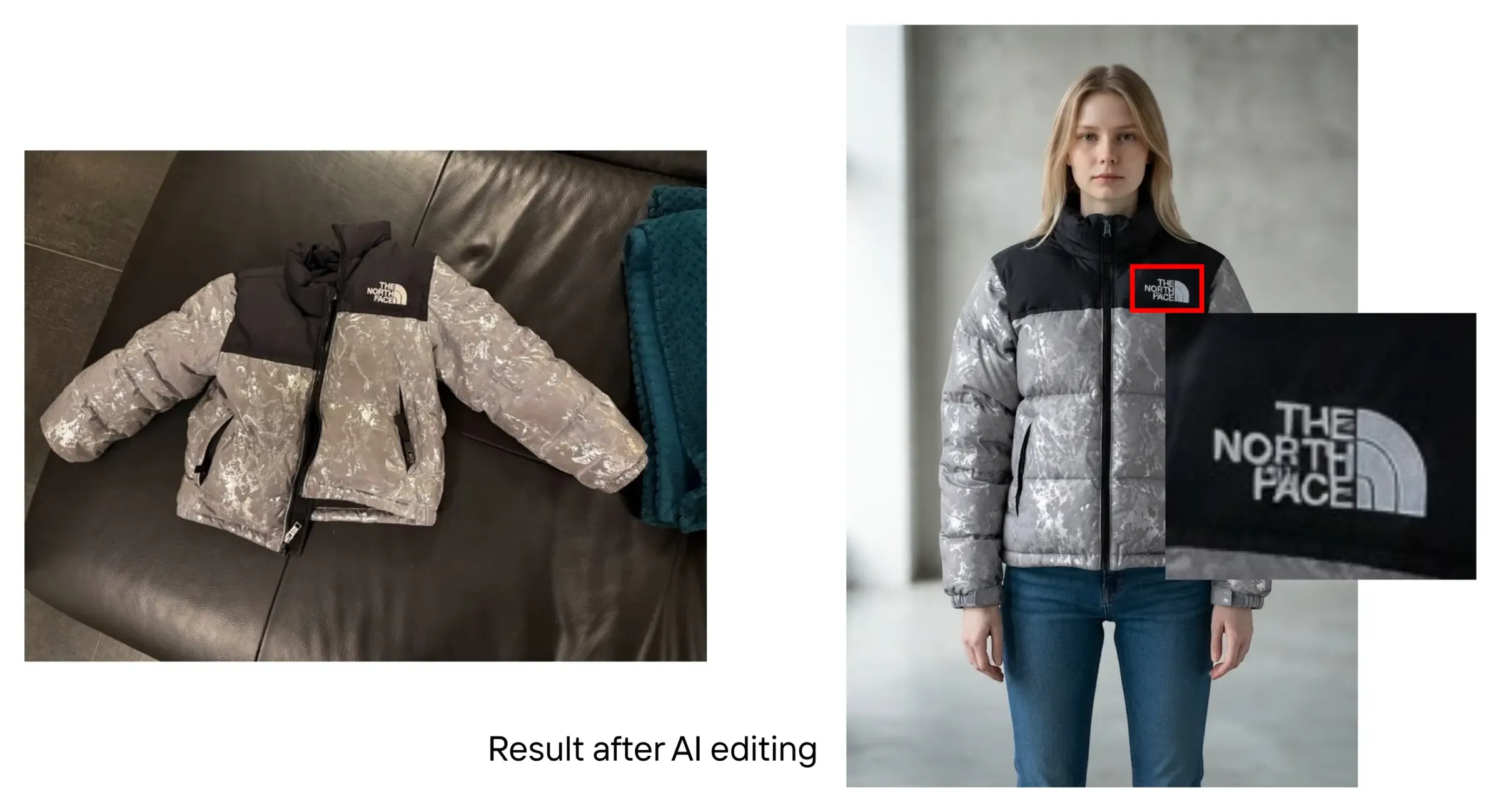
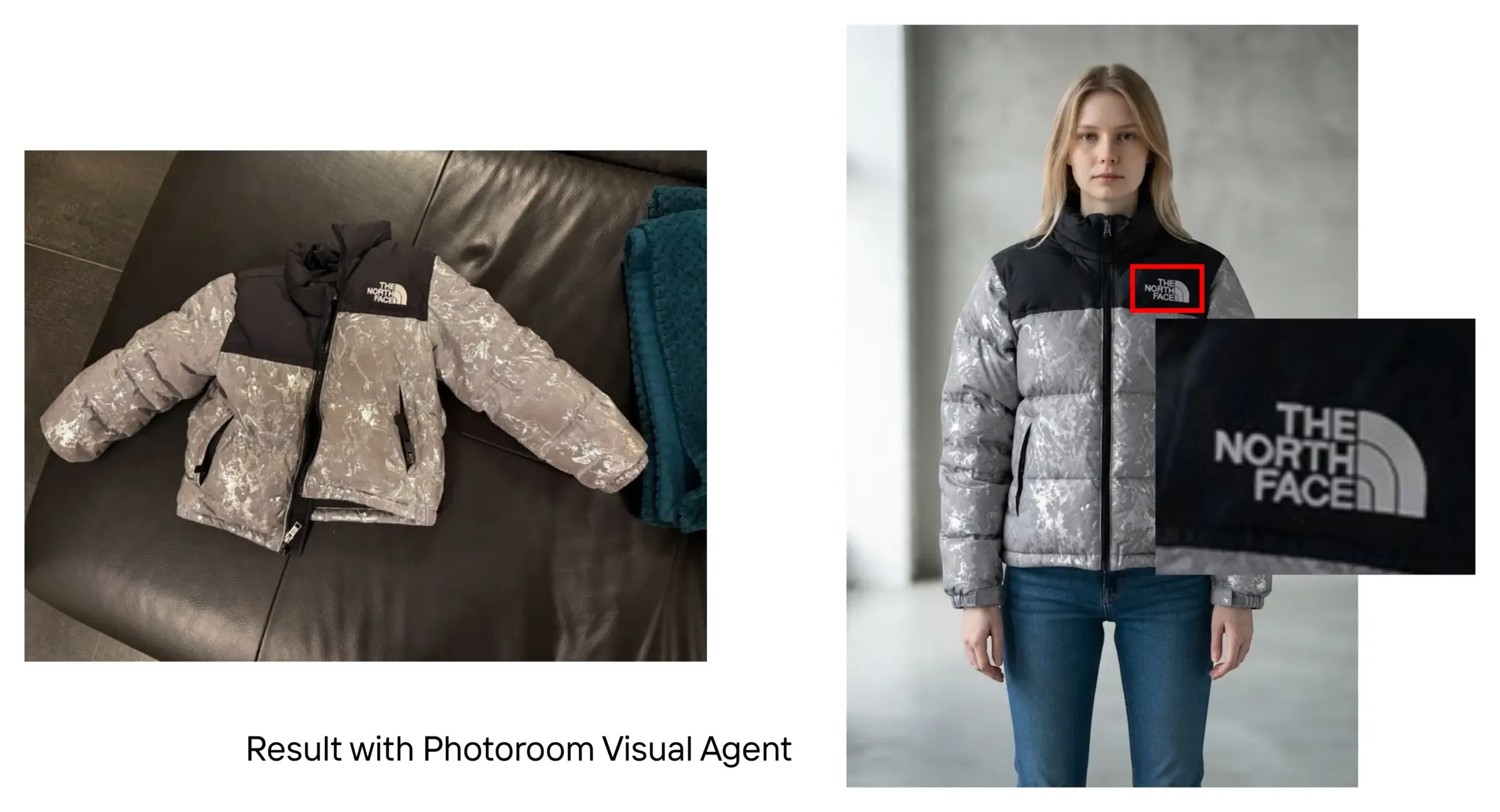
I took a photo of a puffer jacket from a well-known outdoor brand and asked a general-purpose image model to show it on an AI-generated model. The result is very aesthetic. But zoom in on the logo and it looks garbled and low resolution. It doesn't look like the brand's logo at all. To a buyer, that makes the jacket look like a counterfeit, which is the last thing you want.
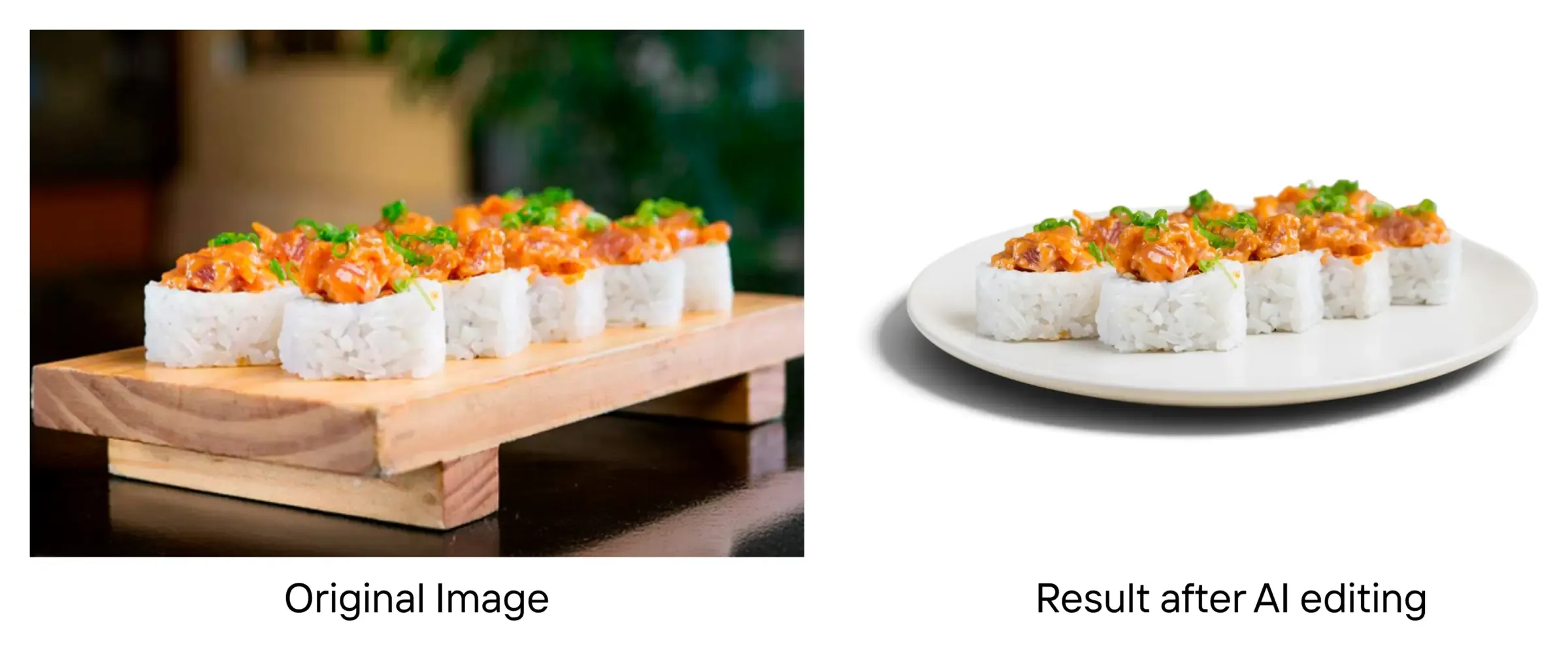
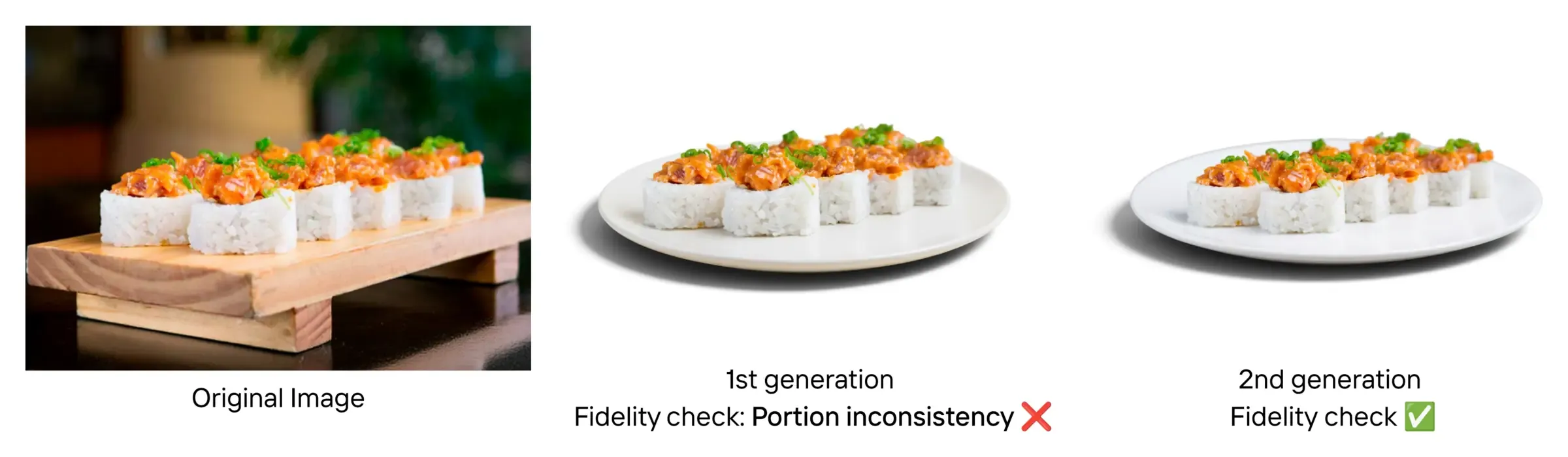
It's not only fashion. A food delivery app asked for dishes on a neutral white plate, with a shadow, on a white background. The merchant's photo showed a sushi platter with five rows of two pieces. After the AI edit, there were four rows. Two pieces had disappeared. The dish is priced for 10, the menu text may still say 10, and the buyer sees 8.
In e‑commerce, people need to be sure that what they see is what they'll get. A product photo that changes a logo, shifts a colour or smooths over a defect doesn't just look wrong. It creates returns, disputes and trust failures at scale.
Why do AI image models change your product?
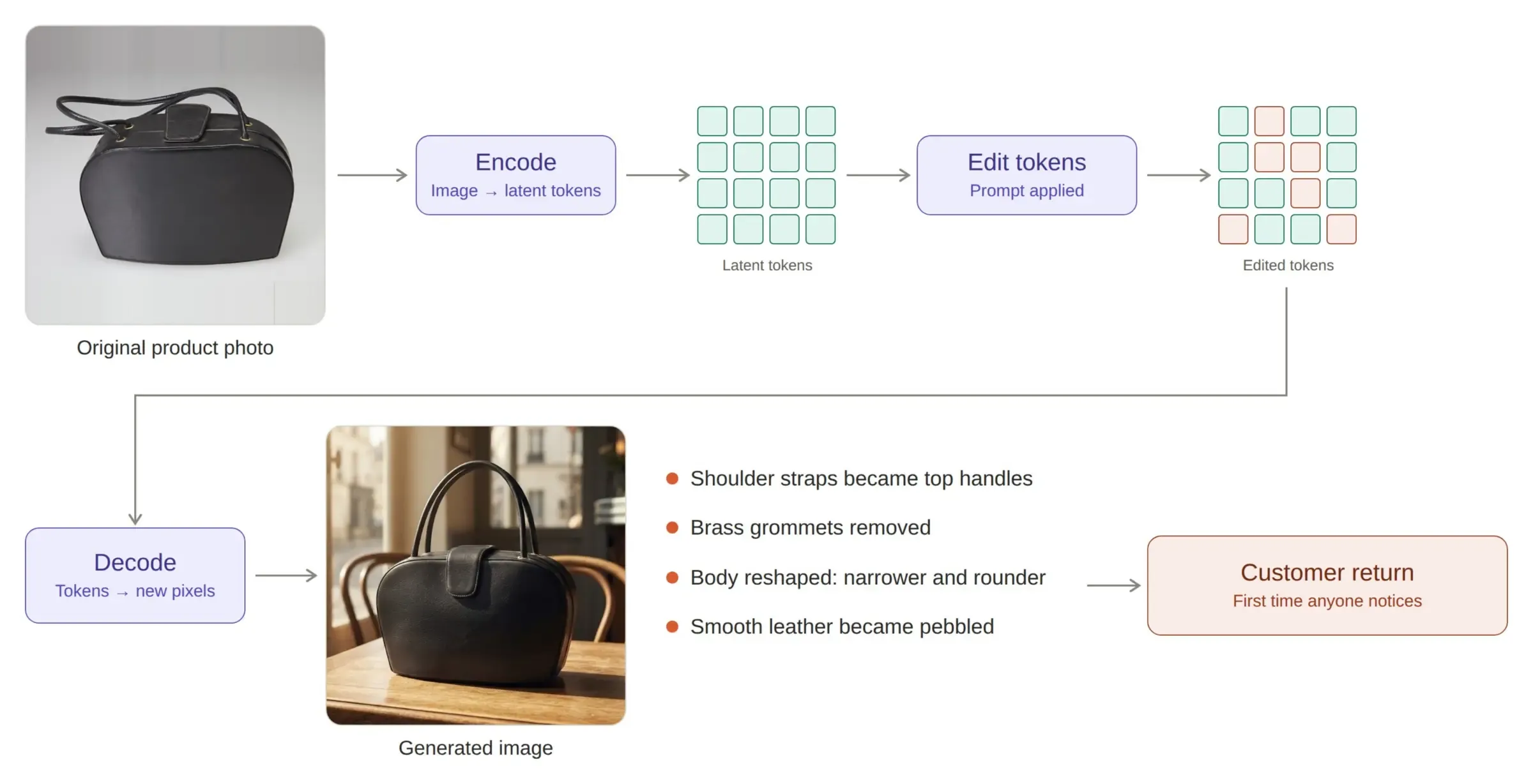
Because they never edit your pixels directly. Here's what happens inside the model:
Encoding. The model turns your image into tokens (a compressed version of the image the model learned during training).
Editing. It applies your prompt to those tokens.
Decoding. It turns the edited tokens back into pixels.
There are good reasons to work this way. The token space is smaller than the pixel space, so it's more efficient, and it helps the model be creative. The drawback is product fidelity (how exactly the output matches the real product). Encoding and decoding is a bit like taking detailed notes on a picture and then redrawing it from memory.
Here's a leather bag I ran through one of these models. The shoulder straps came back as top handles. The brass grommets were gone. The body was reshaped, narrower and rounder, and the smooth leather became pebbled. Nobody would notice in a quick review. The first person to notice is the customer, and that's a return.
That's the root of the hallucinations above. And it's why I think fighting the model head-on is the wrong approach. It's a limit of how these models are designed. The big model providers are excellent at general-purpose creativity, but e‑commerce has its own list of requirements. What you want is a wrapper around the model, so you can control what reaches production.
| General-purpose AI image models | What e‑commerce needs | |
|---|---|---|
| Aesthetics and creativity | Very strong | Nice to have |
| Logo fidelity | Often garbled | Exact |
| Colour and fabric | Can drift | Accurate to the real item |
| Edits like removing wrinkles | Can change other parts of the garment | Change only what you asked |
| Defects on second-hand items | May "repair" them | Keep them visible |
| Lighting and shadows across a batch | Inconsistent | Consistent |
What is a visual agent?
A visual agent edits an image and then checks its own work before anything goes live. If you remember one thing from this post, make it that.
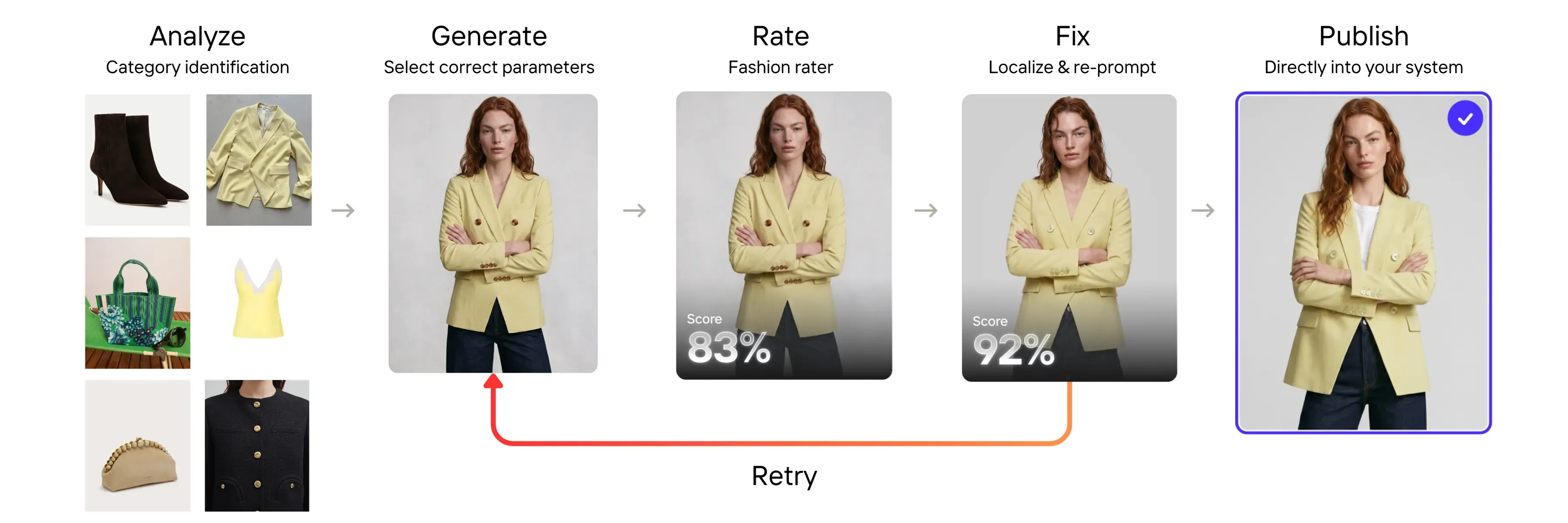
It wraps the AI model in five steps:
Analyze: work out what the product is (its category) and clean up the input so the model isn't distracted (Visual QA).
Generate: the AI edit itself, with the right parameters for that product (Create & Transform).
Rate: score the output against the original with a fidelity rater built for the vertical (Fidelity Raters).
Fix: repair the faulty area and re-prompt, then rate again (Visual Fix). If it still fails, retry.
Publish: only images that pass go straight into your system.
Fidelity raters cover fashion and food today, so those are the examples I'll show.
How does a visual agent work for fashion images?
Take virtual try-on: you start from a photo of a garment and get a photo of a person wearing it.
Analyze. We remove the background, so nothing distracting reaches the try-on model. That alone improves quality. If the input already shows someone wearing the garment, we can also hide their face so the model doesn't get confused.
Generate. The try-on itself.
Rate and fix. A fidelity check compares the output with the original. If it finds a problem, the fix step repairs only that area. Only then is the image marked as successful.
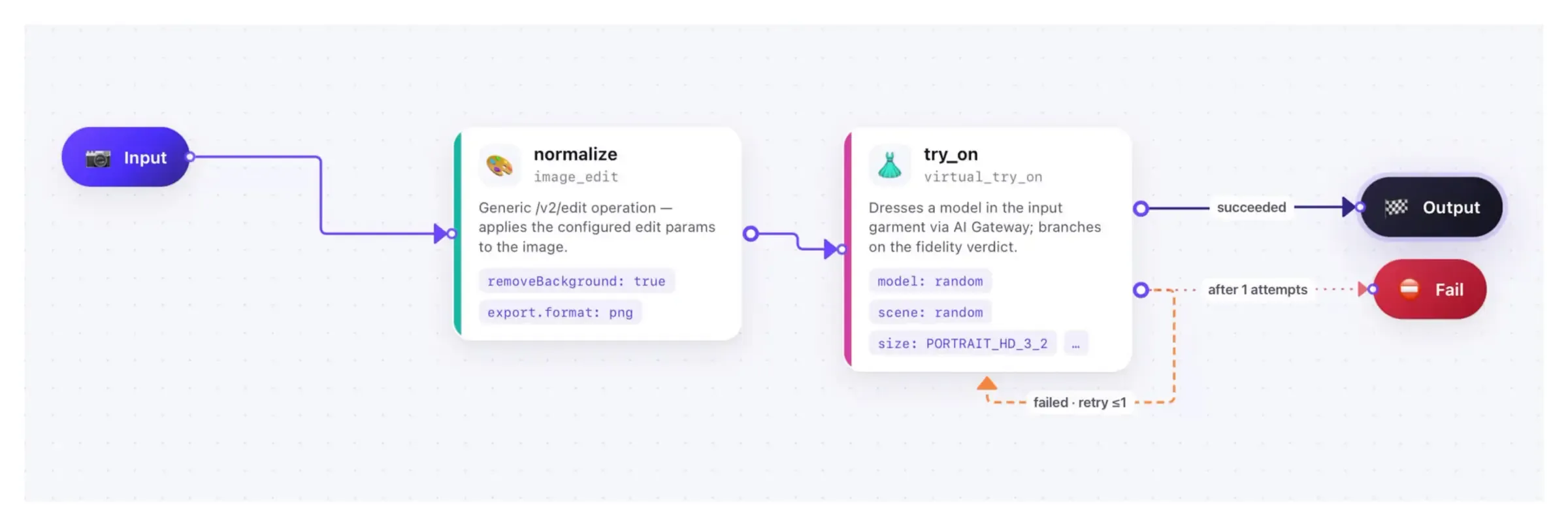
Here's what that looks like in practice.
The puffer jacket logo. Back to the jacket from the start. The rater spots the problem on the logo. The fix step repairs only that area, using the logo from the original photo. Nothing else in the image changes. The logo now looks exactly as it should, and the image is ready for production.
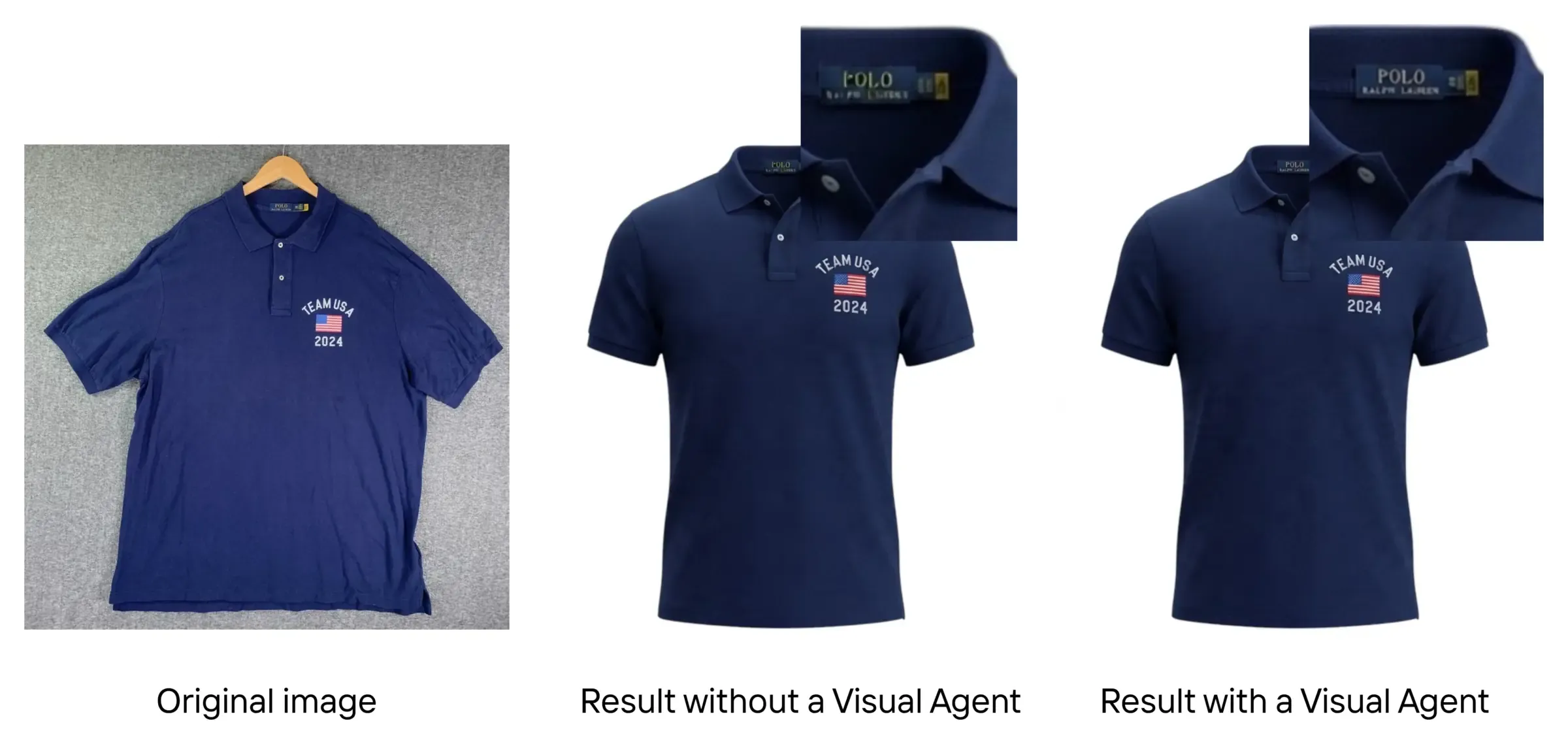
The ghost mannequin tag. I made a ghost mannequin image of a polo shirt (the garment looks as if it's worn by an invisible mannequin, which gives it depth). Without the agent, the brand name on the neck tag changed. With the agent, the rater found the tag, the fix step repaired it, and the label reads exactly as on the original.
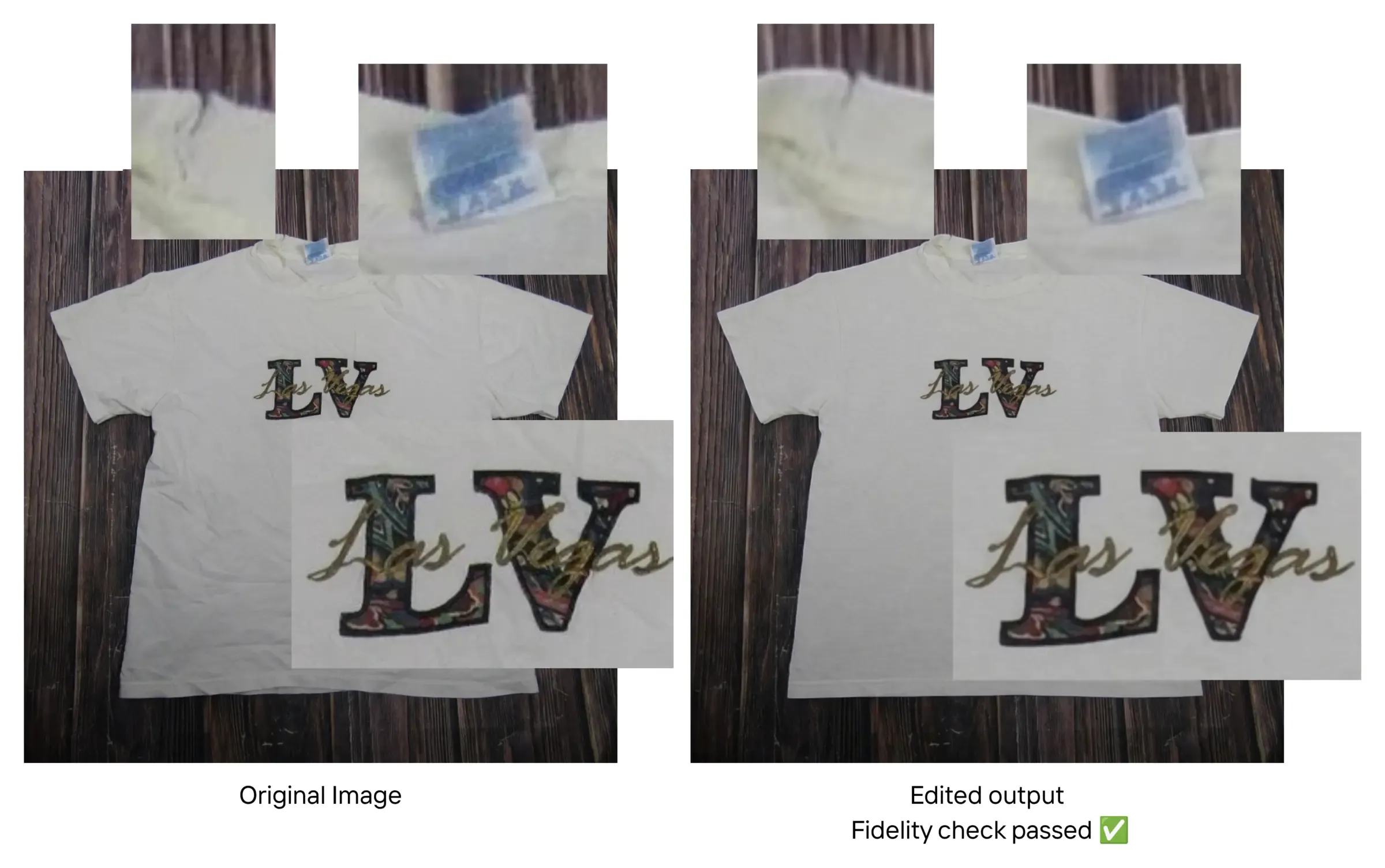
Ironing that keeps the defects. I used AI Ironing to remove wrinkles from a T-shirt. The fidelity check passed: the print on the front and the neck tag are unchanged. Even better, there's a small tear near the collar, and it's still there after ironing. That's exactly what we want. If something is torn, the buyer needs to see it.
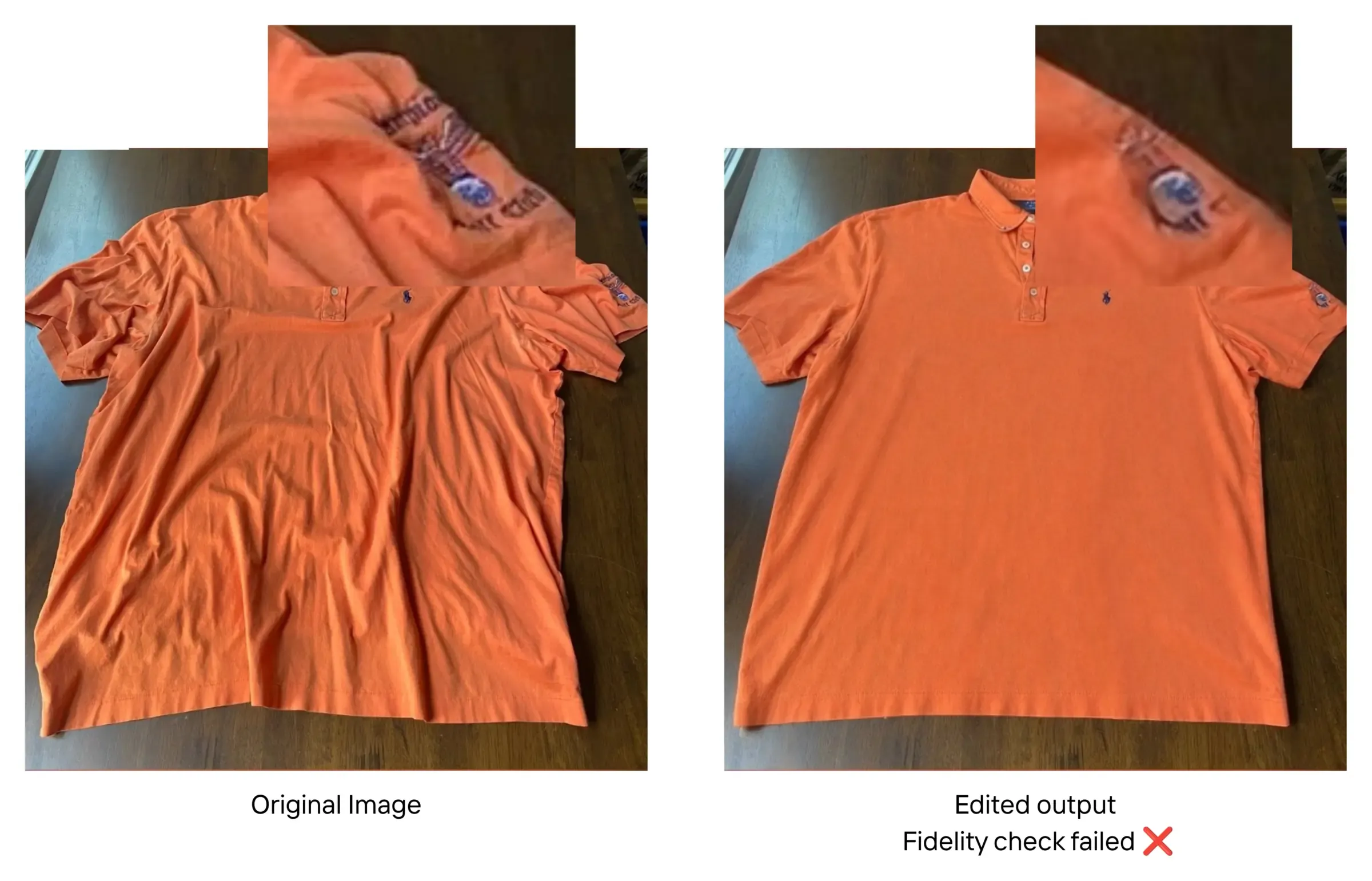
Knowing when to say no. On a polo shirt, a big wrinkle hid part of the logo on one sleeve. No model can iron that accurately, because it can't see what's under the fold. The best it can do is an educated guess, and there could be a hole hiding in there. The fidelity check failed, so the image never reached production. You'd love every image to pass, of course. But it's far better to learn the input wasn't good enough than to publish something that will look strange to a buyer.
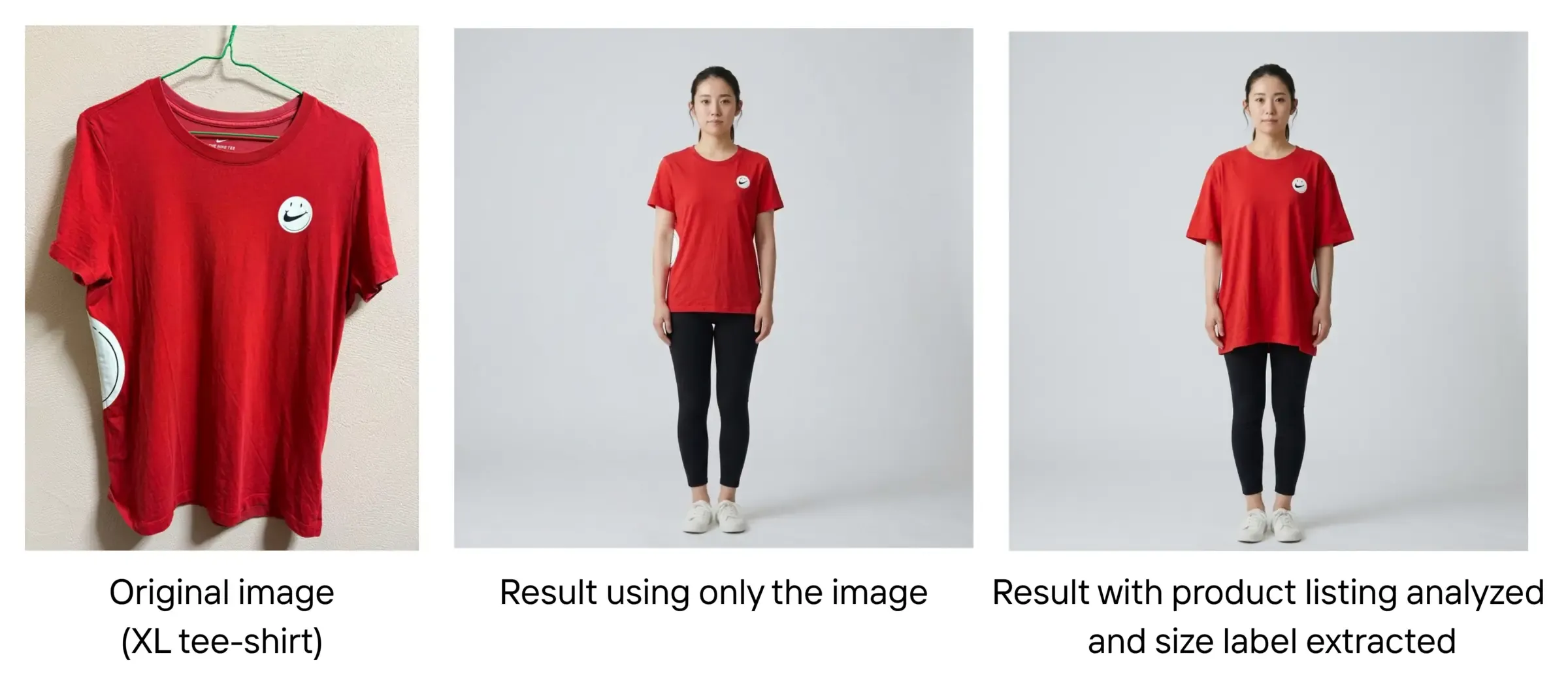
Try-on that knows the size. I generated a virtual model 160 cm tall and tried on an XL T-shirt. A general-purpose model, given only the photo, made it fit like a regular size. It looked nice but not realistic. In my test, the visual agent analyzed the whole product listing, extracted the size label, and used it in the try-on. The result hangs the way an XL shirt really would on someone that height.
How does a visual agent work for food images?
Here the goal is to make the merchant's photo more appealing, or match the delivery app's guidelines, without changing the food: same portion, same ingredients.
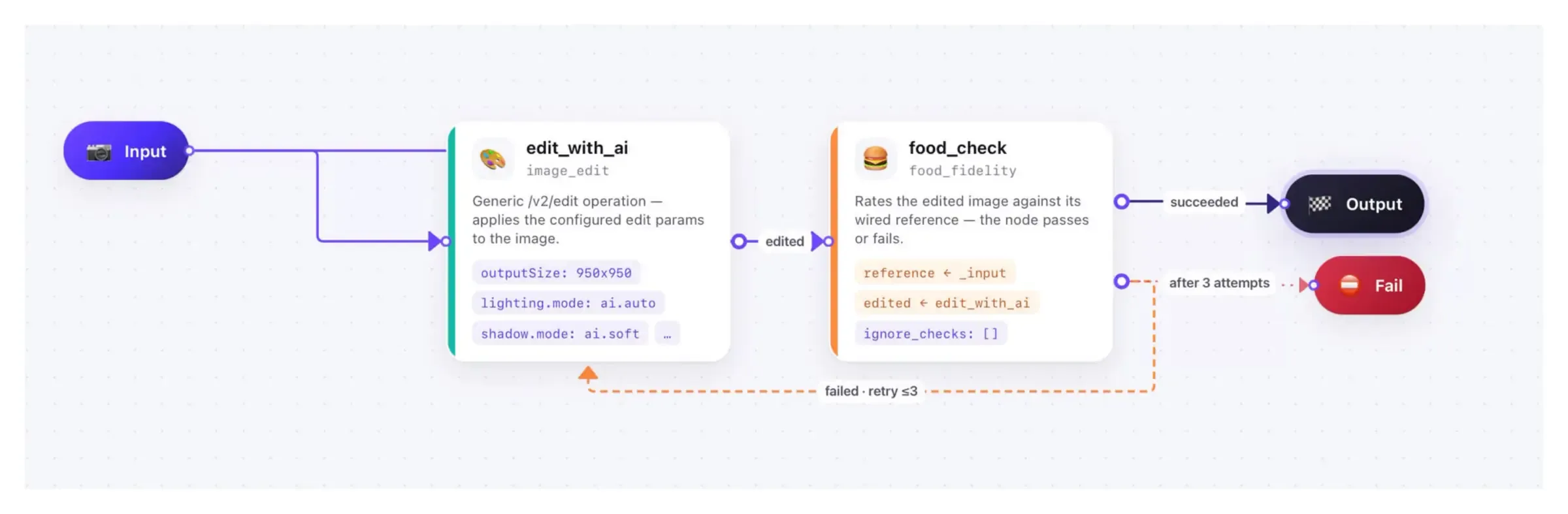
The workflow is an AI edit followed by a food check. When the check fails, the agent retries and takes the reason for the failure into account. In the food agent I showed, an image gets up to three attempts, and the limit is set for each workflow. If it still fails, it's marked as needing human review. Most of the time that's because the original photo was too low quality to improve accurately.
The sushi platter. On the first try, the check flagged a portion inconsistency: the missing row. On the second try, the image matched the guidelines and passed: 10 pieces before, 10 pieces after, with the same fillings.
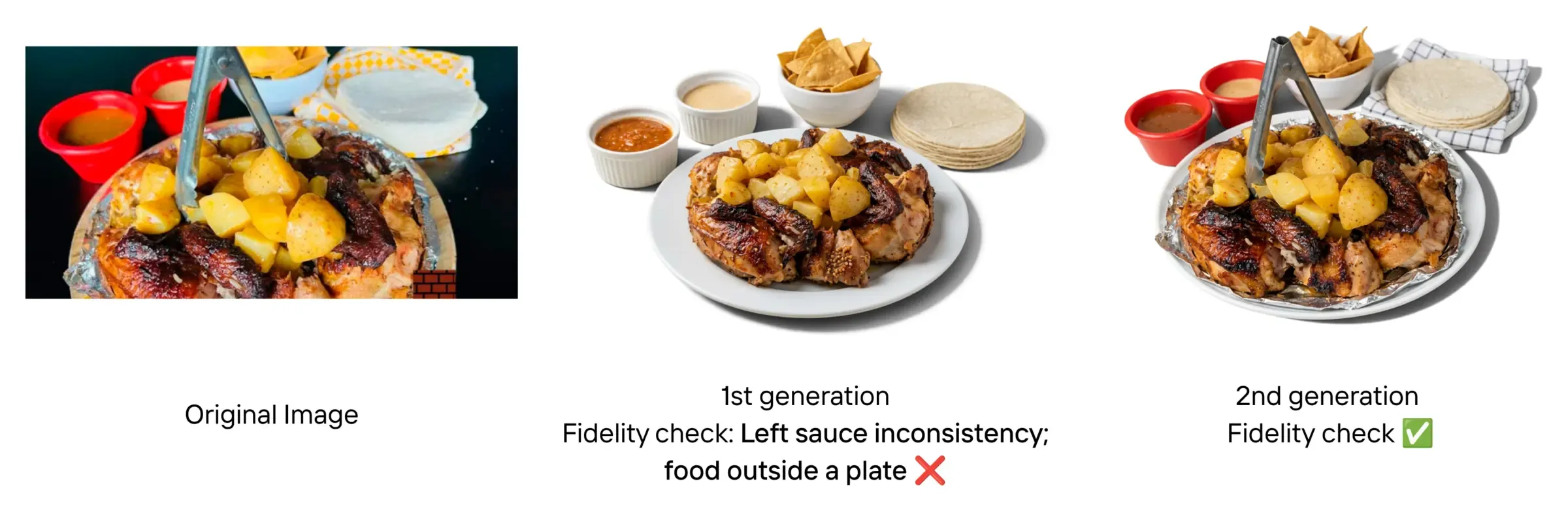
Two failures at once. On a roast chicken dish, the first attempt failed for two reasons. The sauce on the left had changed. And the food was no longer on a plate. The quality rules say food is always shown in a serving vessel, because anything else doesn't look hygienic. The second attempt passed both checks.
I picked failures on purpose to show you how the checks work. To give you an order of magnitude, I ran 100 images from real food delivery apps through the agent:
| Stage | Result |
|---|---|
| First attempt | 70 to 80% passed the fidelity check |
| Second attempt | About 80% of the rest passed |
| After the last attempt | The few left are flagged for human review |
The images that never pass usually show too little of the dish, are too low quality, or show something so specific to one restaurant that the model can't tell what it is. At least they're flagged, so a person can look at them.
How long does a visual agent take per image?
It depends on how complex the task you give the agent is, so take these as estimates. For a simple workflow (analyze, an edit, a fidelity check and a retry), an image that passes first time takes around 10 seconds. When a retry is needed, it's more like 15 to 20 seconds.
Who uses this in production?
Two examples:
Vestiaire Collective, the marketplace for pre-loved luxury fashion, saw listings enhanced with Photoroom sell at a 5% higher rate of liquidity (the share of listed items that sell). Their chief product officer, Thomas Hezard, put it this way: "Photoroom improved buyer engagement on our items without creating any cancellations or returns on our platform." Read the Vestiaire Collective story.
Wolt, the food delivery app, uses Photoroom to bring product images from more than 140,000 merchants in 27 countries in line with its guidelines. I've worked with them personally for several years. At the end of 2024 I built the very first visual agent prototype for them: an analysis step, then different processing depending on what the analysis found. Read the Wolt story.
Key takeaways
Fidelity is non-negotiable. General-purpose models rebuild your images. In commerce, a changed logo or colour means returns and lost trust.
Agents check their own work. Analyze, generate, rate, fix, retry: every image is verified before it reaches your catalog.
It works in production. Teams like Vestiaire Collective and Wolt already run their catalog images through Photoroom at scale.
Try it out
Visual agents aren't on our self-serve API, but we're more than happy to run a test for you. Bring your own catalog: contact our sales team with up to 50 of your product images and tell us how you'd like them improved. We'll run a visual agent on them and send you back the same before and after you saw here, this time on your own products.
For more on why fidelity matters, read how to close the fidelity gap in AI product photography.