

Best AI image extenders to expand a picture in 2026
Resizing an image sounds simple on paper. But for e‑commerce sellers and teams, resizing comes with complications. How do you resize a 1:1 image for a 16:9 Instagram Story? Or a 4:3 banner for Amazon’s marketplace?
In the best-case scenario, you waste time on a series of “creative” edits to preserve your product image. In the worst-case scenario, you’re left with degraded image quality or forced to conduct reshoots.
AI image extenders can help. Instead of just stretching pixels, these tools expand the boundaries of your product photos to create high-quality images every time. What was once only possible with advanced editing skills is now easier than ever with a click (or tap) of a button.
What are the best AI image extenders?
We’ve selected five AI image extenders that use generative AI to expand your photos for all the placements you need when selling online.
At a glance
| Tool | Platform | Key features | Pricing |
|---|---|---|---|
| Photoroom AI Expand | Mobile, Web | E‑commerce ready templates, advanced AI technology, multiple output options, combine and scale | Free plan available Pro: $12.99/month or $90/year Max: $34.99/month or $251,88/year Ultra: From $99/month or $990/year |
| Canva Magic Expand | Web, Mobile | Freeform selection, aspect ratio presets, style matching, multiple output options | Pro plan: $15/month, 30-day free trial |
| Fotor AI Image Extender | Desktop, Web | Flexibility in output size, AI inpainting and outpainting, simple interface, multiple output options | Pro plan: $8.99/month, $3.33/month annually |
| PicsArt AI Image Extender | Web, Mobile | Context-aware AI, social media templates, custom expand prompts | Free for 3 images, $13/month or $60 annually |
| ExtendImage.AI | Web | Direct URL input, image prompts, custom output control | Free |
1. Photoroom AI Image Expand: Best for e‑commerce
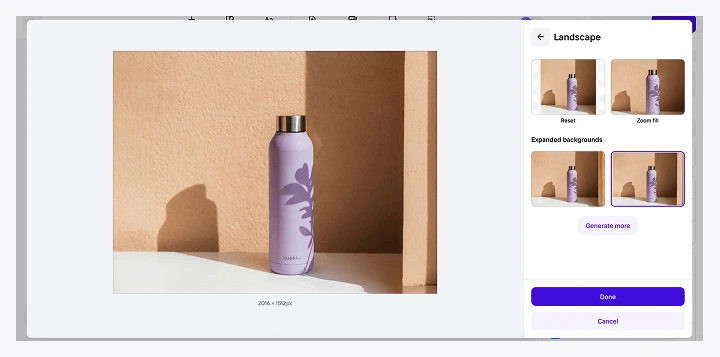
What it does best: Photoroom’s AI Expand uses advanced outpainting technology to extend the boundaries of your images, delivering production-ready outputs with no visible loss of resolution.
Ideal use case: You’re updating your marketing to reflect your new product line, but the photos you took aren’t sized correctly for specific placements, like banners or Instagram stories. Instead of cropping your image, use Photoroom AI Image Expander to extend the borders with high-quality, realistic results.
Pros:
AI Expand is natively integrated into Photoroom’s resize tool. Simply upload your image, tap resize, and select from a wide range of different aspect ratios for use across platforms.
Turn your design and sizing preferences into a custom template you can apply across product photography at scale.
Advanced AI technology preserves your product's integrity while creating realistic backgrounds.
Photoroom offers multiple output options for each image you resize.
2. Canva Magic Expand: Best for design teams and agencies
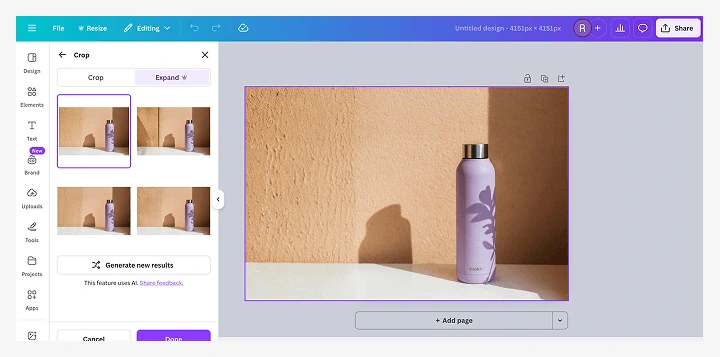
What it does best: Canva Magic Expand allows you to extend both the borders of your image and specific segments for flexible photo editing.
Ideal use case: You’re a graphic designer creating new assets for a client’s marketing and website. The client hasn’t invested in professional photography, so you use Canva to refine the image and Magic Expand to make it appropriate for all placements.
Pros: Canva Magic Expand is integrated directly into its design interface, making it easily accessible to Pro users alongside Canva’s existing editing tools.
Canva Magic Expand is ideal for design teams and agencies that are looking for editing tools that can be applied across clients. But the tool requires several separate steps and a slow processing speed, making scaling edits and creating seamless workflows difficult.
Read More: Photoroom vs Canva: Which tool fits your editing needs?
3. Fotor AI Image Extender: Best for manual control
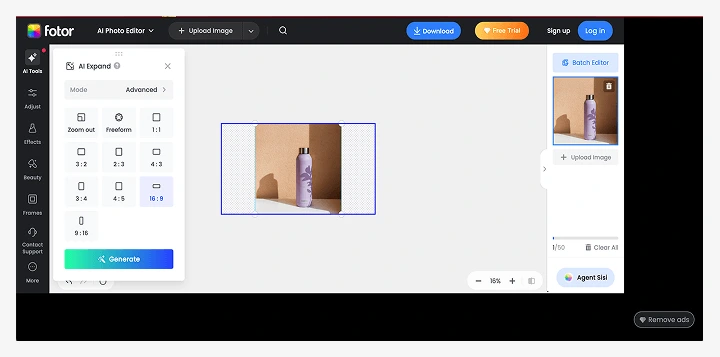 What it does best: Fotor AI Image Extender lets users enlarge images by zooming out up to 2x from the original or by entering a custom size.
Ideal use case: You’re a photographer who wants to refine and expand the shots from your latest lifestyle photoshoot. Experiment with Fotor AI Image Extender to center your subjects, zoom out, or add a new dimension to existing shots.
Pros: Fotor’s AI Image Extender custom sizing options and reframing capabilities allow for greater manual control of your image outputs.
Fotor’s free AI Image Extender is a great tool for photographers and designers who require precision in their editing, but it requires several manual steps that might slow down workflows.
4. PicsArt AI Image Extender: Best for social media editors
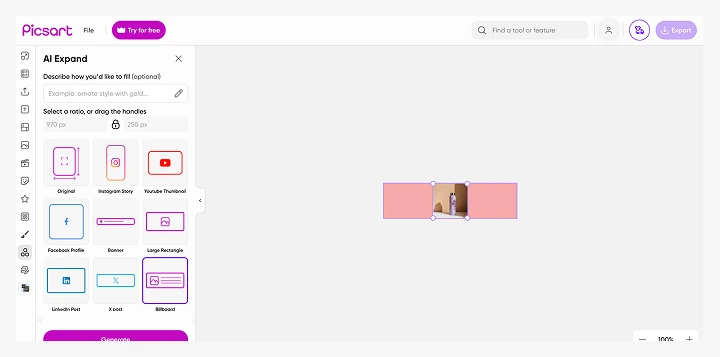
What it does best: PicsArt AI Image Extender makes it easy to transform portraits into landscape images with context-aware generative AI.
Ideal use case: You’re a social media editor who needs to extend backgrounds of product photos for YouTube thumbnails, Instagram stories, and LinkedIn banners. Use PicsArt AI Image Extender and social media templates to create assets for each platform.
Pros: Users of PicsArt’s AI Image Extender can combine their tool with custom prompts to inform the details that will appear in the extended image. For example, if you’re expanding a photo of a pillow to include the entire bedroom, you can prompt the tool to add in bedside tables and lamps.
PicsArt AI Image Extender is a strong option for social media editors who want to create social media assets from existing product photography.
5. ExtendImage.AI: Best for simple image resizing
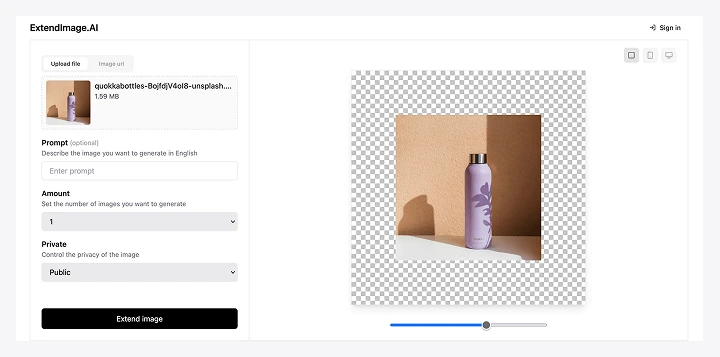
What it does best: ExtendImage.AI is a convenient, web-based tool that lets users upload images from their computer or a URL and expand them to three preset sizes.
Ideal use case: You forgot to capture a wide shot of a ceramic dish in your new product line. Instead of retaking the photo, upload a tight shot of your product into Extend Image and prompt it to create a wide shot that matches your other photography.
Pros: Extend Image’s URL uploader and prompt-based expansion capabilities make it an easy, accessible tool for quick fixes and beginner editors.
ExtendImage.AI is an easy, lightweight tool, but its capabilities for e‑commerce teams are limited. You can only select three sizes for your image—square, mobile screen size, and PC screen size—and files can’t exceed 4 MB, which limits higher quality uploads.
What is an AI image extender?
An AI image extender is a tool that uses outpainting to expand the borders of an original photo without compromising quality.
This differs from a standard image enlarger, which uses resizing: a process that stretches pixels without generating new content. Resizing can cause images to become blurry and may require additional edits for more drastic size changes.
AI image extenders use outpainting, a process in which artificial intelligence analyzes an image's content and generates new visual data to extend it in any direction.
For e‑commerce sellers, an AI product photograph image expander helps adapt product photography across different marketplaces and advertising platforms while maintaining brand consistency.
What are the benefits of AI image extenders?
There are multiple benefits of using an AI image extender in your creation process. The best AI image extenders allow you to:
Create consistent product imagery
Resize and extend images to any dimension without compromising on image quality or product definition. AI extenders generate new, realistic pixel data to expand your canvas while maintaining the integrity of your product photography.
Reduce spend on reshoots
For e‑commerce sellers, marketing teams, and enterprise companies, AI extenders provide a much more cost-effective solution than reshooting images or purchasing stock photos at various sizes.
Increase content ROI
A single image can now be repurposed and optimized for any use case, including multiple marketplaces, website placements, and catalogues. No need to shoot multiple versions—the best AI photo extenders let you resize to any dimensions required.
Scale with fast, easy workflows
Traditional image resizers require advanced editing or one-off strategies to optimize product photography for varying platforms. With an AI-powered photo expander like Photoroom, you can save and reapply workflows that work all the time, every time.
AI image extenders help e‑commerce teams create consistent, platform-ready visuals that integrate seamlessly with existing workflows.
Create a 360-degree product photography workflow with Photoroom
Photoroom’s suite of tools is designed to help you and your team edit product photography to perfection in a few simple clicks. Remove backgrounds to meet marketplace standards, adjust lighting for more professional-looking photos, and generate scenery for lifestyle photography—all powered by Photoroom’s advanced AI technology.
With the addition of AI Expand, you can save time and money on editing photos to meet various aspect ratios of platform standards. Instead of reshooting photos or compromising with awkward crops, you can simply “uncrop” and extend images as needed.
Download Photoroom on the Google Play Store or App Store to get started or sign up on Photoroom Web.
Frequently Asked Questions
1. How does an AI image extender work?
An AI image extender works by first analyzing your original image to understand its visual context: colors, textures, lighting, and composition. When you select new dimensions, the tool expands the canvas around your image and uses outpainting to generate new background content that matches the original scene. The AI preserves your subject exactly as you photographed it while filling new areas with realistic pixels. This process maintains clarity and key details while allowing you to reuse images for different aspect ratios.
2. How is an AI image extender different from resizing or cropping?
Resizing stretches or compresses existing pixels, which can blur your images or distort product dimensions. Cropping removes parts of your image entirely, potentially cutting out key product details or context you need to show.
An AI image extender uses outpainting to generate new content around your original image. Your product stays exactly as photographed, with no distortion or loss of detail. The AI simply expands the borders by creating matching background elements, letting you adapt one image to multiple aspect ratios without compromising your product's appearance.
3. What is the best AI image extender for product photos?
E‑commerce teams prefer Photoroom’s AI Expand tool because it’s built specifically for e‑commerce workflows, with marketplace templates (Amazon, Etsy, Shopify) and social platform presets.
The tool delivers production-ready outputs with realistic backgrounds that maintain your product's integrity. Unlike other expanders that focus on creativity, Photoroom prioritizes consistency and accuracy, which is critical when you're managing product catalogs across multiple channels. You can also save custom templates and apply them at scale, ensuring brand consistency across hundreds or thousands of images.
4. Can AI image extenders be used at scale for e‑commerce or enterprise teams?
Yes, but not all AI image extenders are built for volume. Look for scalability and workflow integration. Can you apply the same expansion settings across your entire catalog? Can you combine resizing with other edits, like background removal?
Photoroom's AI Expand integrates natively with its full product photography suite, letting you build predictable, repeatable workflows that work whether you're processing 10 images or 10,000.
5. Do AI image extenders preserve image quality?
Yes, AI image extenders preserve image quality by using outpainting rather than traditional resizing. Instead of stretching existing pixels (which causes blur and pixelation), outpainting generates entirely new pixel data that matches your original image.
The AI analyzes your image's visual context—colors, textures, lighting, shadows—and creates new content that blends seamlessly with the original. Your product remains sharp and detailed at its original resolution, while the expanded areas maintain the same quality standard.
6. When should you avoid using an AI image extender?
AI image extenders have limitations. Avoid using them when your product imagery includes complex reflections, intricate shadows, or highly specific branded environments that need to match exactly across all images. The AI may not perfectly replicate detailed reflective surfaces or branded set designs.
7. What’s the difference between AI image extenders and AI image generators?
AI image extenders expand existing photos by generating new content around the borders. You start with a real photo and extend it to fit different dimensions. The subject of the image stays exactly as photographed.
AI image generators create entirely new images from text descriptions or prompts. They're designed for creative exploration and conceptual work, not for adapting real photography.

Raleigh NorrisI share tips for improving e‑commerce workflows and performance with AI.