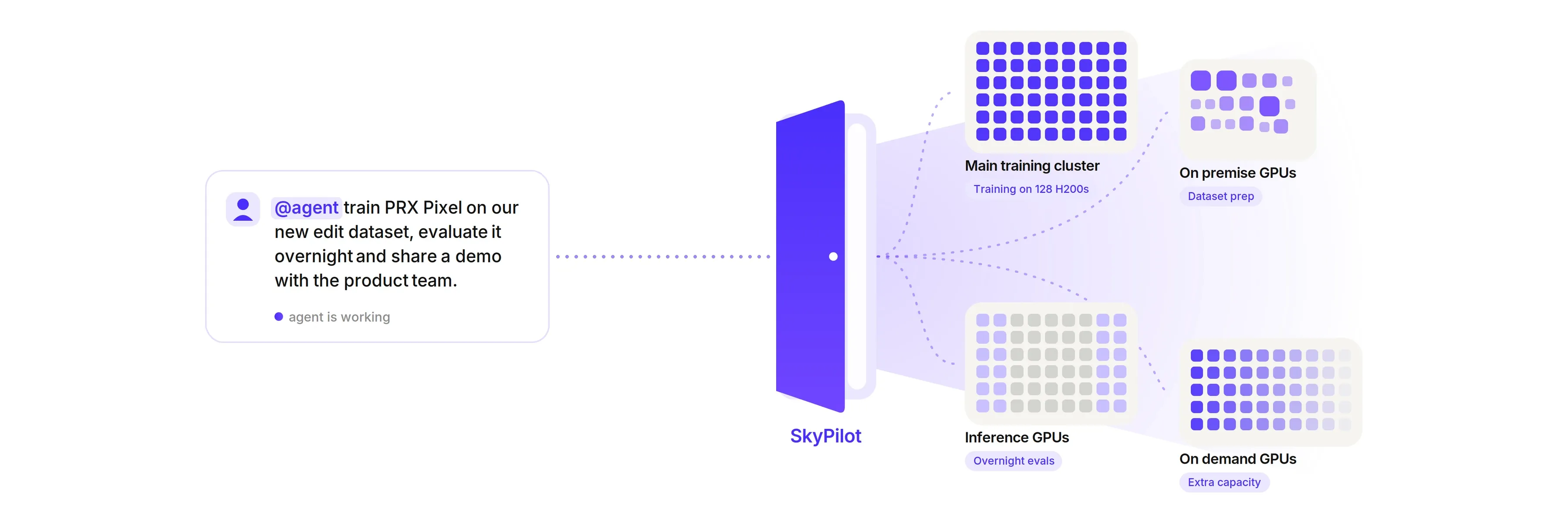
Today at Photoroom, a single researcher with an agent can use every GPU we have, without requiring any engineer’s time for infrastructure. A typical day can look like this:
The agent prepares a dataset on some of our on premise RTX 3090 or RTX 6000 Ada GPUs, close to our local data caches.
It then launches a diffusion model training on 128 H200s, where InfiniBand makes multi node training fast.
At the end of the day, it evaluates some checkpoints on idle inference GPUs and shares a demo with the product team.
When the team runs short of GPUs, or wants to try a new one, workloads can quickly spill over to on demand GPUs from several providers, with no procurement and no new setup. In October only, our researchers used about 1,000 GPU hours a week on inference GPUs that used to sit idle off peak.
This is what SkyPilot [1] brought us. SkyPilot unified our GPU clusters under one platform. Researchers now spend less time on infrastructure and more time on their models. Engineers no longer have to make hard choices: we can stay opportunistic and plug in whatever GPUs make sense next, without betting on one stack and signing up for all the work that comes with it. And our main training cluster stays free for the large trainings that really need it. With GPUs still hard to get these days, every hour we can use matters.
To explain why this matters so much to us, let me go back a bit. When I joined Photoroom a few years ago, our GPUs were workstations spread across the office, and Slack was full of “Is node X free?” and “Can I kill this job on node Y?”. We moved to Slurm, a racked server room and a shared data workspace. Then our main training capacity moved to the cloud, an H200 InfiniBand cluster managed with Slurm. On the production side, our infrastructure team moved inference from hand managed VMs to a multi provider Kubernetes cluster in a few months. Our GPUs ended up spread out again, this time across clusters and schedulers instead of desks. And now that agents launch more jobs than ever, we needed a single way in to all of them.
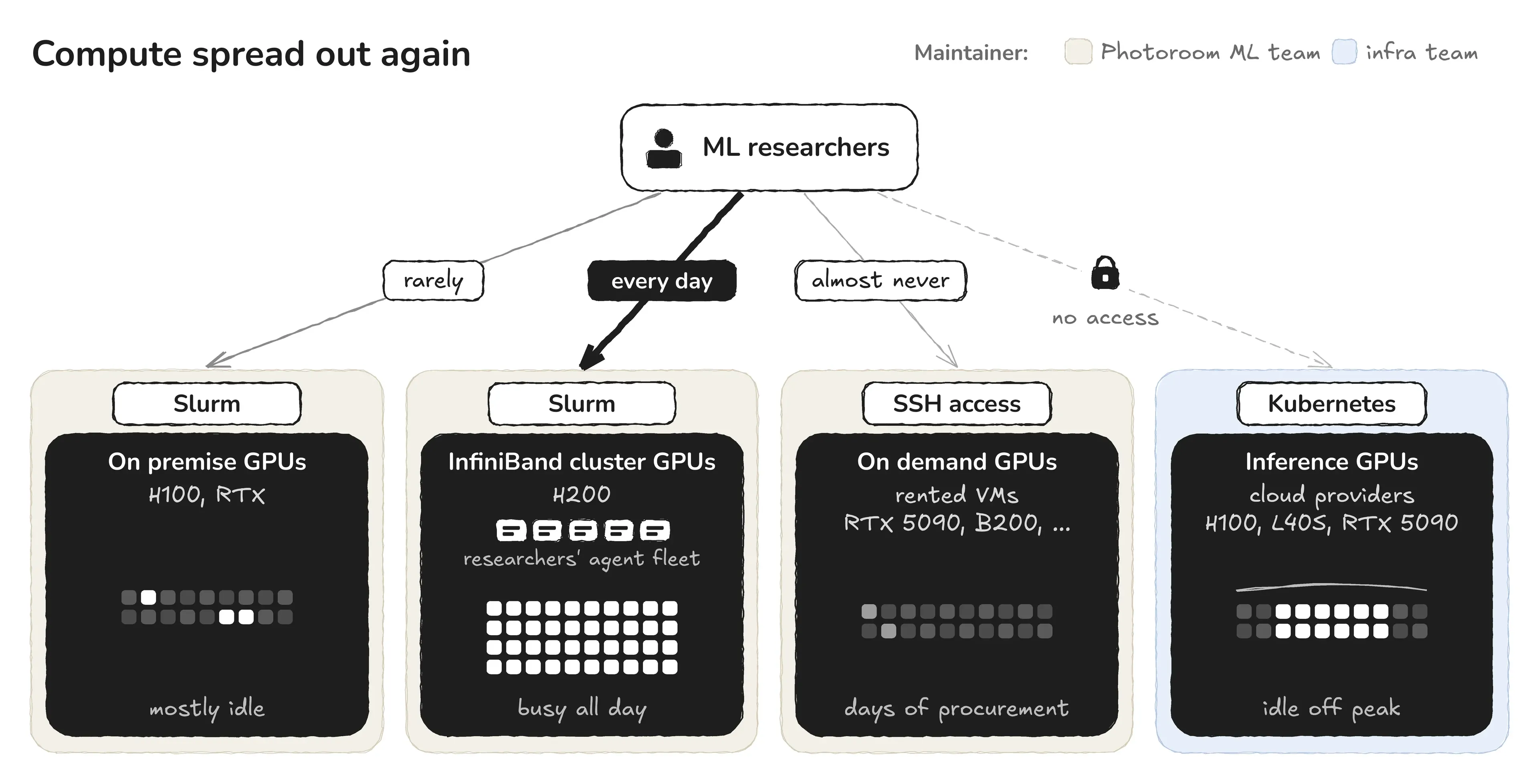 Compute spread out again: four GPU pools, three schedulers, one habit.
In this post, we share what researchers can now do from a single prompt, why we chose SkyPilot, how we set it up, our first results, and what we learned along the way.
Deploying GPU jobs in the agentic era
Researchers now hand more and more of their work to agents: deploying workloads, reading results, iterating on the solution. Agents run many experiments in parallel, and one will happily launch fifty jobs in an afternoon.
This is where infrastructure can become a blocker. Out of daily habit and to keep our velocity high, everyone connects to our main training cluster. Most of the work lands there, while other GPUs sit idle and large training jobs that need InfiniBand lose capacity. For agents to offload work anywhere, our training and dev infrastructure needs one door to all our available compute: one API, the same rules everywhere, and credentials the agent never has to see.
The ML compute infrastructure that levels up the whole team
At Photoroom, ML researchers should not have to care about the infrastructure their jobs run on. Their time belongs to one thing: shipping valuable in-house models that end up in our users' hands. Our ML Engineering team handles most of the engineering behind shipping, but training a model already comes with a ton of engineering, and a non-negligible part of it is about infrastructure. Anyone who has trained models on custom data, distributed across many GPUs, knows it well.
This matters even more because our team is "ML full stack". We prepare our own datasets and train our own series of models (for example PRX Pixel [2]), but we also host and serve them in production (see how we built our multi provider inference backend [3]), on GPUs we manage ourselves. That calls for a heterogeneous infrastructure: engineers need room to work on infrastructure and optimisation, and researchers need room to train.
Our goal is to hide this mix of clusters from the people who use it. It has to stay cost efficient, and it should never slow down the work. In fact, everyone shares the same GPUs, so nobody should have to wait or take compute from someone else. Each team still manages its own clusters with its own scheduler: the Photoroom ML team takes care of R&D, and the infrastructure team takes care of production. As a user, you do not see any of this: you ask for GPUs the same way, from any laptop or from a service account, and this is what we call our door to every GPU.
This is where SkyPilot comes in. You choose the GPUs you want, and SkyPilot handles the rest, whether the machines run Slurm, Kubernetes or are only reachable with SSH. On the production GPUs, research jobs only run when user traffic leaves them free.
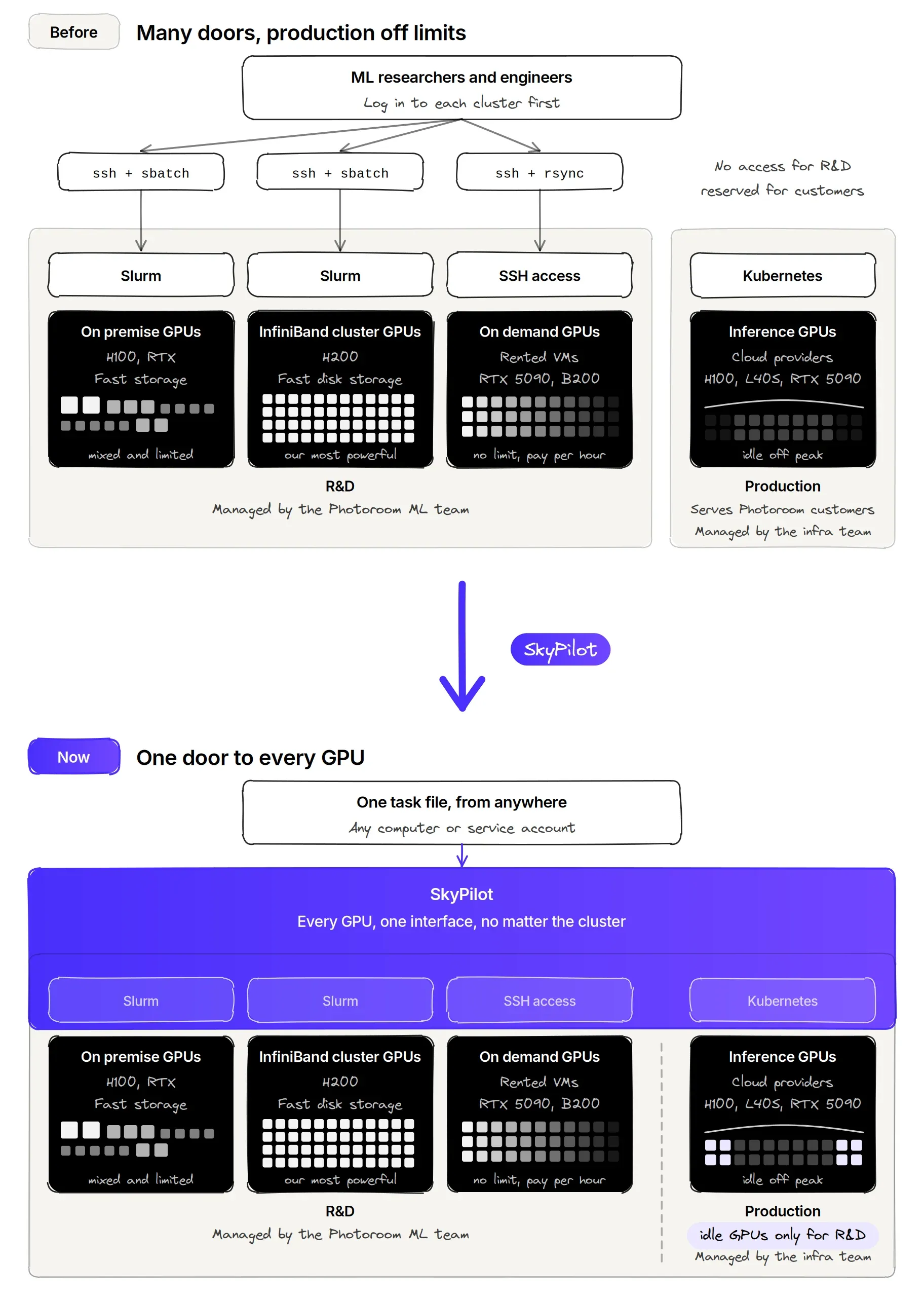 Then: many doors, production off limits. Now: one door to every GPU
What ML researchers can now do from a single prompt
The ML Engineering team built a set of skills and a setup with SkyPilot at the core, which unlocked several use cases across the company. SkyPilot now powers the skills we use to process our data, launch trainings, deploy our demos and some pre production endpoints, and they are even available in Slack. Here is what that looks like day to day, across three very different jobs.
Everything starts from a task file. It describes what the job needs, not where it runs:
name: caption-shard
resources:
  accelerators: H100:1

setup: |
  uv sync

run: |
  python caption.py --shard 0
The same file then runs anywhere, and only the target changes:
sky jobs launch task.yaml --infra slurm/on-prem                 # our on-prem GPUs, through Slurm
sky jobs launch task.yaml --infra k8s/inference                 # idle inference GPUs, through Kubernetes
sky jobs launch task.yaml --infra vast --gpus B200:1            # a rented GPU from the Vast.ai marketplace
You can do all of this by hand, but in practice our skills write the task file, pick the target and launch it for you.
ML jobs routed to the right cluster, automatically
Before, each cluster had its own scripts and paths, and moving a job meant rewriting its launcher. Our whole GPU fleet is now reachable from the same skill and the same task file. The skill picks the target for each job, and as a project matures, its parts are spread across clusters: development, debugging and test jobs go to the on premise or idle inference GPUs, and only multi node trainings, the ones that really need InfiniBand, land on our main training cluster. The skill integrates many aspects of the training workflow: it wraps the code and its dependencies, moves data between clusters, smoke tests the run on the target GPU, and submits it as a managed job [4] that frees the GPU on finish or crash. It also sizes jobs to the free capacity, restarts preempted runs from their last checkpoint, and tracks every run in our logger.
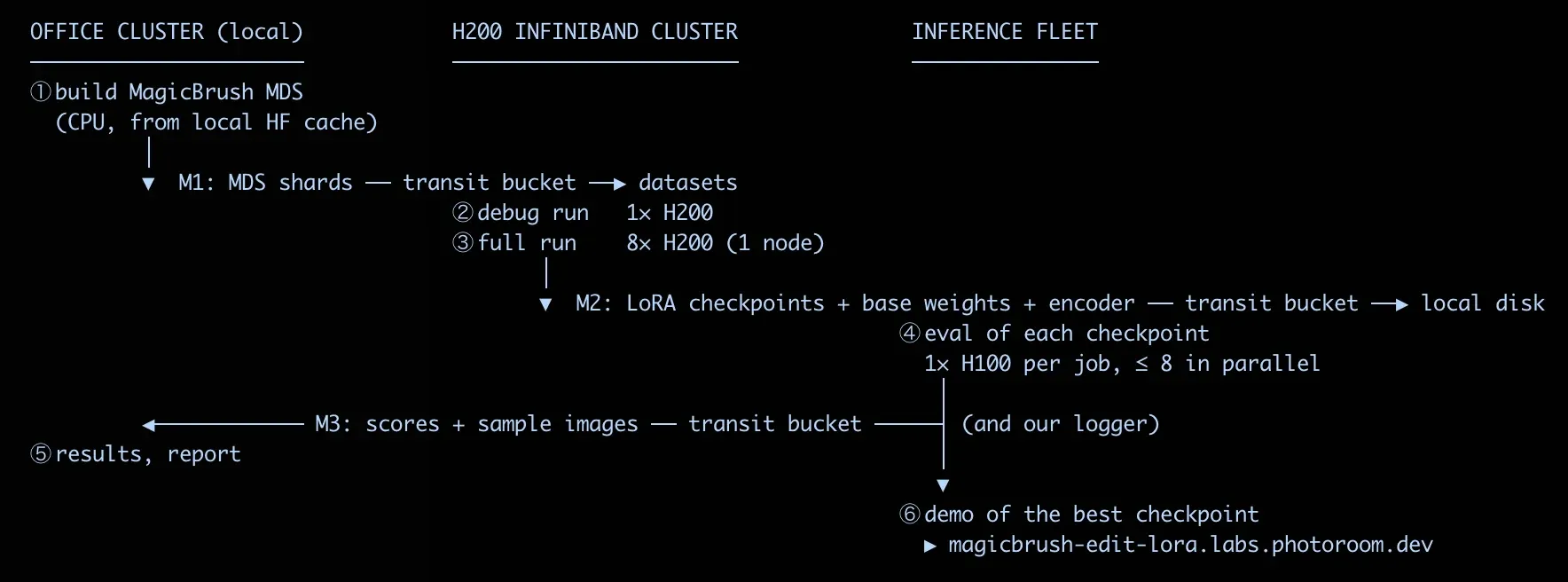 One prompt, three clusters: the agent prepares the data on our office GPUs, trains on the main training cluster, evaluates every checkpoint in parallel on idle inference GPUs, and serves a demo of the best one, with the transit bucket moving data between them.
Data prep, evals and demos on idle inference GPUs
Before, research had no access to production GPUs at all, even off peak, when user traffic is low. Dataset captioning, data processing, evaluations, model demos or any other GPU job can now run on production GPUs when the app leaves them idle. Inference always wins: if serving needs a GPU back, the job is evicted and relaunches later on its own. The pool also grows with our engineering work: every time an optimisation lets a model run on fewer GPUs in production, the GPUs it frees flow straight into the R&D pool.
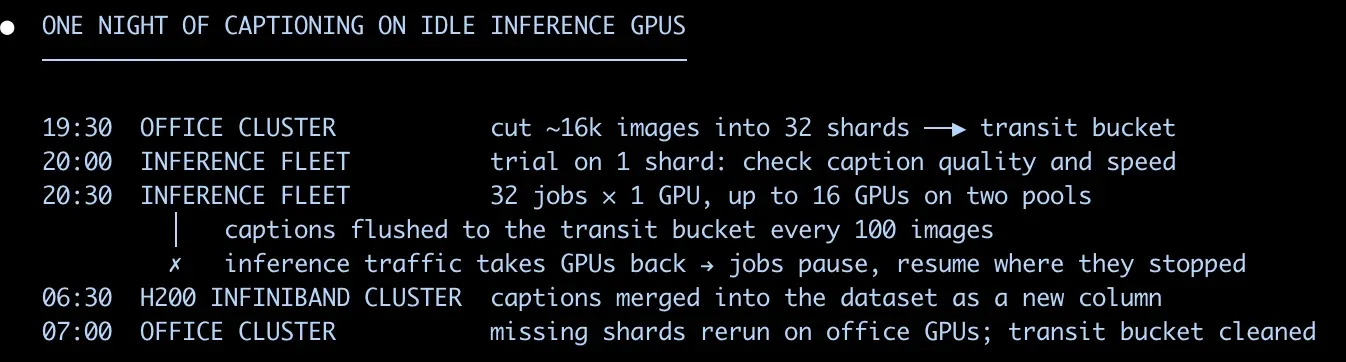 One night of captioning: jobs start when inference traffic drops, pause when serving needs GPUs back, and resume where they stopped. By morning, the captions are merged into the dataset.
Demos and pre production endpoints run there too, with no infra and no PR. Before, a demo lived behind an SSH tunnel on our main training cluster, only the ML team could open it, and moving it anywhere else was a pain. Now it takes minutes: name a cluster lab-something, run it on idle inference or on demand GPUs, and it gets a company URL behind Google login, and an admin can open it to external people when needed. Product, designers and even early access customers can try a new model the day it works.
 Claude in Slack with SkyPilot: restarting a demo is one message away
On demand GPUs at no infra cost
Before, testing a new GPU meant days of procurement. When we need a GPU type we do not own, one sentence is now enough: SkyPilot launches it on a GPU marketplace, or on any machine we can SSH into, with the same task file. Picking GPUs from any of the on demand providers SkyPilot supports [5] is exactly what allowed us to check whether RTX 5090s could serve one of our models more cheaply, or B200s more efficiently with MXFP8 and NVFP4. No new launcher, no new setup.
What makes it work
Under the hood, the setup has three layers: one control plane, a connection to each cluster, and a few rules that make every cluster look the same.
A single SkyPilot API server, on our own ML platform
The ML Engineering team runs a small Kubernetes cluster for its internal services, where adding a service is a single pull request. SkyPilot is one of them, next to Dagster and our evaluation platform, which send their GPU work to it directly. Argo CD deploys it from Git, Vault holds its secrets, and its state lives in a shared Postgres database. Nothing is exposed to the internet: an outbound tunnel dials out, and Google SSO guards every request. Engineers log in once, pipelines and agents use a service account, and nobody needs SSH access to a cluster anymore.
SkyPilot unifies Slurm and Kubernetes under one platform
SkyPilot talks to the on premise GPUs and our main training cluster as a Slurm client [6], through a secure tunnel for the on premise GPUs. It talks to the production Kubernetes clusters [7] through dedicated namespaces, and to on demand GPUs through SSH node pools [8] or a marketplace API. Nothing changes on the clusters themselves: Slurm stays Slurm and Kubernetes stays Kubernetes.
An admin policy that makes every cluster look the same
SkyPilot lets us plug a small server side policy [9] into the API server, and ours rewrites every task before it runs. It lets ML engineers set standard rules once for every job, by cluster, by user account or by fleet. The policy injects the right paths for the cluster the job lands on, the storage and logger credentials, and the fleet rules, such as GPU caps or auto shutdown of idle dev sessions. All of it stays hidden from the user and the agent. Nobody has to burn brain cycles specifying where checkpoints or artifacts should land on each cluster: the rules are explicit, and results are always available in our logger and checkpoint bucket. A script never contains a path or a key, so the same file runs on any GPU.
name: my-job
resources:
  accelerators: H100:1

run: |
  python train.py --data "$LOCAL_CACHE_DIR/my-run" --out "$CHECKPOINTS_DIR/my-exp"
A transit bucket for data
Moving data from one cluster to another has always been a pain for researchers. Shared storage does not cross clusters, so here data moves through an S3 transit bucket on an egress free provider, and all of it is abstracted: the skill handles the copies, with credentials already injected. We also tuned rclone to be fast for most of our use cases. We did try mounting buckets as a file system first, but it did not work well on our Slurm clusters. The bucket is transit, not storage.
Priority classes for idle GPUs
On the production clusters, research jobs run in their own namespace at priority -1000 [10]. They never evict production, never trigger the autoscaler, and are capped per cluster. We set this up with our infrastructure team, and they keep full control of their clusters.
Skills on top
SkyPilot ships an official agent skill [11] that teaches coding agents how to use it, and we load it directly. On top of it, our own Claude Code skills encode how we work: which cluster fits which stage of a project, how to move data, how to smoke test before a long run. They are what makes SkyPilot a seamless integration for researchers, turning all of the above into a single prompt. As an AI first team, we found agents very good at building this middleware layer themselves, to the point where we barely need to maintain a Slurm or Kubernetes launcher anymore.
One source of truth, read by both humans and agents
Our infrastructure rules live in a single page that the team maintains and our skills follow as a contract. A vague rule there shows up at once as a wrong launch, so agents turned out to be the best reviewers of our documentation. Hardware, on the other hand, does not need to be written down: new GPUs can be added in minutes, without a pull request or a doc update, and agents can learn the infrastructure through the SkyPilot API.
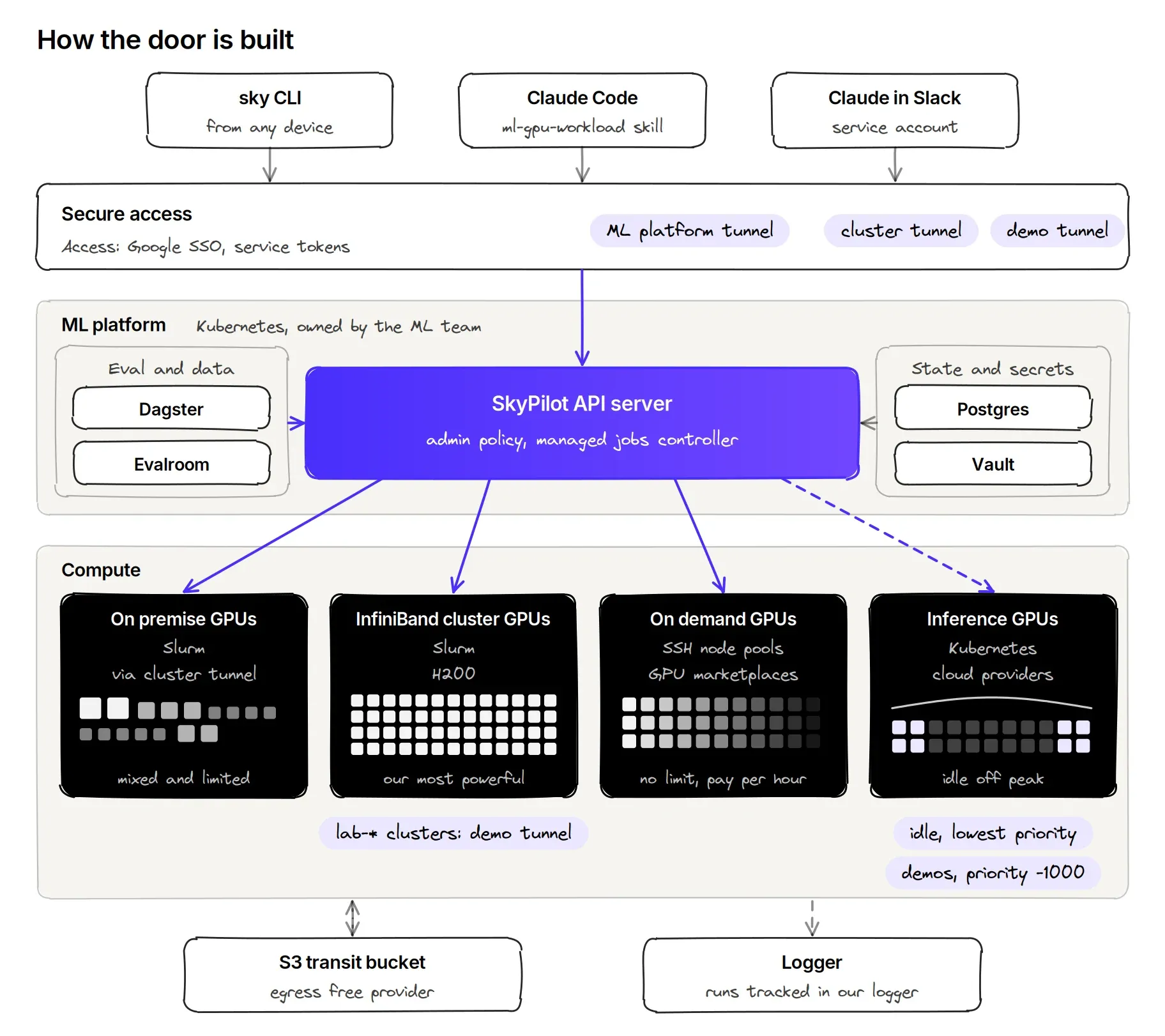 How the door is built: entry points, Cloudflare, the ML platform with the SkyPilot API server, the four compute pools and shared data
Early results
The most telling number is the compute that simply was not within reach before. Idle inference GPUs were off limits to research, and a GPU type we did not own meant days of procurement. In eight weeks, these two pools absorbed almost 3,900 GPU hours of work that would otherwise have competed for our main training cluster. In the week of 19 October alone, they took about 1,400 GPU hours, close to half of everything launched through SkyPilot.
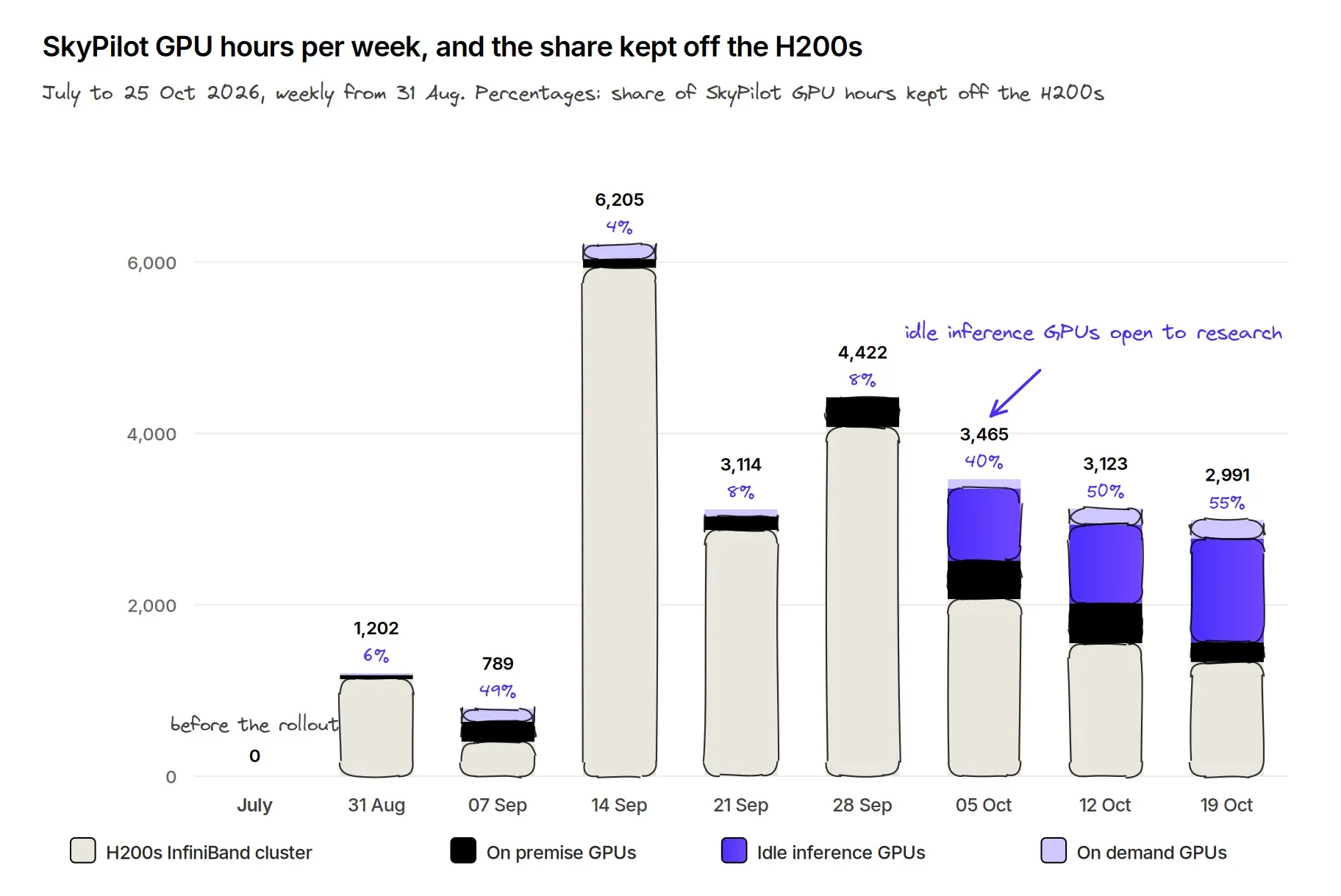 SkyPilot GPU hours per week, and the share kept off the H200s
Smoke tests pull their weight too: of 600 toy jobs, with a median run time of 61 seconds, about one in four caught a problem before a long run started.
These numbers are early. We did not give SkyPilot full access to our clusters to begin with, which keeps some parts of our codebase out of reach. That was a deliberate choice, to avoid any risk of a cluster outage, and we are now confident we can raise these limits step by step, which will open SkyPilot to more use cases. As for the dip in the week of 19 October, blame GTC Berlin: for once, part of the team was listening to talks about GPUs rather than keeping ours warm.
Keeping the clusters healthy
Housekeeping jobs already clean up unused checkpoints and artifacts and move checkpoints to cheaper storage, and shared caches, such as a global Hugging Face cache and an enroot image cache, save everyone from downloading the same files twice.
SkyPilot raises the pace, with agents happy to launch fifty jobs in an afternoon, so we went further: a global uv cache, dedicated endpoints for users, and 60 second smoke tests before any long run. Next, making SkyPilot the default entry point for every job will let us apply the same rules everywhere, which will cut the maintenance cost of our clusters: good news for everyone, and especially for the occasionally lazy cluster maintainer in me.
What's next
Let's be honest: for anyone who runs GPUs in production at scale, 1,000 GPU hours a week is not a lot. It is just the start. Our inference traffic follows a strong day and night cycle, so off peak capacity has far more to give, and we will push hard to put it to work. And beyond getting more out of the GPUs we already have, growing is now simple: adding on demand GPUs or a new cluster takes minutes, every researcher and agent can use it right away, and the team's output can scale almost linearly with compute.
Next, every new job goes through the door. First, we will give the SkyPilot account the same capabilities a user has on the cluster today, with proper user workspaces. Then we will adapt our cleanup automation to SkyPilot jobs and move our CI onto the same path, starting with our heavy nightly test runs.
We also want much faster cold starts for our jobs. We have not optimised them at all yet. One idea we would like to explore is GPU memory checkpointing, which already cut cold starts from minutes to seconds on our inference fleet [12] and could help for some workloads.
Researchers should never have to think about infrastructure again. Finding compute, launching jobs and reaching every GPU in the company should just be part of the day. Only the engineers who run the clusters should ever log into them. Everyone else, people and agents alike, goes through the door. For engineers, it is also a great opportunity: autoresearch style agents can now run experiments on whatever GPUs are free, and we can start building that kind of automation straight into our job launcher. One door, every GPU: that is the bet.
Thanks to the SkyPilot team for their help along the way, and to the Photoroom infrastructure team, who made it possible to open idle production GPUs to research.