


Photoroom vs Claid: A complete comparison for AI product photography
Photoroom and Claid.ai are both recognized names in AI product photography, but they're designed with different editing priorities and technical architectures. Claid prioritizes image enhancement using a fixed, single-model system. Photoroom prioritizes end-to-end image production using a flexible, multi-model architecture.
If you’re an e-commerce leader or small business owner weighing the differences between Photoroom vs Claid, this comparison explains how they differ across workflows, system flexibility, automation scope, output quality, and enterprise readiness. By the end, you'll understand which to choose and why Photoroom is the complete solution for businesses looking to scale image production.
Table of content
Photoroom vs Claid: e-commerce visual production compared
Here's how Photoroom and Claid compare at a glance:
| Feature | Photoroom | Claid |
|---|---|---|
| Best for | E-commerce brands needing to produce high-volume, compliant, and realistic product images | E-commerce teams focused primarily on image enhancement and cleanup |
| Primary use case | Product image automation and enhancement at scale for e-commerce | Product image enhancement |
| Availability | API, web app, iOS, and Android | API and web app |
| What the tool produces | Marketplace & omnichannel-ready product visuals with brand consistency: enhanced images, AI-generated scenes, compliant outputs | Enhanced product images with improved lighting, quality, AI-generated backgrounds |
| E-commerce readiness | Flexible workflow, data protection coverage, no API data training, bulk image processing (API and web), marketplace compliance automation | Fixed enhancement workflow, bulk processing (API only), basic security measures |
| Brand and catalog consistency | Brand Kits, custom templates, automated QA scoring, reusable presets across teams | Custom presets, limited template library |
| How scale is applied | Batch automation in web app and API, async processing, template-based workflows, team collaboration tools, preview before processing | Batch automation in API only, async processing, auto-apply rules |
| Control over final visuals | Multi-step workflow customization, preview mode, adjustable parameters per product type | Fixed enhancement sequence, fast processing without preview |
| Typical e-commerce workflow | Background removal and generation, product staging, virtual models, relighting, shadow adjustment, centering, template-based design, bulk editing, auto-formatting for platforms, catalog uniformity | Background removal and generation, lighting correction, upscaling, color adjustment, bulk enhancement, platform formatting |
| How teams use it in e-commerce | Product, creative, technical, and ops teams process large image volumes, standardize catalogs, enforce visual guidelines, and ensure compliance | Technical teams process large image batches, operations teams enhance existing photography |
| Pricing | From $12.99/month (web) From $0.02 per image (API) | From $15/month (web) From $0.059 per credit (API) |
| Credit use | Credits for AI image and video generation only | Credit-based for all editing operations |
What’s the difference between Photoroom and Claid?
The main difference between Photoroom and Claid lies in their AI model flexibility and image editing priorities. Claid uses a single proprietary model with a fixed enhancement workflow, while Photoroom gives you a model-agnostic system with flexible, end-to-end production.
AI model flexibility
Claid relies on a single, proprietary model and a fixed processing workflow. A proprietary, locked-in system can deliver strong results, but it has some limitations. If that workflow can't be modified—meaning you can't change the order of steps, skip steps, tweak parameters, or swap in different models—your business becomes dependent on one vendor's research and development (R&D) pace and priorities. If they don't adopt the next breakthrough, or a competitor does it better, you're forced to migrate to a new platform, which is often an expensive and time-consuming venture.
Claid does offer a Custom AI feature that trains on your specific product photos to generate multiple lifestyle-scene variations, but this still operates within Claid’s proprietary model architecture.
Photoroom is model-agnostic with a flexible processing workflow. The platform combines proprietary models with specialized external models, making it more future-proof. Multi-model platforms adopt new and improved AI models that emerge, without requiring your business to change its entire setup. With Photoroom, you don't have to choose between outgrowing your system or committing to a single vendor's AI model. You get long-term scalability without the risks of migrating platforms.
Product photo editing priorities
Claid focuses on automated image enhancement and standard edits—removing backgrounds, correcting lighting, upscaling resolution, and applying consistent improvements across batches. An enhancement-first workflow is useful for simple, consistent touch-ups, but it can quickly feel restrictive for e-commerce product photography.
E-commerce needs vary across products. A leather bag might need background removal and color correction. A glass bottle needs reflection fixes and label straightening. A clothing item needs wrinkle smoothing and fit adjustments. Enhancement-first workflows assume every image needs the same treatment.
Photoroom prioritizes end-to-end image production. The platform is trained on 1B+ e-commerce and marketplace images for commerce-grade results. It enhances product photos through background removal, relighting and shadows, product beautification, product staging, AI-generated fashion models, image resizing, and more, making images packshot compliant. But it also provides brand control features, automates quality assurance, and scales image consistency across all brand visuals.
End-to-end product image workflows and model-agnostic systems adapt to different product requirements, making it easy for teams to reduce manual work, avoid system switching, keep every image on-brand, and launch products faster.
Running an e-commerce business means managing large catalogs that grow as the business expands. Managing this requires a reliable, integrated workflow. Photoroom provides the multi-model architecture and repeatable workflows that e-commerce businesses need to produce images that are consistent, compliant, and conversion-ready across listings, marketplaces, and ads at scale.
How Photoroom and Claid.ai compare for e-commerce needs
Here’s how Photoroom and Claid compare across the three product photography priorities for e-commerce businesses: automation scale, result quality, and enterprise readiness.
1. Scaling image production with automation
Both Photoroom and Claid automate the product photo editing process, but they differ in the businesses they serve, the channels available for batch editing, and the AI product photography tools that enable brand consistency at scale.
Claid has a web app, but it only provides batch editing through its API. Photoroom supports batch editing via its API and apps (Photoroom web, App Store, Google Play)—both suitable for enterprises and small businesses (SMBs).
For SMBs, this means you can process hundreds of product images without writing code using Photoroom. For enterprises, it means product managers can standardize workflows easily, while technical teams integrate Photoroom’s API directly into existing systems, ensuring faster image production and product launches for brands.
Watch retailer Watches Inc uses Photoroom's web app to produce professional product photos without technical resources, processing entire catalogs through batch workflows and achieving a 40% increase in qualified leads. Luxury resale brand Valuence Japan integrates the Photoroom API to process 24,000 photos monthly and has saved $80K annually while saving 600 hours of monthly editing time.

Claid’s web app editing interface. No batch editing and can be complex for non-technical users.
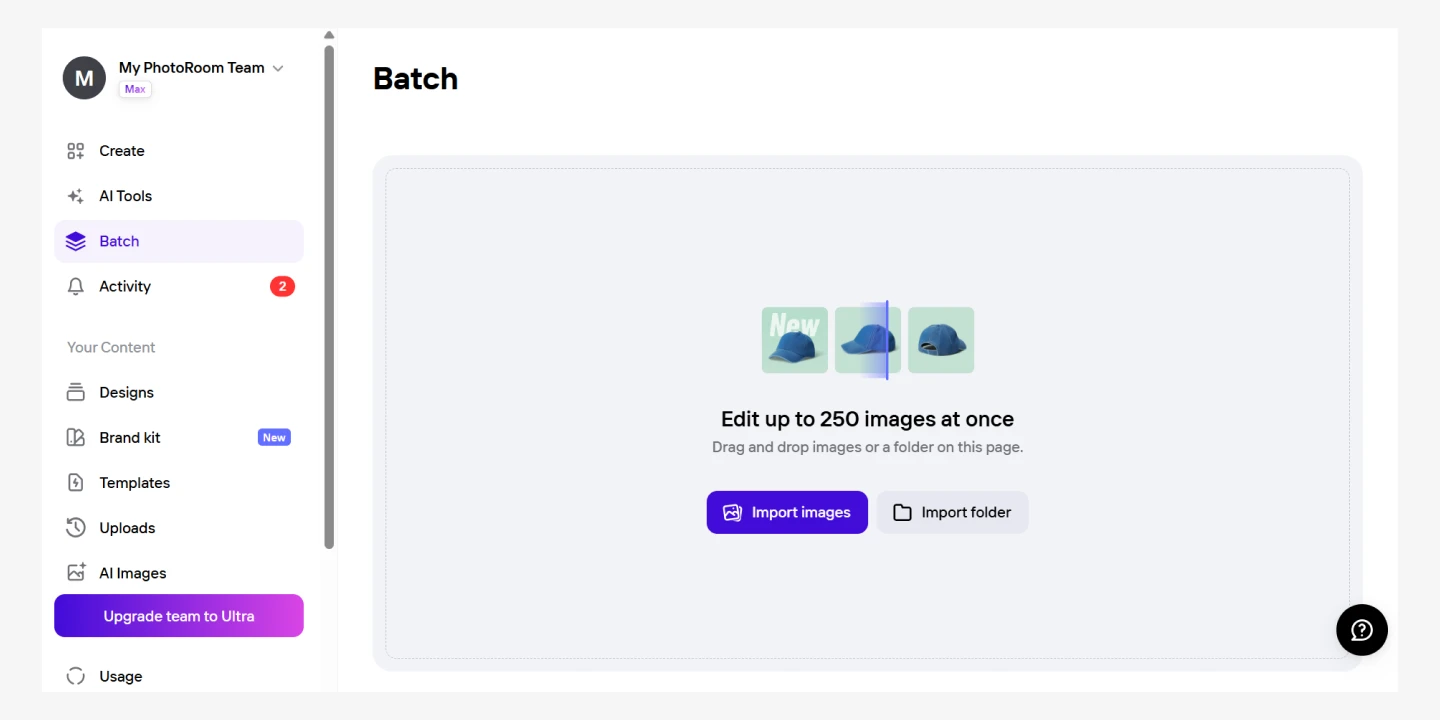
Photoroom’s web app editing interface with batch features handles up to 250 images at once and provides a more user-friendly experience.
Use the Photoroom web app to batch edit images →
Automation matters for businesses that want to edit images in bulk, scale image consistency, and avoid the slow and expensive process of manual product photo editing. The best AI tools for product photos provide the infrastructure and features that enable all three.
Here's an overview of what both platforms offer through their web apps and API:
| Feature | Photoroom | Claid |
|---|---|---|
| Batch processing | Available in web app and API | Available in API only |
| Workflow | End-to-end editing Auto apply rules Async API | Enhancement-first editing Auto apply rules Async API |
| Image preview | Preview available | No preview (faster credit use) |
| Editing tools provided | Robust tool library Background editing tools Image enhancement tools Image generation tools Image modification tools Image-to-video tool | Small tool library Background editing tools Image enhancement tools Image generation tools Image modification tools Image-to-video tool |
| Brand controls | Pre-made and custom templates Brand kits in web app Custom API presets Reusable controls | Limited pre-made templates Custom presets |
| Team collaboration | Available in web app | Unavailable |
| Automated quality assurance | Automated review flows + Image scoring with the right workflow routing | Unavailable |
| Localization features | Supports market-specific backgrounds, language, & compliance needs | Unavailable |
| Multi-channel outputs | Auto-format for Amazon, Shopify, Instagram, ads, Etsy, Mercari, custom needs, and several platforms | Auto-format for Amazon, Shopify, Instagram, YouTube, Meta, and custom needs. |
| API integration | Custom integration. Integrates directly into existing DAM, PIM, CMS, and e-commerce platforms | Custom integration. Integrates into existing cloud storage + DAM via third-party integration platforms like Zapier |
While Claid prioritizes large enterprises and limits batch processing to API-only workflows, Photoroom automates product photography workflows at scale for businesses of all sizes through both web app and API.
2. Quality of results
Photoroom and Claid produce different quality of images across the three main areas for assessing output quality in AI product photography: accuracy, consistency, and realism.
Accuracy: Handling complex product details
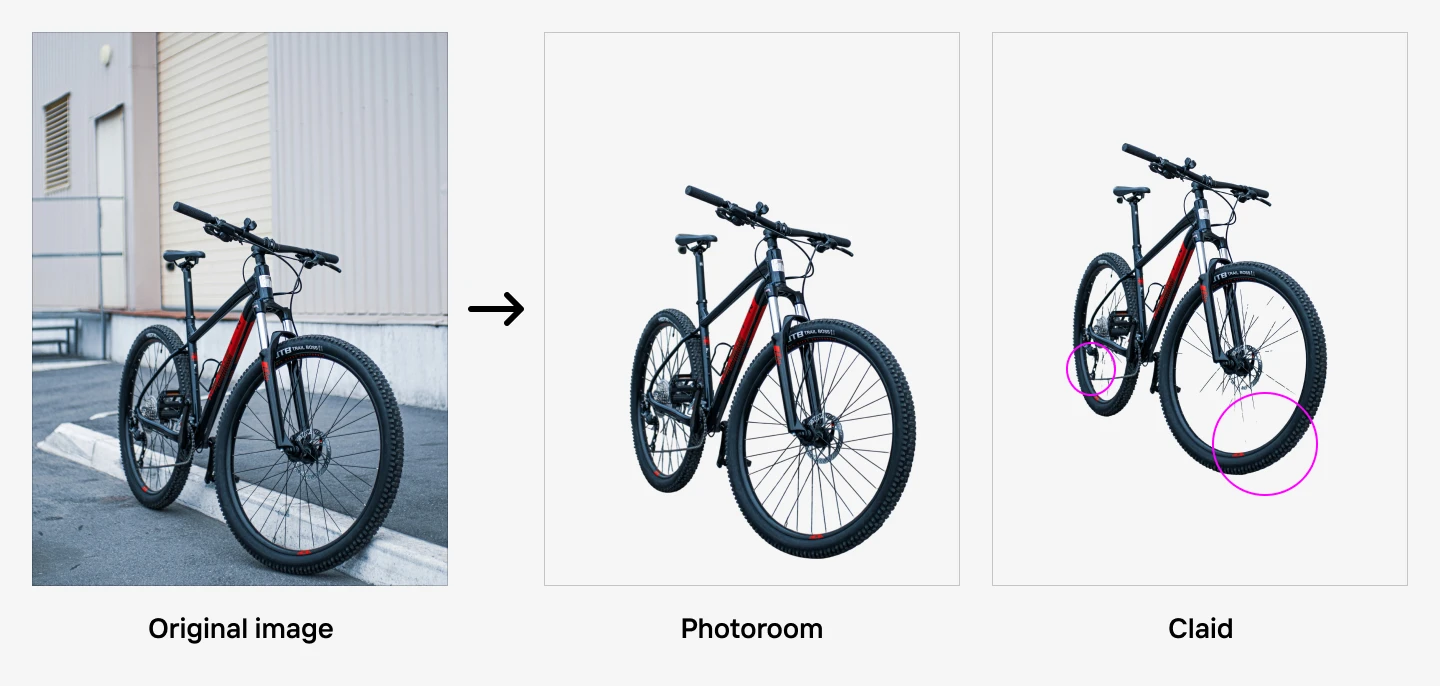
When assessed for accuracy, both platforms handled complex edge detection well, but Photoroom handles intricate details like bike spokes more precisely.
Claid's background removal works well, but misses small artifacts, requiring manual fixes at scale. It's subtle, but when you're processing hundreds of products with intricate details like bicycle spokes, wire shelving, or mesh materials, those small differences in edge precision add up to noticeable quality inconsistencies across your catalog.
Consistency: Framing and positioning across batches
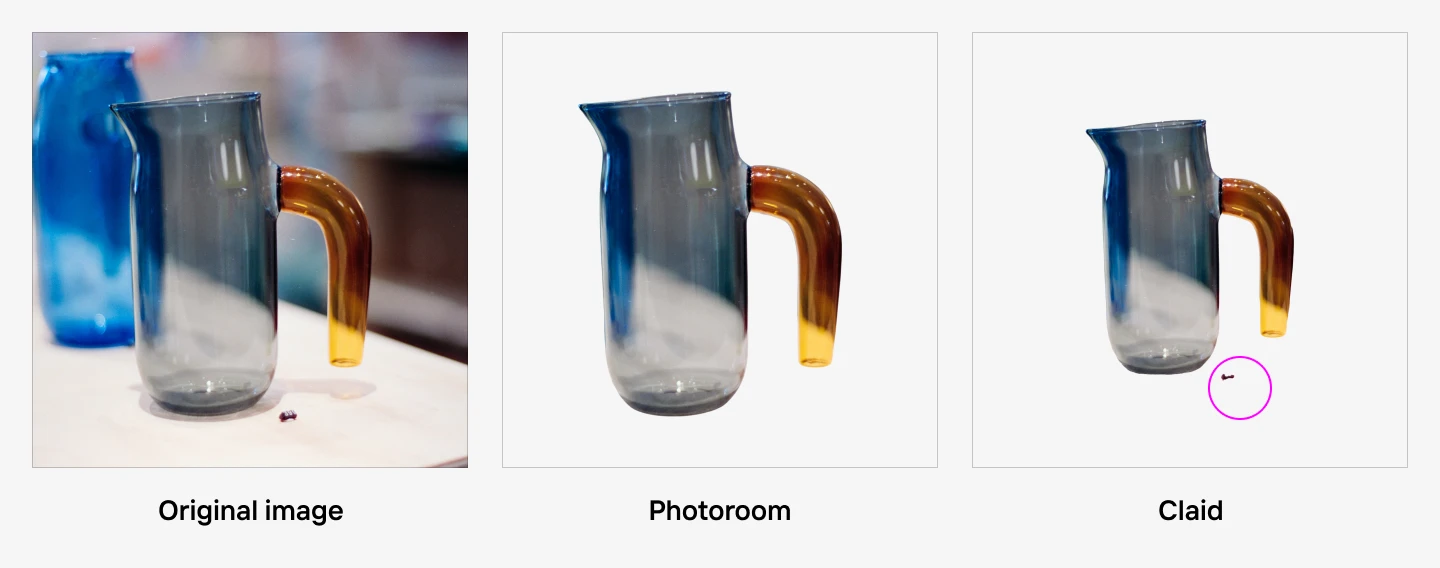
When benchmarked for consistency, Photoroom creates more consistent product images. The platform applies consistent framing and padding across image batches better than Claid in several examples.
Claid's API doesn't support positioning the subject to occupy all available space, minus padding. This means that if you remove a product's background and place it on a new canvas, Claid won't automatically scale and center the subject to use the available space effectively while maintaining appropriate padding. You'd need to manually adjust positioning or handle it with additional tools or code, which adds friction when processing thousands of images. Manual image processing doesn’t scale with SKU growth. Rather, it causes launch delays and increases production costs.
Realism: Maintaining product authenticity
When assessed for realism, Photoroom is a better Claid.ai alternative for retaining product authenticity.
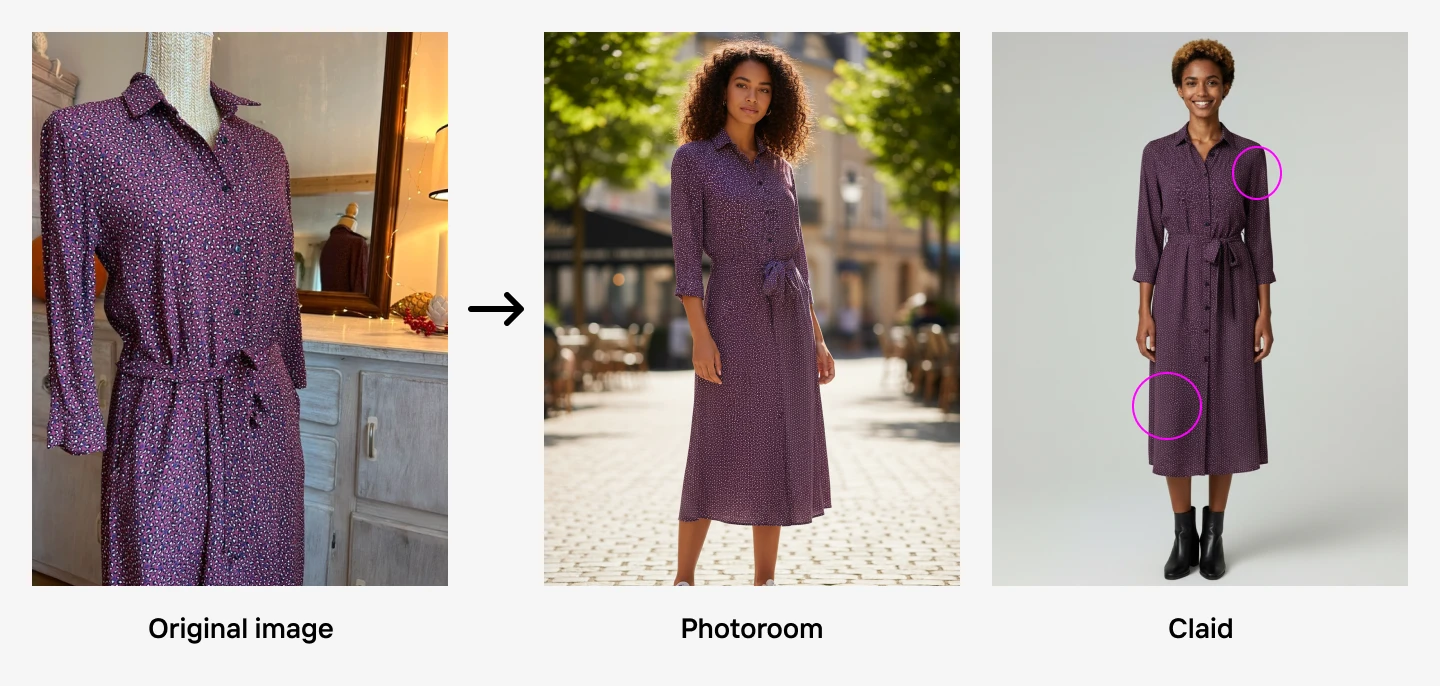
Take this marketplace photo uploaded by a seller, for example. The dress pattern appears slightly darker when applied to Claid's AI-generated model, compared to how well the color and pattern appear more vibrant and true to the original with Photoroom.
Photoroom maintains better color accuracy and pattern definition, even when compared to great image models like Gemini. Claid's studio lighting can flatten the product visually, making it harder to see the true fabric quality and print detail that customers need to evaluate before buying.
High-quality, consistent product images drive conversion. When second-hand marketplace Label Emmaüs integrated the Photoroom API to enhance inconsistent product photos from diverse sellers across 400 groups in 40+ countries, the company improved conversion significantly: 56% for fashion items, 34% for home products, and 12% for high-tech items.
Photoroom applies consistent edits across images and delivers accurate, realistic product images without hallucination or distortion, ensuring marketplace-ready visuals that maintain product fidelity at scale.
3. Enterprise readiness
Photoroom's product ecosystem is more suited for enterprise scale than Claid's.
For e-commerce platforms and marketplaces, image processing goes beyond enhancing images and standardizing catalogs. At this level, your business processes hundreds to millions of product images daily, which requires partnering with a product photography platform with reliable performance during peak periods and clear data handling policies.
Downtimes lead to delayed launches and lost sales. Security breaches expose sensitive product data, seller information, and customer-facing content. You need a platform that won't slow your revenue stream or put your business at risk.
Here's how Photoroom and Claid differ when it comes to enterprise readiness:
| Factor | Photoroom | Claid.ai |
|---|---|---|
| Security | SOC 2 Type II certified | Basic security measures |
| GDPR compliance | Certified | Not certified |
| Data storage | Short-term image storage for API customers to support async API features | Stores data for an unspecified period |
| AI training | Images uploaded to API are not used for for AI training | Unclear standards |
| Payment processing data | PCI DSS is covered via Stripe | Unspecified |
| Indemnification for AI-generated images | Provided | Not provided |
| Uptime | 99.9% API uptime | Unavailable in public |
| Model improvement | Continuous and automatically adopted and integrated | Continuous and automatically integrated |
Photoroom is a complete AI photo editor for e-commerce that provides the continuous improvement and security standards that e-commerce and marketplace operations depend on. This combination allows teams to scale image production efficiently, freeing up engineering resources to focus on competitive differentiation and growth.
When to choose Photoroom or Claid for AI product photo editing
Choosing between Photoroom and Claid depends on your workflow needs, output standards, and future image volume.
Use the decision framework below to determine which AI product photography platform fits your business.
| Factor | Choose Photoroom | Choose Claid |
|---|---|---|
| Business size | You manage an enterprise or a scaling small business | You manage an enterprise business |
| Workflow agility | You want a complete workflow that accommodates different product requirements | You want a single-priority workflow focused only on image enhancement |
| Trust and safety | You want strong security with verified security standards in place | Transparent third-party security is not a priority for your business |
| Batch automation | You want bulk image processing via an API or a web app | You want bulk image processing via an API |
| Output standard | You need predictable output at any image volume, with accurate, consistent, and realistic results | Your image output needs quality enhancement but not SKU-level consistency |
| Future-proofing | You want automatic model improvements that evolve with your needs | You can commit to a single, fixed proprietary system long-term |
For e-commerce leaders making a decision, the choice often comes down to asking the bigger-picture questions about creative flexibility and long-term fit.
Modern e-commerce businesses require high-quality, consistent product photos that sell. A few platforms can provide quality images with the right editing tools. But the right product photography partner goes beyond product catalog enhancement to ensure complete standardization, security guardrails, and future-proof systems.
Photoroom is built to do more than edit images. Brands already using Photoroom for AI product photography report 75% reduced editing time, 4x faster time to market, a 23% increase in conversion rate, and up to 500% sales increase. Photoroom helps e-commerce teams work smarter, spend less, scale faster, and achieve valuable business results.
Photoroom vs Claid comparison: FAQs
1. What's the main difference between Photoroom and Claid?
Photoroom uses a model-agnostic architecture with flexible workflows that adapt to different product requirements, making it easy to evolve workflows as catalog needs change without platform migration. Claid is a Photoroom alternative that only uses a single proprietary model with a fixed enhancement pipeline.
2. Which tool is better for e-commerce product photos, Photoroom or Claid?
Photoroom is a better Claid.ai alternative for e-commerce photos because it handles the complete e-commerce production workflow—from packshot cleanup to marketplace formatting and image enhancement to brand governance. Claid focuses on enhancing existing images through lighting correction and upscaling, which isn’t comprehensive for marketplace needs.
3. Can both Photoroom and Claid be used at scale?
Both Photoroom and Claid.ai support AI product photo editing at scale through batch processing, but Photoroom offers bulk editing through web app and API, incorporating brand governance in the process; while Claid.ai limits batch automation to API only. Photoroom works for teams without technical resources and enterprises with complex integration needs.
4. Can I swap AI models or modify workflows with Photoroom or Claid.ai?
Claid's proprietary pipeline doesn't support model swapping or workflow modification, which affects long-term flexibility if your needs evolve. Photoroom's architecture allows the platform to adopt new AI models, which means you can swap models, add steps, and evolve output without needing to migrate to a different platform.
5. What are Photoroom and Claid API file size and output limits?
Claid Studio supports a maximum upload size of 10MB (Studio); and BMP, GIF, JPEG, PNG, TIFF, WEBP, AVIF, and HEIC file formats. For output, Claid supports JPEG, PNG, WEBP, AVIF file types. AI-generated backgrounds are limited to 2048x2048 pixels maximum.
Photoroom supports up to 30MB for the Image Editing API and 50MB for the Remove Background API. It also supports JPG, PNG, and WebP file formats (plus HEIC as input for the Remove Background API). You get full control on the output size for the Image Editing API. The API handles multiple aspect ratios with platform-specific formatting for Amazon, Shopify, Etsy, and custom marketplace requirements.

Etashe LintoI explore ways you can use AI technology to improve your product photos and create stellar visual content.