Never underestimate the power of exposure events — in the context of sequential testing
In my first two articles, I covered why Photoroom uses Amplitude sequential testing and how feature flags form the foundation of our experimentation system. This article focuses on what we learned about exposure events, and why choosing the right one is critical to obtaining reliable experiment results.
Through this work, one lesson became clear: the way we analyze experiments must remain aligned with our product principles. When metrics or calculations feel disconnected from how a product is actually used, it usually means we need to revisit how results are being computed and interpreted.
In this article, we cover when an exposure event should happen, how exposure can be implemented in practice, and the conditions under which it introduces bias. We also explain how exposure events influence experiment result charts in ways that initially made them unusable for our business needs — and how recent changes in Amplitude now allow us to address these limitations.
Exposure is not a technical detail, but a core part of experiment design, and it should be treated with the same level of rigor as the experiment itself.
1. What an exposure event really is (and why it matters)
An exposure event marks the moment a user enters the experiment analysis. It defines who is counted in the experiment results.
This is not the same as:
being assigned to a variant
seeing a UI change
using a feature
In my second article, I covered assignment: it is the moment a user is attributed to a specific variant — control or treatment — for a given feature flag. Once assigned, the user receives a user property whose key is the flag name and whose value is the assigned variant.
Assignment answers: Which variant should this user receive?
Exposure answers: From when should this user be counted in experiment results?
A user can be assigned without ever being exposed; a user cannot contribute to experiment results without exposure.
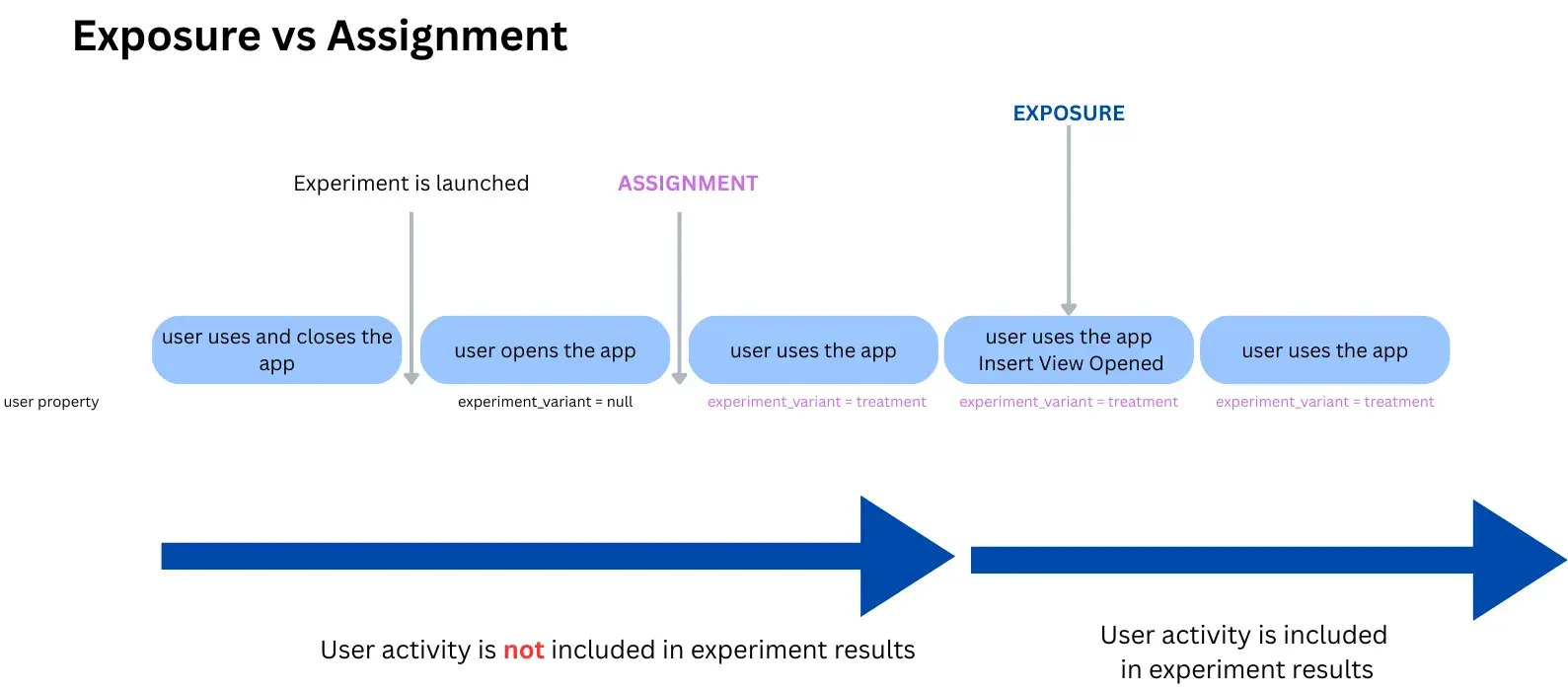
When should exposure happen?
As a rule of thumb, exposure should be fired at the moment we intentionally allow the user to enter the experiment analysis, i.e. the first moment after which differences between variants are expected to be meaningful for the metrics we interpret.
For example, if we change something in the insert view (the in-app panel that opens when users tap on “Start from a photo” in the Photoroom mobile app), the exposure event should be triggered when that view opens:
not earlier, when nothing has changed yet
not later, after downstream behavior has already been influenced
That said, “seeing the UI” is not a strict requirement: in some setups, exposure may happen at flag evaluation time, before any visual change, as long as this moment correctly represents entry into the experiment analysis.
Why exposure matters much more in sequential testing
In many classic t-test setups, the analysis population is defined by assignment upfront, making exposure effectively implicit. In sequential testing, exposure is central.
Because results are observed continuously, who enters the analysis directly impacts:
denominators
effect sizes and uncertainty
when the test is allowed to stop
Change the exposure event, and you don’t just change a chart; you change the experiment itself.
2. How to set exposure in Amplitude
2.1 The exposure event in the event timeline: $exposure
At the lowest level, exposure is an event sent to Amplitude. When exposure is logged at the SDK level, it appears as a $exposure event in the event stream. Its timing depends on where and how exposure is emitted — for example, when a feature flag is evaluated or when exposure is logged manually.
In many client-side setups, exposure is logged when the application calls .variant(), which triggers the SDK to resolve the variant for the user. This default behavior is convenient, but not always correct: resolving a variant is not necessarily the right moment to include the user in the experiment analysis from a measurement perspective.
⚠When the variant is deployed by the backend rather than resolved by the client SDK, the SDK won’t automatically emit the exposure event. In that case, exposure must be logged explicitly.
Depending on the needs, we can also set a “custom” exposure event in the code. Last month, we implemented an in-app message showed to specific users who performed two exports with a transparent backgrounds; we wanted to broadcast our new and improved batch feature. Because we did not have any event when this nudge appeared, we implemented a custom exposure event in the code and the $exposure event was triggered exactly after the second transparent background which was incredibly useful.
This event includes:
the experiment / flag key
the assigned variant
the payload (if any)
This event exists in the raw event stream, independently of how experiment results are later computed.
2.2 The exposure event you select in experiment results charts (analysis exposure)
Separately from the $exposure event, Amplitude asks you to choose an exposure event in the experiment results settings.
This is the event that defines:
when a user enters the experiment analysis
the denominator used in experiment charts
the first step of the experiment funnel
This event can be: $exposure or any other event you select (for example, a feature-linked event)
This is a critical point:
The exposure event selected in experiment results is not just descriptive — it defines the analysis population.
Changing it impacts:
who is counted
which metrics are attributed
how results are interpreted
At Photoroom, for client deployments, we intentionally define exposure at the analysis level instead of relying on the SDK-emitted $exposure event.
2.3 Custom exposure settings: attribution and window
Amplitude also lets you configure how exposure is attributed to downstream metrics. These settings do not change assignment — they change how results are counted.
Default behavior (custom exposure OFF)
A user enters the analysis as soon as they trigger the exposure event
All downstream metrics are counted normally
Custom exposure ON - attribution = first
Amplitude will only count the funnels (if your success metric is a funnel) that started X min (window) after the very FIRST exposure event. Useful when exposure should only affect metrics in a limited time window.
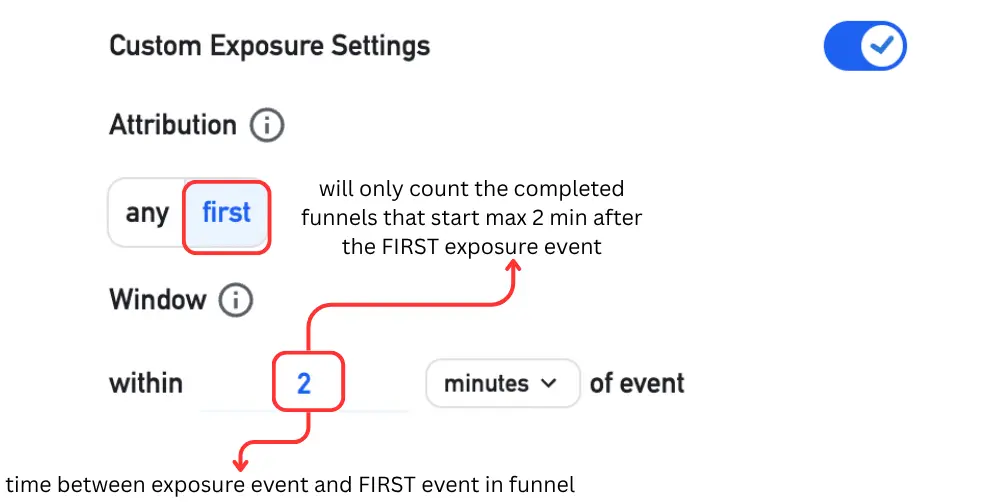
Custom exposure ON - attribution = any
Amplitude will count ALL funnels (if your success metric is a funnel) that started X min (window) after an exposure event. If the selected funnel counts uniques, then users will be counted once after each exposure event.
Note: the window does not have any effect in the case where the exposure event and first event of funnel are the same.
3. When feature-linked exposure is safe (and when it isn’t)
3.1 The Photoroom approach: exposure as the first funnel step
At Photoroom, exposure is often defined as the first step of the experiment funnel; in the example of the Insert View mentioned in the first section of the article, the exposure event would be at the time the view opens on the user’s screen.
This approach is valid only if one key assumption holds: the app is strictly identical for control and treatment before exposure.
When this is true:
exposure is independent of the variant
users enter the analysis based on intent, not treatment
sequential testing remains valid for that conditional population
Results must then be interpreted as:
The effect among users who reached that entry point.
Not as the global effect of assignment.
3.2 When exposure introduces bias
Exposure introduces bias when the treatment can influence whether a user triggers the exposure event. In that case, being assigned to a variant changes the probability that a user enters the experiment analysis.
This is a classic case of post-randomization selection bias.
This typically occurs when the exposure event is a downstream funnel step or a usage action influenced by the feature itself. In these situations, the probability of exposure differs between control and treatment: in other words, being assigned to the treatment changes the likelihood that a user triggers the exposure event.
The analysis population is no longer randomized. Filtering on exposure then becomes equivalent to conditioning on a post-randomization variable, a well-known source of selection bias in experimentation. Neither t-tests nor sequential tests can recover an unbiased estimate in that situation.
3.3 A simple check to validate your exposure choice
For every experiment using a custom exposure event, we recommend checking:
exposure_rate = exposed / assignedby variant. This check should be done once a reasonable number of assignments has accumulated, not in the very early phase of the experiment.
Similar rates → exposure is likely treatment-independent
Diverging rates → exposure is influenced by the variant
This is the simplest way to falsify the key assumption.
4. How exposure drives experiment result calculations
4.1 Exposure is the first step of the experiment funnel
In Amplitude experiment results, we discovered that exposure is not just metadata. It is the entry point of the analysis.
Concretely:
Total users = users who triggered the exposure event
All reported metrics (conversion, averages, lift) are conditional on exposure
In sequential testing, stopping decisions are based on these exposed users
This means that exposure defines the entry point of the experiment analysis, regardless of how the success metric is computed.
No exposure → no inclusion → no contribution to results
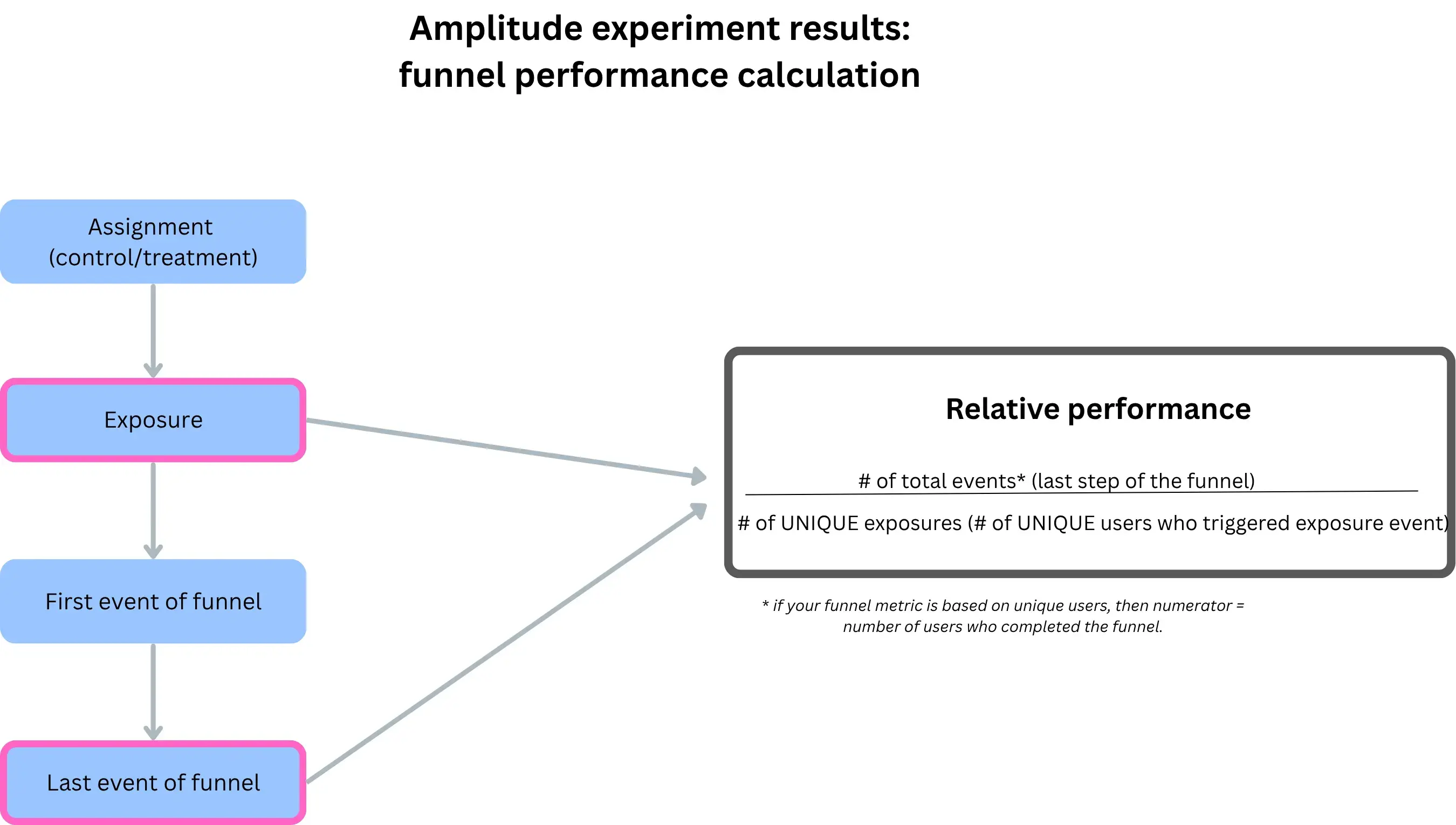
4.2 Changing exposure changes the denominator
Because exposure defines who enters the analysis: changing the exposure event changes the denominator, even if the number of conversions stays the same and even if assignment does not change
This is often surprising, because the experiment itself has not changed — only the analytical gate has.
4.3 Why this does not satisfy Photoroom business needs
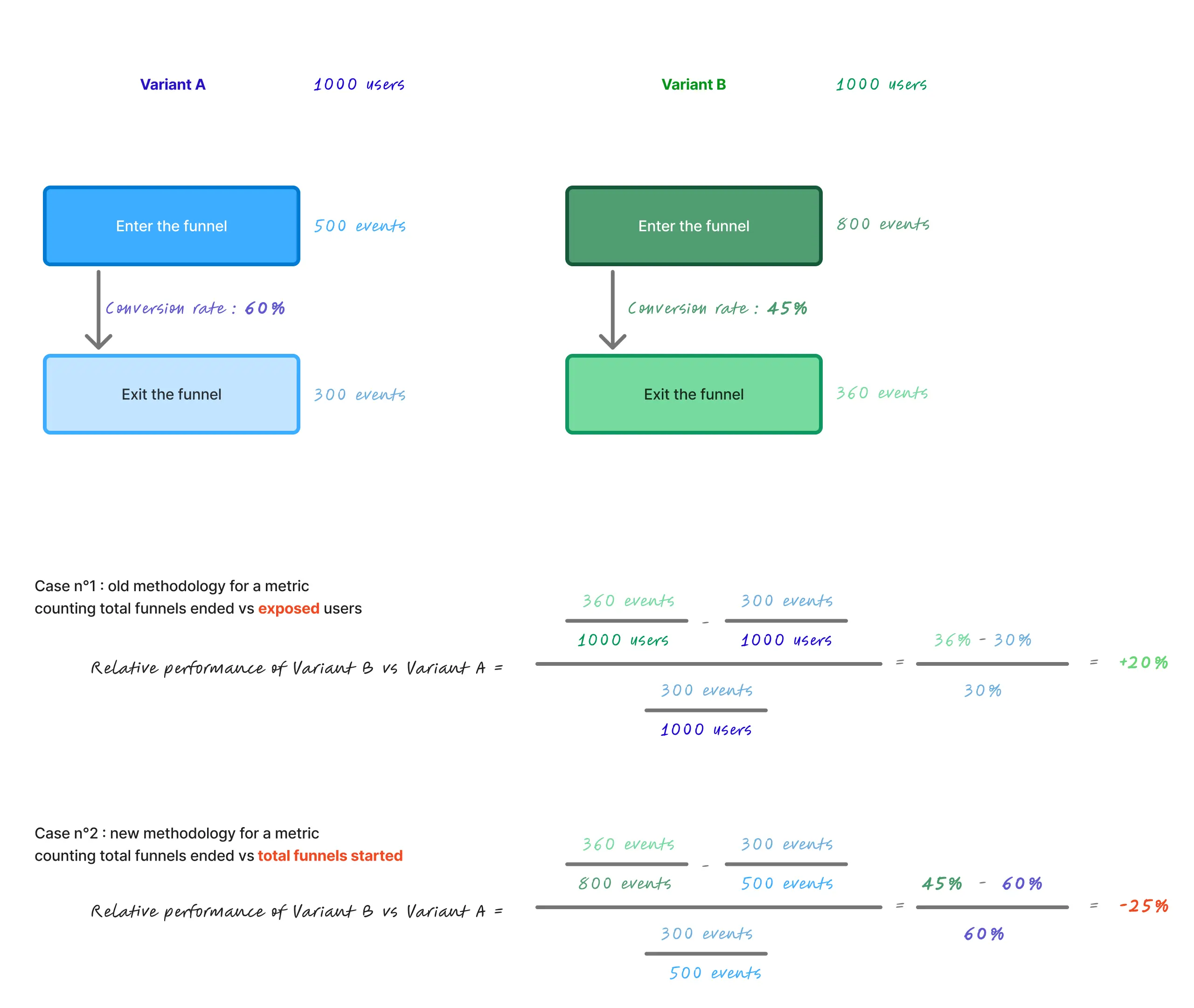
Most of our success metrics at Photoroom are funnels counting totals. This is because we constantly aim at crafting and improving every step of our users’ workflow, for every workflow. Amplitude performance calculation does not take in account the number of times a funnel started; only the number of ended funnels, relative to the number of unique users who were exposed. This creates a mismatch with how we evaluate funnel performance. Let’s say 10 users start a funnel, twice each. Only 1 ends it, and does so the two times. The relative performance will be 2/10 = 50%.
Let’s say 10 other users start a funnel, once each — 2 users will end the funnel. The relative performance will be the same as before, i.e 2/10 whereas in our opinion, the second example shows a better performing funnel but this won’t be reflected in the relative performance.
As a product led growth company, we need our apps to be best in class for every step of the workflows started, regardless of the number of funnels started. According to us, we need to reflect the number of times funnels were started, because we want not only the funnels to be optimized for every user, but for every single funnel they start.
This does not mean one denominator is universally better — it means that the default exposed-user denominator did not align with Photoroom’s product optimization goals.
4.4 An alternative denominator aligned with Photoroom’s use case
Over several discussions with the Amplitude Experiments team, we spent a significant amount of time walking through our use case, our calculations, and the limitations we were observing with the default exposed-user denominator.
The outcome was that for experiments focused on optimizing repeated workflows, conditioning results solely on exposed users can lead to misleading interpretations.
As a result of these discussions, Amplitude introduced an option to compute experiment results using the number of funnel starts as the denominator, instead of the number of exposed users: all we need to do is to toggle off the “normalize by exposure” setting. This only works for experiments, not for feature flags who have not been converted to experiments. (I can't wait for this confusion to end !)
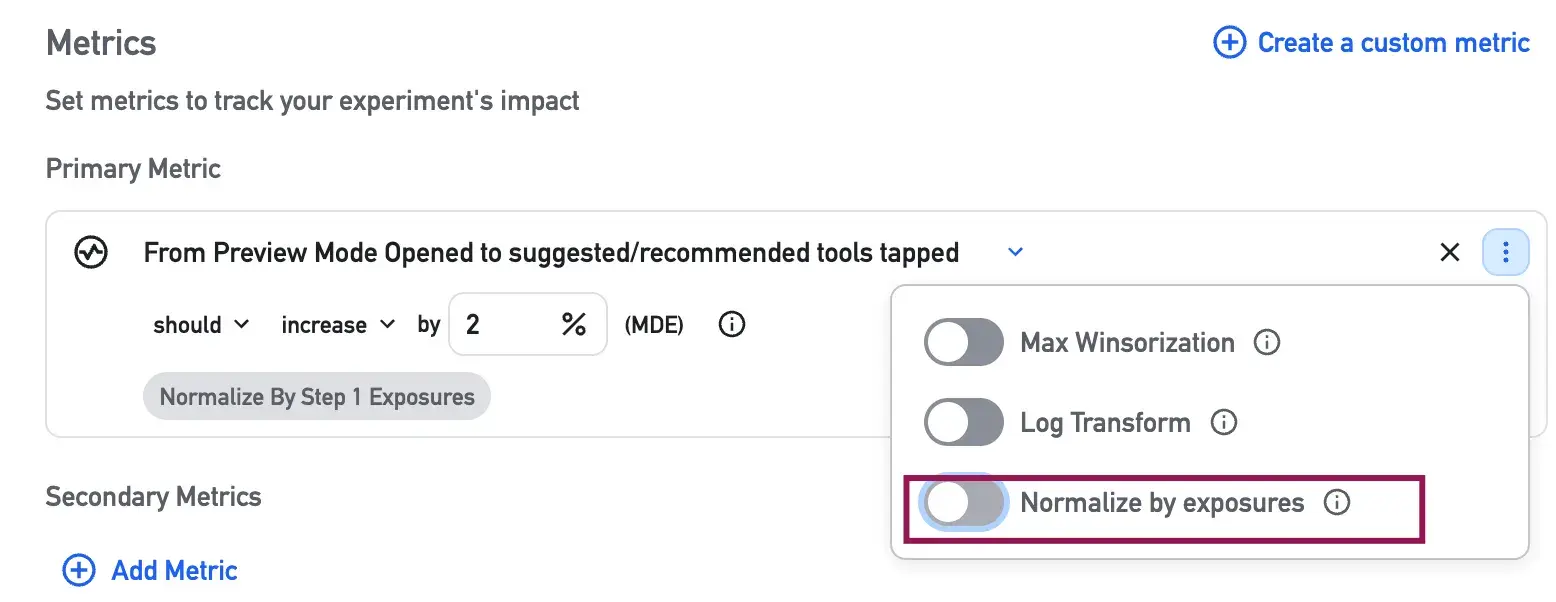
each funnel initiation becomes a unit of analysis
repeated workflows started by the same user are explicitly accounted for
and performance reflects how often workflows succeed, not just how many users ever succeed
With this approach, each workflow initiation is treated as an observation. This allows experiment results to reflect how often workflows succeed, rather than how many users ever succeed at least once.
This methodology better matches how we evaluate product performance at Photoroom, where improving repeated workflows matters more than optimizing single user-level outcomes. It does not replace the exposed-user denominator, but complements it for experiments focused on per-workflow performance.
Conclusion
Exposure is not a technical detail or an implementation artifact. It is a design decision that defines when users enter the experiment analysis and what population the results actually describe.
In sequential testing, this choice is especially critical. Results are evaluated continuously, meaning that exposure directly determines denominators, effect sizes, and stopping behavior. Changing the exposure event does not merely alter a chart — it changes the experiment itself, and therefore the results and decisions derived from it.
One of the key lessons from this work is that analysis frameworks must serve the product strategy, not the other way around. When results feel misaligned with how a product is used or optimized, the issue is often not the experiment itself, but the assumptions embedded in its analytical model.
This work took time, iteration, and repeated discussions to challenge those assumptions and make them explicit. But it reinforced an important principle: it is always worth pushing until what you measure truly reflects what you are trying to improve.
Reliable experimentation is not about accepting default settings; it is about continuously validating that what we measure - and how we measure it - truly reflects the product we are trying to build.

Charlotte de ThiersantI am a Product Data Analyst at Photoroom. My role is to cultivate a data-driven culture and help teams make confident, data-informed decisions through self-serve analytics.