The 7 best AI photo editing software for product photos
AI photo-editing software presents an opportunity and a challenge for e-commerce teams, whether you’re a business owner, marketer or agency. These photo editing tools can do more than make high-quality edits; the best AI photo editors increase speed and scale in ways that make a real difference for your business.
Imagine if you could edit your next product catalog in just a few clicks, or use a single photo to generate assets across multiple platforms. You could go to market faster and use that extra time to grow your business—all while seeing higher conversions. Your competitors are already using AI product photography tools. Now it’s your turn.
The challenge lies in finding the right tool. What is the best AI photo editing software for product photography? We took a close look at the top AI photo-editing tools and analyzed their software and capabilities for e-commerce workflows.
Key takeaways
AI features are standard across most photo editors, but the ones that matter for e-commerce teams (such as background removal, object removal, outpainting, and upscaling) aren’t ubiquitous.
Workflow fit is key to making the most of an AI photo editor. Depending on your business and needs, this could include features like batch editing, templates, RAW file processing, and/or mobile and desktop compatibility.
Pricing model types vary across AI photo editors. Many offer subscription models that allow you to cancel at any time, while others are one-time purchases for perpetual licenses.
Best AI photo editing software for e-commerce
| Tool | Best for | Pricing | Compatibility |
|---|---|---|---|
| Photoroom | Creating production-ready visuals for e-commerce | Free plan available Pro: $12.99/month or $90/year Max: $34.99/month or $251.88/year Ultra: From $99/month or $990/yea | iOS, Android, iPad, macOS, Windows |
| Adobe Photoshop | Precision and heavy manual control | Plans start at $22.99/month with an annual subscription | Windows and macOS |
| Adobe Lightroom | Batch edits and integrations into existing Adobe Suite products | Plans start at $11.99/month with an annual commitment | Web, iOS, Android, iPad, macOS, Windows |
| GIMP | Creating custom interfaces and tools | Free | Linux, macOS, Windows |
| Luminar Neo | Quick enhancement of product images | Perpetual-use licenses start at $99 for desktop-only use. | macOS, Windows, iOS, Android, Chrome OS |
| Canva | Heavily branded product photography | Free plans are available AI tools are included with Pro plans, starting at $15/month or $10/month when billed annually | iPad, macOS, Windows, iOS, Android |
| Capture One Pro | In the moment, photo edits on professional sets | Plans start at $26/month or $17/month when billed annually | iOS, Android, iPad, macOS, Windows |
Our criteria for choosing an AI photo editor
With so many AI editing tools available, the key is finding one that matches how you actually work. The best tools simplify your existing product photography workflows, making them both faster and more efficient—all while improving the overall quality of your images.
How do you know which tool will help you do just that? We’ve evaluated each AI photo editor based on the following key factors:
User interface: Intuitive layouts, clear menus, and straightforward workflows.
E-commerce specific capabilities: Features that merchants need, like background removal, batch editing, and outpainting, and marketplace templates.
Compatibility: With various operating systems (Windows, macOS, Linux) and support for different file formats, especially RAW.
The best AI photo editors
1. Photoroom

What it does best: Photoroom’s AI-powered image editor is built specifically for e-commerce. Teams of all sizes use Photoroom to simplify catalog and listing workflows and create production-ready product visuals at scale.
Best use case: You’re an enterprise-level sports gear company that regularly releases new, seasonal product catalogs. Discover how Photoroom’s Enterprise API can automatically remove backgrounds, adjust lighting, and upload photos to your content management system.
Pros:
Background removal and generation allow you to reuse images across multiple platforms and contexts. Create lifestyle photography, studio shots, and flat-lay images from a single photo.
Photoroom has a wide range of AI-powered tools trained specifically on e-commerce images. Tools like Instant Shadows (for adding realistic shadows), Ghost Mannequin (for capturing fit and drape), Virtual Models (for showcasing products on people), and Recolor (for capturing new colorways) are beginner-friendly and provide professional results.
The tool’s enterprise API integrates with existing workflows on platforms like Zapier, Figma, and Shopify.
Batch editing lets you apply the same edits to up to 500 photos at once, reducing manual work, errors, and editing time.
Photoroom offers multiple export options, including resolutions and file formats (PNG, JPEG, and WebP), suitable for various platforms.
2. Adobe Photoshop

What it does best: Adobe Photoshop is a go-to editing software for marketing teams and agencies that require deep manual control, precision, and custom product visuals.
Best use case: You are a photo editor for a marketing team of a large fashion brand. You use Photoshop to edit lifestyle imagery for a new catalog, focusing on features like retouching and advanced photo manipulation.
Pros:
Adobe Photoshop offers a range of features for precise editing, such as layers, masks, and selection tools. These features allow users to make intricate adjustments to their photos.
Strong retouching capabilities, with tools for removing blemishes, correcting colors, and restoring old photographs. Best for e-commerce teams who frequently work with models or on imperfect sets.
AI features like Content-Aware Fill, Generative Fill, and auto-tagging reduce the time it takes to make complex edits.
Adobe Photoshop is an industry standard for photo editing, but its complex interface and in-depth tools lead to heavy, time-consuming workflows that are difficult to replicate across catalogs.
Learn more: Photoroom vs Photoshop: which tool wins for e-commerce visual marketing?
3. Adobe Lightroom

What it does best: Adobe Lightroom’s beginner-friendly batch editing capabilities allow e-commerce teams to correct product and brand photos at scale.
Best use case: A recent studio photography shoot for a new catalog has poor lighting and contrast. Instead of manually editing each photo, apply exposure adjustments and color balance edits across the entire catalog.
Pros:
All edits in Adobe Lightroom are non-destructive: the original image remains untouched, and changes can be reversed or modified at any time.
Integrates with Photoshop and other Adobe apps, allowing existing Adobe users to integrate Lightroom into their editing workflows.
Adept at handling RAW files, offering extensive tools to adjust exposure, contrast, color balance, and more while preserving high image quality and color consistency.
Adobe Lightroom is a strong tool for e-commerce teams looking to make batch edits, but without compositing tools or automation capabilities, it doesn’t support more complex photo edits at scale.
4. GIMP

What it does best: GIMP (GNU Image Manipulation Program) is a free, manual image editor with features that rival those of expensive professional software.
Best use case: You are a student running a resale business out of your dorm room. Instead of investing in a costly photo editor (or risk losing sales to more experienced sellers), you use GIMP to achieve professional-level product listings at no cost.
Pros:
GIMP offers advanced image manipulation tools, including photo retouching, selection, image composition, and image authoring.
Similar to Photoshop, GIMP supports layers and masks, enabling complex compositions and adjustments without altering the original image.
Users can customize the interface to suit their workflow, arranging tools and panels to their preference. If you have an advanced understanding of photo-editing software, this can significantly improve your workflows.
GIMP is an attractive free option, but it has a steep learning curve for teams without professional photo-editing experience. And unlike Photoroom, GIMP lacks features that streamline workflows.
5. Luminar Neo
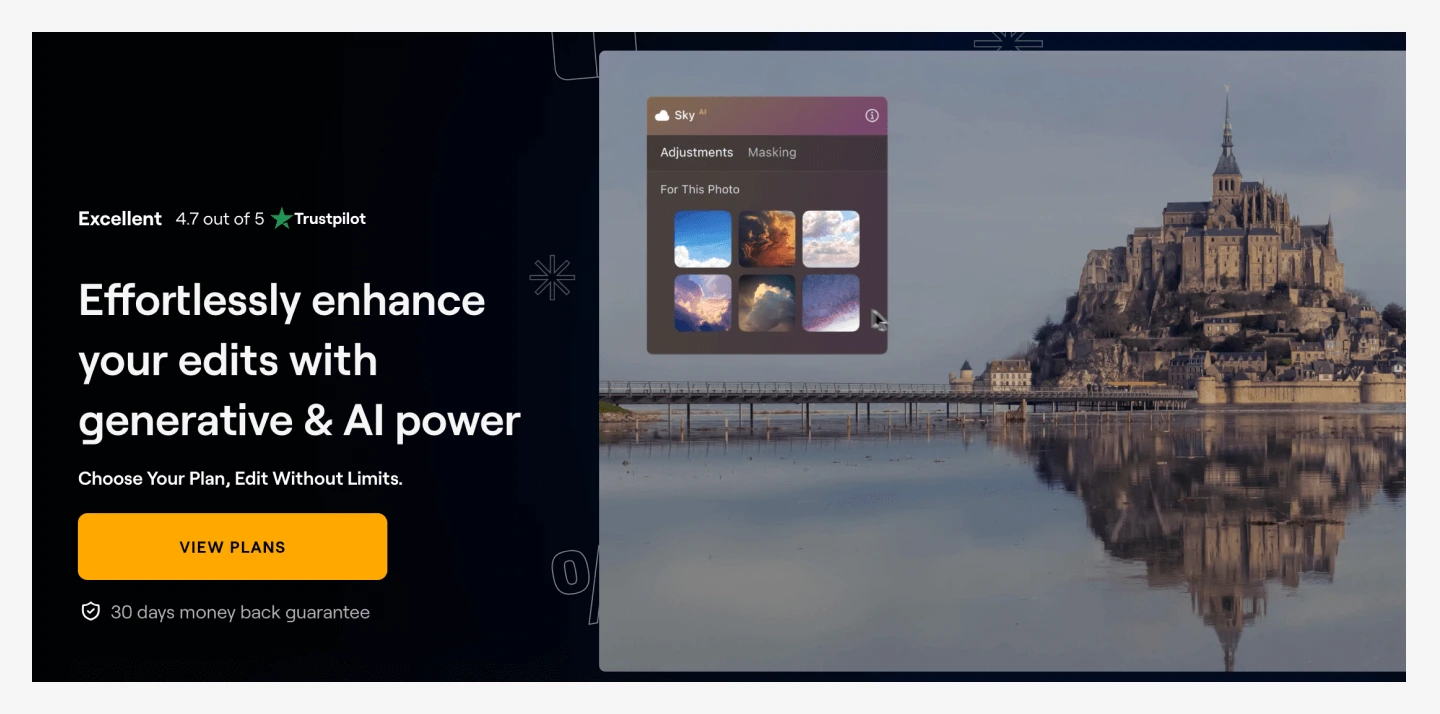
What it does best: Luminar Neo’s advanced AI filters and tools quickly enhance product images with professional-level results.
Best use case: You are a jewelry designer preparing to launch your new collection on Shopify, but the photos you took at home aren’t as high-quality as your products. Use Luminar Neo’s AI filters to enhance lighting or colors, and remove or replace background objects.
Pros:
AI photo-editing features and filters like Sky Replacement, AI Structure, and AI Enhance allow e-commerce teams to dramatically improve product photos with minimal effort.
Luminar Neo supports up to 1000 cameras and multiple file types, including RAF, ORF, and NEF.
The tool’s interface is easy to navigate, making it beginner-friendly without sacrificing advanced editing tools.
Luminar Neo’s AI photo-editing tools are easy to use for one-off edits, but e-commerce teams that need to regularly edit product photos at scale might find the tool’s lack of batch editing and automated workflows limiting.
6. Canva

What it does best: Canva’s brand kit templates lend themselves to consistent, high-quality product photography without extensive editing knowledge.
Best use case: You’re an artisan hot sauce maker with a strong visual brand. Use Canva’s brand kit to apply your logo and signature colors across each one of your product photos for every single launch.
Pros:
Canva’s Magic Studio offers a suite of AI-powered tools that e-commerce teams need to create product images, including Background Remover and Magic Expand, an outpainting tool for enlarging product images.
In addition to brand kits, Canva Pro users can create templates that multiple team members can access, making it easier to standardize product photography for larger teams.
Beginner editors find Canva’s drag-and-drop interface easy to navigate and use without much additional training or tutorials.
Canva is a strong option for e-commerce teams looking to create brand-forward product photography, but its AI workflows are highly manual and can’t be applied to multiple images at once.
Learn More: Photoroom vs Canva: which tool fits your editing needs?
7. Capture One Pro
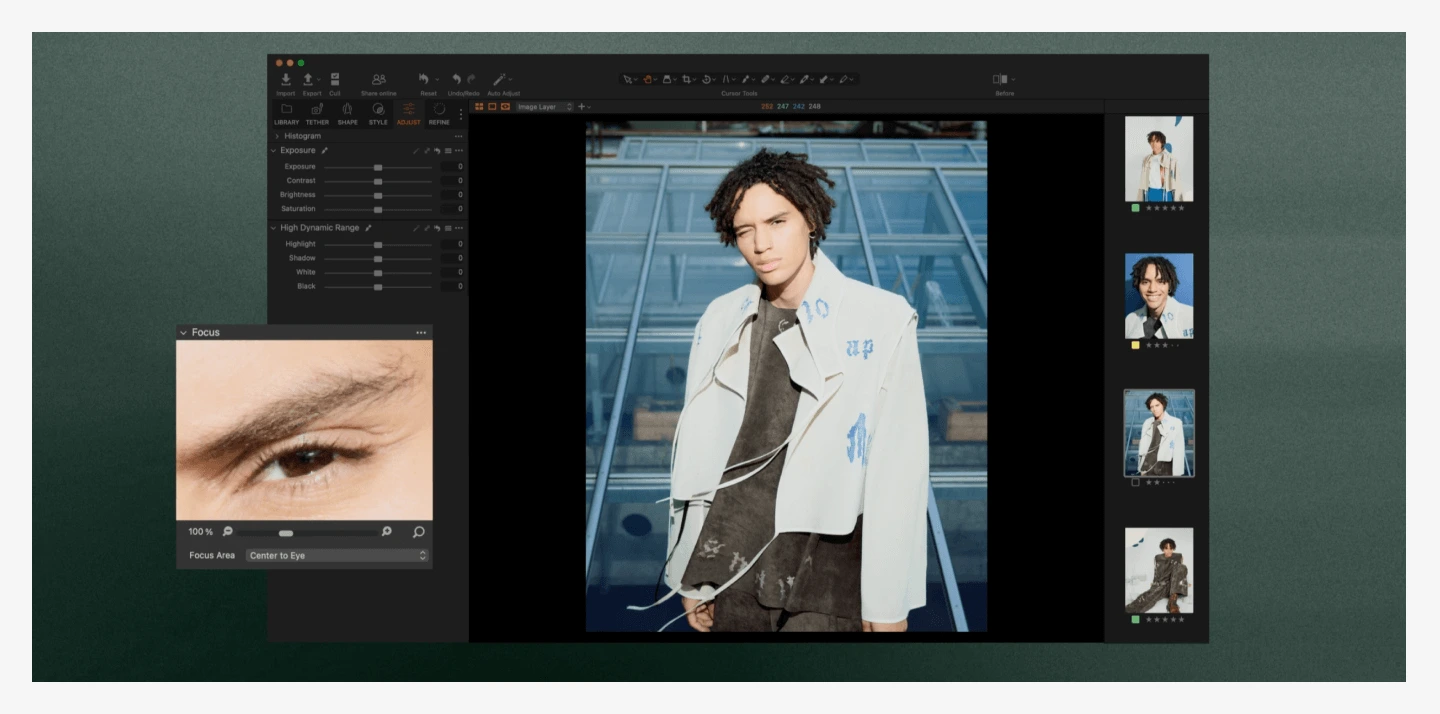
What it does best: Capture One Pro is studio-grade product-photography software that is especially good at RAW handling and tethered shooting, making it a preferred choice for studio environments where instant feedback is important.
Best use case: You’re overseeing a lifestyle shoot for a client’s newest home decor line. Use Capture One Pro to test lighting and edits as you set up your shots.
Pros:
Capture One Pro is renowned for its excellent RAW file processing, delivering high-quality results with great detail and color accuracy.
Asset management features, including catalogs and sessions, help teams efficiently organize and manage large photo libraries.
The software provides sophisticated color grading tools, including color wheels, curves, and an advanced color editor, allowing for precise color adjustments.
Capture One Pro is a favorite among professional photo editors, but it's a heavy, expensive tool compared to other options on the market that offer stronger e-commerce-specific features.
How to choose the best photo editor for your needs
The best AI photo editor for your unique needs is the one that matches your skill level, is compatible with your most common edits and workflows, and fits comfortably within your budget. Here’s a guide to help you make an informed decision.
Step 1: Identify your skill level
Some tools are easier for beginners than others, offering intuitive templates and AI features that simplify complex editing processes. If you feel comfortable with AI photo editing tools, you might focus more on advanced processing capabilities or enterprise integrations to grow your business further.
Step 2. Determine your editing needs
Maybe you’re a Shopify merchant who wants their listings to stand out on the Shop app, or you’re a one-person marketing team who spends hours editing product images. Whatever your use case, ask yourself: which edits do you make the most often? Which would you make if you had the capabilities? The combination of these two will determine which features to look for in an AI image editing software.
Step 3. Consider your workflow
Your AI photo-editing tool should work together with your other creative tools, programs, and processes. For example, if you regularly upload dozens of new products to Amazon, use a tool like Photoroom, which offers batch editing and Amazon templates. If you need to edit photos on the go, choose software that offers mobile versions or cloud synchronization for consistent editing across devices.
Step 4. Evaluate your budget
For budget-friendly editing without compromising quality, consider a subscription-based photo editor. You can plan for monthly payments and cancel when you no longer need it. If you’re ready to commit to one tool, an annual subscription is usually cheaper in the long run than monthly payments.
Step 5. Test before you commit
Many paid photo editing apps offer free trials. Use these to test the tool’s capabilities and determine whether they meet your needs. You can also watch demos and read tutorials to understand the software’s capabilities and workflow before making a decision.
Match the editor to your workflow
Any AI photo editing software can help you create high-quality product images, but not every tool can help you create them at scale.
Along with budget and ease of use, the best AI photo editor for your e-commerce business will simplify and unify your workflows—saving you time and creating new opportunities for growth.
Among AI photo-editing tools, Photoroom stands out for its unique features and workflows designed for e-commerce teams. Not only is the tool’s AI trained on e-commerce images, but the easy-to-navigate interface, one-click editing tools, and features like batch edit, allow you to create your best product images yet, faster and at scale.
Download Photoroom from the App Store or Google Play, or use the web app to get started.
Frequently asked questions
What is AI photo editing software for e-commerce?
AI photo-editing software for e-commerce automates product image workflows, including background removal, resizing, color correction, and format conversion. Unlike general photo editors, e-commerce-focused tools prioritize speed, consistency, and scale over creative flexibility. They help sellers prepare catalog-ready images faster by handling repetitive tasks that would otherwise require manual editing across hundreds of SKUs.
Can AI photo editors handle large product catalogs?
Yes, but capabilities vary significantly across software. Batch editing is the key differentiator. Tools like Photoroom and Lightroom let you apply identical edits across multiple images with just a few clicks, while others like Canva and Luminar Neo require manual, image-by-image workflows. Look for tools that support batch processing, reusable templates, and API integrations to avoid bottlenecks during seasonal launches or inventory updates.
How do AI photo editors help adapt images for different marketplaces?
Marketplace-ready tools automate format adaptation—resizing a single product shot for platforms (e.g, Amazon, Shopify, Etsy) and use cases (lifestyle, studio shots, overhead images). Advanced editors like Photoroom include platform-specific templates that can be combined with other AI editing features to create scalable workflows. For example, use Background Remover to clean up product photography, Recolor to showcase new SKUs, Virtual Model to create lifestyle imagery, and Batch to apply these edits across every image. The result is marketplace-compliant photography that stands out against competitors.
What makes an AI photo editor suitable for product listings?
Listing-specific features matter more than general AI capabilities. The editor you pick should meaningfully simplify your product photography workflow for catalogs and listings. Tools to look for include background removal for clean product shots, consistent lighting and shadow generation, upscaling for high-resolution marketplace requirements, and one-click formatting for various platforms. The editor should also prioritize production speed over creative effects. Features like batch mode, reusable backgrounds, and export presets save more time than artistic filters when managing active inventory.
Is AI photo editing reliable for commercial product images?
Yes, although some tools offer more consistent edits than others. AI photo editing is especially reliable when the tool is trained on commercial imagery. E-commerce-specific editors like Photoroom deliver consistent, marketplace-compliant results because the AI understands product photography contexts. General-purpose AI tools may produce inconsistent outputs that require manual correction. Test any editor with your actual product images before committing, and focus on output quality across different product categories and materials.

Raleigh NorrisI share tips for improving e-commerce workflows and performance with AI.