



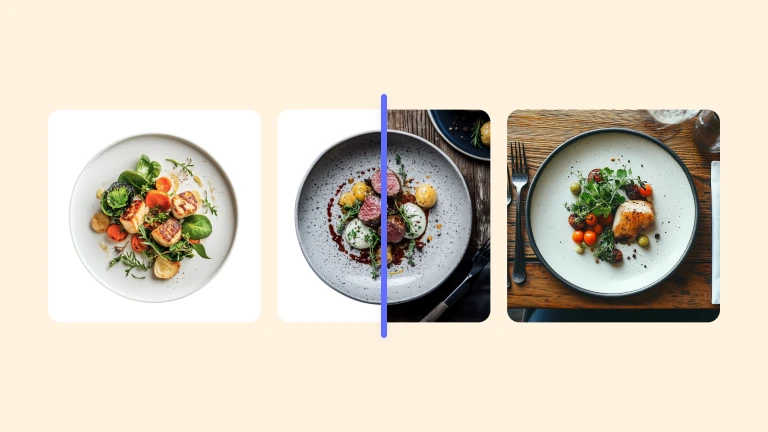
Animate your product photos with our AI Video Generator

Turn any static product photo into a short motion video automatically. No video editing skills or reshoots required: just fast, realistic results ready for every sales channel.

Use video to capture attention where static photos can’t

Turn product images into high-converting animated videos

Static product photos are easy to scroll past. On marketplaces, PDPs, and listings, shoppers rarely stop unless something moves. Creating product videos usually requires reshoots, editing skills, and a lot of time. Most e-commerce teams don’t have the resources to animate their entire catalog, so products end up looking flat or less compelling than competitors’ listings. With Photoroom’s AI Video Generator, you can turn any product image into a short, realistic animation that highlights real features like texture, shape, or shine without changing your brand style.

Convert product images into videos without switching tools

Creating e-commerce visuals often means bouncing between multiple apps, exporting files, and losing consistency along the way. Remove that friction by handling background removal, lighting improvements, and image-to-video animation all in one place. Whether you’re a solo seller or a global brand, streamline your workflow and create more product-ready photos and videos faster by integrating Photoroom’s photo-to-video generation directly into your editing process.

Create ready-to-share videos for e-commerce with zero design skills

Creating product videos usually means learning complex editing tools or stitching effects together manually. With Photoroom, all you need is a single product image. Upload your photo and generate a short motion video that highlights real features like material, shine, or silhouette. Photoroom automatically prepares the animation for e-commerce use, keeping your product centered, your brand style consistent, and your video formatted for marketplaces, PDPs, and social listings.

Showcase your products in motion across every channel

Different platforms favor different formats, and video consistently gets priority in feeds, ads, and product discovery surfaces. As part of Photoroom’s AI product photography suite, the AI Video Generator lets you instantly create channel-ready videos from your existing product photos. Produce versions optimized for social listings, marketplace galleries, PDPs, and online stores so your products stay competitive wherever shoppers browse. These videos are designed to draw attention more naturally than static photos.

Real results from brands and marketplaces using Photoroom

96%

average boost in sales

93%

reduction in photo editing costs

56%

uplift in sell-through rate

99%

visual branding compliance achieved

How to animate product photos with Photoroom

Step 1

Choose a product photo

Go to the Content tab in your Photoroom app to choose an existing design or upload a new product image. 

Step 2

Select Create Animation

Click into the image you want to add motion to, select Create Animation, and then choose an animation style (glide, 360, sweep, etc.).

Step 3

Export your AI-generated video

We’ll notify you in-app as soon as your video is ready, then you can view and download it from the Animations folder.

All the AI product photography tools you need

Keep your brand looking sharp and consistent with Photoroom’s AI product photography tools.

Erase photo backgrounds

Instantly remove any background and replace it with a studio-quality backdrop that professionally showcases your products.

Generate AI backgrounds

Generate custom product photo backgrounds with AI or change background colors while maintaining visual brand identity.

Create lifestyle images

Help customers imagine your products in use by placing them in real-life scenes with Photoroom’s Product Staging AI tool

Enhance and resize images

Visualize products on AI models

Show customers how your products fit on diverse, AI-generated models with Photoroom’s Virtual Model tool.

Export and share

Export ready-to-use AI product photography for your website, marketplace listings, and other sales outlets.

Refine product shots with AI

Upload a product photo to automatically enhance lighting, details, and color in seconds with Photoroom’s Product Beautifier tool.

Adapt image orientation

Resize and expand product photo backgrounds from portrait to landscape and vice versa without losing image quality.

Automate workflows (API)

Save time and simplify visual asset editing and management by connecting Photoroom’s API directly with your website or marketplace.

Add text to a photo

Customize your images with text overlays. Choose from a variety of styles to create engaging messages.

Edit images in batches

Save time by batch editing hundreds of images. Apply the same backgrounds, effects, or resizing options in just a few clicks.

Collaborate with your team

Keep projects moving by sharing designs and feedback with your team in real-time.

Create a brand kit

Store your logos, fonts, and colors in one place to keep your branding consistent and unified with Brand kit.

Create logos with AI

Design a unique logo in seconds using Photoroom's AI logo maker.

Access anywhere

Edit and manage your brand’s visuals from any desktop or mobile device.

Photoroom is loved by companies of all sizes

See real stories from businesses like yours.
Customer story

"Photoroom changed everything for us. It automated the background editing, making every photo consistent. This has considerably streamlined our process, giving us the freedom to innovate and improve the speed at which products are made available online."

Audra Jones
Product Owner at GoodBuy Gear
Read story
Customer story

“The time Photoroom saves me is HUGE. What took forever in Photoshop now takes seconds in Photoroom. It's phenomenal and fun!”

Pam East
Founder, Pam East Designs
Read story
Customer story

“I’m really skeptical when it comes to AI photography and photo editing because I am a photographer, but Photoroom’s AI Backgrounds always looks great and realistic.”

Nick Hawkins
Founder, The 1994 Candle Co.
Read story

Explore more AI product photography tools

AI Product Beautifier
Convert any product image into a studio-grade professional product shot in seconds with AI.
AI Product Staging
Create realistic product scenes to put your product in action with AI.
AI Backgrounds
Generate realistic AI backgrounds in less than a second.
Background Remover
Remove the background of your image automatically.
Batch Mode
Save time by editing your images in batch.

AI video generator: your questions answered

  • How can I turn a photo into a video with AI?

  • What makes Photoroom’s AI Video Generator different from other tools?

  • Can I animate any image with Photoroom?

  • What is an image-to-video converter?

  • What is the best product image to product video tool?

  • How fast can I create a product video from an image?

  • Can I create videos from text with Photoroom’s AI Video Generator?

Go further with Photoroom

Want to unlock even more features to make your photos shine? With Photoroom Pro, you'll get access to useful features like Batch Editor, HD quality, Smart Resize, and more.