콘텐츠로 건너 뛰기

Transform product images at scale with one image editing API

Photoroom API powers product visuals for the world's leading marketplaces and brands, processing over 3 million images daily - built for the speed, consistency, and scale commerce demands.
업계 선두 기업들도 선택했어요

상품 카탈로그와 광고 이미지를 몇 초 만에 바꿔보세요

A juicy cheeseburger with lettuce, tomato, and a beef patty on a wooden table, with a kitchen background and stacked white plates nearby.
A juicy cheeseburger with lettuce, tomato, and a beef patty topped with melted cheese, served in a soft, lightly toasted bun.
A cheeseburger with lettuce and tomato on a wooden table by a beach, with blue ocean and sky in the background, partially shaded by palm leaves.
Cheeseburger with lettuce, tomato, and a beef patty on a bun against a red background, with text: "$7.99 Burger Menu Offer."
A cheeseburger with lettuce, tomato, and a juicy beef patty inside a golden-brown bun on a marble surface.
A stainless steel electric kettle on a wooden countertop in a store with various kitchen appliances displayed on the walls and shelves.
Stainless steel electric kettle with a black handle and base.
A stainless steel electric kettle on a wooden counter with a soft background, including a potted plant and a blurred window.
Stainless steel electric kettle with black handle on a blue background. "Sale 20%" text in the corner.
A stainless steel electric kettle with a black handle on a wooden surface, against a blurred green background.
Dark blue pump bottle on a bathroom sink, surrounded by toiletries. A vase with white tulips and a woman in the mirror are in the background.
Dark blue pump bottle with a black dispenser top on a white background.
Blue pump bottle on a reflective surface with a 20% off label in the top right corner; blurred lights in the background.
A dark blue pump bottle on a white surface, surrounded by vibrant orange and red flowers, with the word "PURE" in large white letters at the top.
Blue pump bottle on a bathroom countertop with plants in the background.
Silver Mercedes SUV parked on gravel with a cityscape background; people and trees visible nearby.
White Mercedes-Benz SUV with black wheels, front and side view, isolated on a white background.
White Mercedes-Benz SUV parked on a road, surrounded by lush greenery and mountains at sunset.
White Mercedes SUV with a special deal price of $23,000, set against a blue background.
White Mercedes SUV on a road with overlaid text "New Offer" and "Get In Now," set against a forested mountainous background.
A young woman with curly hair smiles while standing on a city street. She is wearing a white shirt with green trim and jeans.
Smiling young woman with long curly hair wearing a white and green t-shirt and jeans, standing against a plain background.
A smiling young woman with curly hair, wearing a white shirt, framed by pink sparkle graphics, and the words "This Barbie is a mood. Own it now."
A smiling young woman with curly hair, wearing a white shirt with green trim, featured on a Netflix promotional poster for "Anna is Awful," coming soon.
Smiling person with long curly hair wearing a white t-shirt stands in a cobblestone street lined with trees, with the Eiffel Tower in the background.

One photo editing and image manipulation API, 20+ solutions

Connect once and get 20+ photo editing and image manipulation tools for every step of product visual production, from background removal and upscaling to product staging and ghost mannequin.

Photoroom MCP

사용 중인 LLM에 Photoroom MCP를 연결해 상품 등록 이미지를 자동으로 만들어 보세요.

배경 지우기

AI 배경 제거 API로 복잡한 경계와 투명한 부분까지 깔끔하게 자르기! 여러 상품 목록이나 마켓 등록 이미지를 한 번에 손쉽게 완성할 수 있어요.

가상 모델

브랜드 감각에 맞는 AI 모델 위에 의류와 액세서리를 자연스럽게 입혀보세요. Virtual Model API로 촬영, 캐스팅, 스튜디오 없이도 바로 착용 이미지를 만들 수 있어요.

플랫 레이

수천 개의 상품도 한 번에, 감각적인 플랫 레이 제품 사진을 일관되게 만들어 보세요. Flat Lay API로 브랜드 이미지를 쉽게 통일할 수 있어요.

고스트 마네킹

고스트 마네킹 의류 사진을 완벽한 형태로 만들어 보세요. AI 기반 고스트 마네킹 API로 스튜디오 없이도 자연스러운 마네킹 이미지를 손쉽게 완성할 수 있어요.

제품 연출

제품을 실제 생활 속 장면에 자연스럽게 연출해 보세요. 손에 들거나, 착용하거나, 진열된 모습까지 고급 화보처럼 자연스러운 조명과 구도로 완성할 수 있어요.

AI 상세 편집

바꾸고 싶은 점을 쉽게 말해보세요. 색상 변경, 오브젝트 추가·제거, 장면 연출, 카메라 각도 조정까지 한 번에 해결해드려요.

AI 보정

저화질 상품 및 음식 이미지를 AI 보정 API로 자동으로 개선하세요. 리터치나 스튜디오 없이도, AI가 디테일을 살리고 색감을 보정해 대량으로 품질을 높여줍니다.

그림자 추가하기

이미지의 주요 피사체에 사실적인 그림자를 더하고, 그림자의 부드러움과 강도, 위치를 완벽하게 조절해 보세요.

배경 만들기

최고급 생성형 AI로 새로운 배경을 다이내믹하게 만들어 원본 이미지의 주제와 완벽하게 어울리게 해보세요.

조명 보정

어둡거나 밝은 사진도 자동으로 밝고 선명하게 만들어드려요. 제품 색상은 그대로, 인물 사진은 더 돋보이게 편집할 수 있어요.

텍스트 제거

워터마크, 라벨, 실제 간판을 자동으로 깔끔하게 지워보세요 원하는 부분만 남기고 손쉽게 편집할 수 있어요.

확장하기

어떤 이미지든 크롭 없이 원하는 형식으로 사이즈 변경해보세요. 우리의 AI가 원본과 어울리는 추가 배경을 자연스럽게 채워드려요.

확장하기

프레임에 잘린 피사체도 복구할 수 있어요. 보이는 부분만으로 부족한 부분을 자연스럽게 채워드려요.

다림질

모든 옷을 방금 다림질한 듯 깔끔하게 만들어보세요. 주름이나 구김도 자동으로 매끈하게 정리해드려요—다림질도, 다시 촬영할 필요도 없어요.

이미지 생성

텍스트 설명만으로 이미지 생성이 가능해요. 장면을 자유롭게 설명하고, 원하는 형식을 골라 나만의 이미지를 받아보세요.

불확실성 점수

자르기 결과가 한 번 더 확인이 필요할 때를 쉽게 알 수 있어요. 모든 결과에는 0에서 1 사이의 신뢰 점수가 표시되어, 애매한 이미지는 자동으로 검토 대상으로 지정할 수 있어요.

원근감 바로잡기

비스듬한 사진을 반듯하게 바로잡아요. 카드, 책, 게임 등 네모난 상품을 깔끔하게 정면에서 보여줄 수 있어요. 인위적인 왜곡 없이 원래 모습 그대로 편집돼요.

배치 조정

피사체 위치를 원하는 대로 조절해 보세요. 크기, 정렬, 여백까지 세밀하게 맞춰서 상품 목록의 모든 이미지를 깔끔하게 통일할 수 있어요.

스마트 크롭

이미지를 자동으로 다시 크롭해서 원하는 요소에 집중하거나, 마켓플레이스 규정에 맞게 얼굴을 잘라낼 수 있어요.

화질 개선

작고 저화질 이미지를 선명하게 4배 더 크게 만들어보세요. 빠른 모드로 여러 장을 한 번에, 느린 모드로는 최고의 품질로 완성할 수 있어요.

여러 가지를 손쉽게 조합해 강력한 작업 흐름을 만들어보세요

원본 업로드부터 대표 이미지, 번들, 비디오까지—카탈로그에 필요한 모든 에셋을 한 번의 API 플로우로 만들어보세요.
Photoroom API

AI 배경 API 비교하기

상위 AI 이미지 생성 API들의 성능을 한눈에 비교해보세요.

Two intricately designed earrings with blue center stones, displayed on a green surface and a darker surface.

The ROI teams using Photoroom already see

4x

faster market rollouts

89%

lower image processing costs

56%

higher conversion on listings

236%

increase in average order value

Exclusive to Enterprise plans

Guaranteed quality, Visual QA, video and Visual Agents

Collage of a woman in a white halter dress, a bowl of vibrant poke, and a woman holding a mustard handbag with hoop earrings.
기업용 품질 보장 서비스
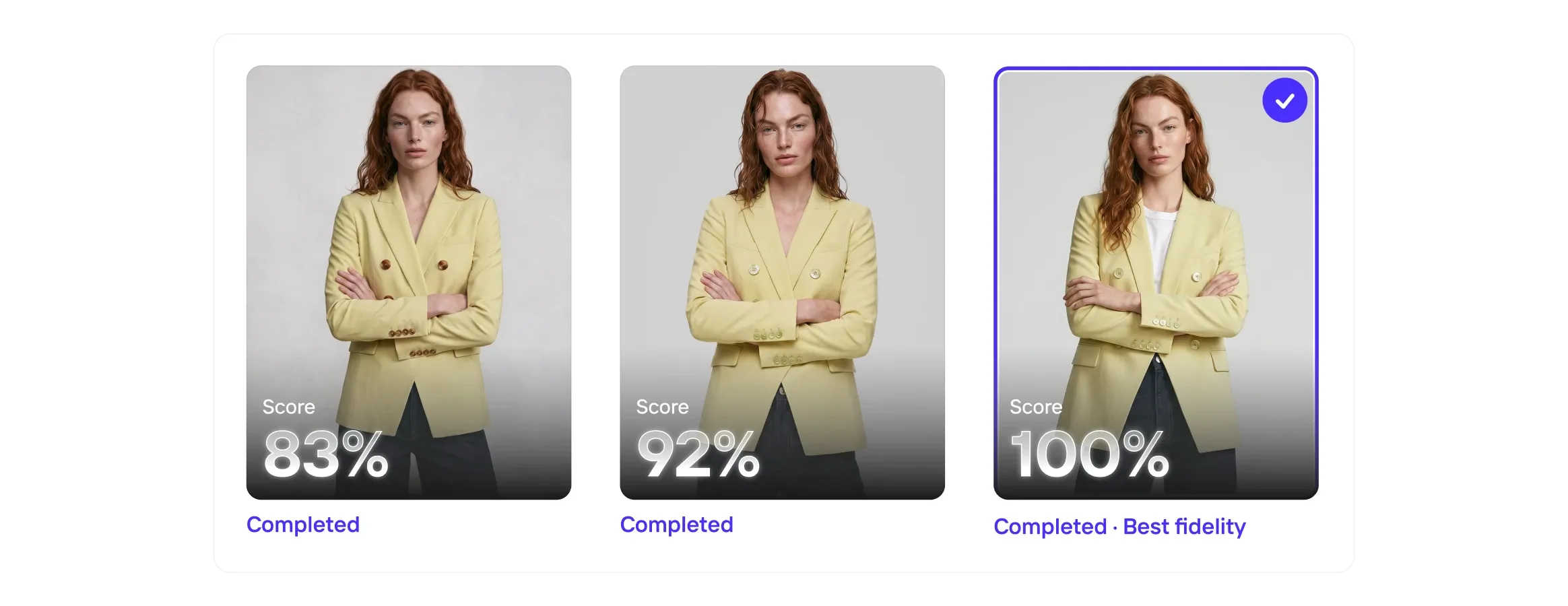
기준을 통과한 결과물에 대해서만 비용을 지불하면 돼요. 제품 재현성 기준을 미리 정해 두세요. 모든 결과물을 자체 제품 재현성 모델로 요청 사항과 대조해 확인해요. 기준에 미치지 못하는 결과물은 팀에 전달되기 전에 다시 생성해요.
Three images of a woman in a yellow blazer, each with a completion score: 83%, 92%, and 100% labeled as "Best fidelity."
비주얼 QA
아무리 뛰어난 AI도 실수할 수 있어요. 그래서 비주얼 QA가 모든 결과를 꼼꼼하게 점검하고, 놓친 부분을 찾아내어 고객에게 전달되기 전에 세밀하게 수정해드려요.
Four fashion items with play icons: a brown handbag, sage green mule, person in a gray shirt and cardigan, and white sneakers with orange accents.
이미지-동영상 API
Image to Video API로 정적인 제품 사진을 자동으로 짧은 영상으로 바꿔드려요. 제품 이미지를 올리면 자연스러운 카메라 움직임, 애니메이션, 원하는 효과가 적용된 완성된 영상을 받아볼 수 있어요.
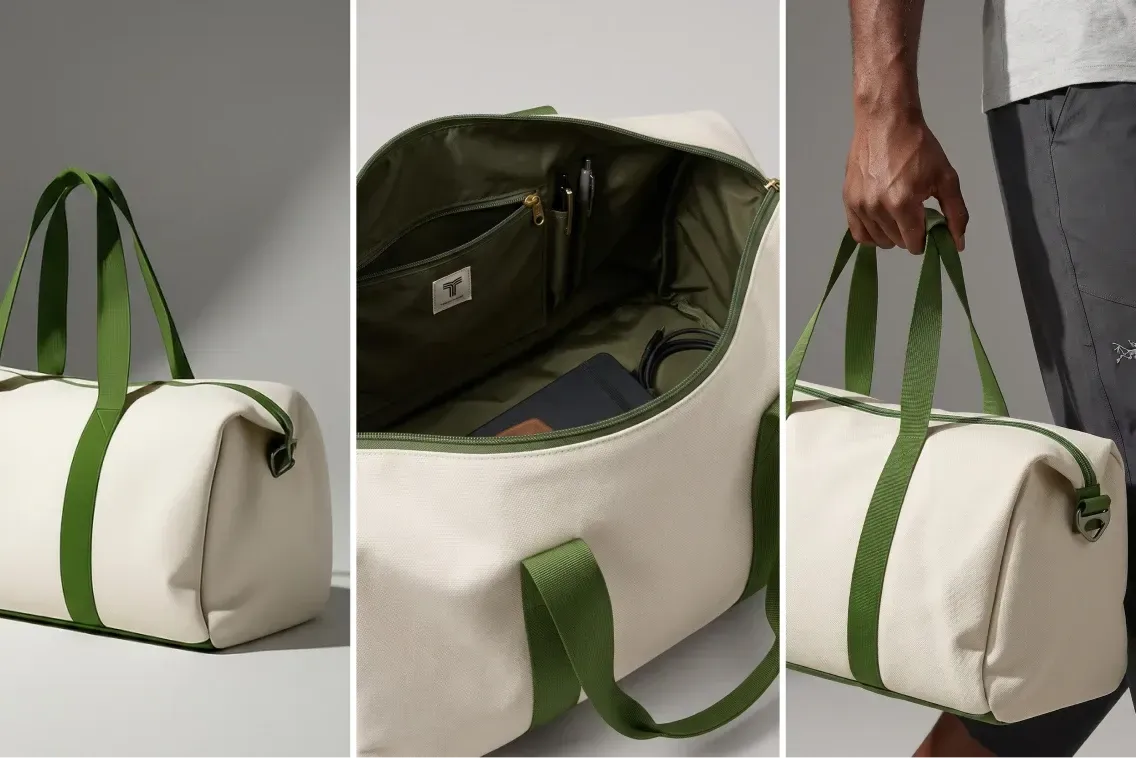
Collage of a beige duffel bag with green straps, showing its exterior, spacious interior with pockets, and a hand holding it.
Visual Agents
Visual Agents가 여러분의 목적에 딱 맞는 워크플로우를 실행해요. 모든 입력을 꼼꼼히 분석하고, 이미지를 만들고 편집한 뒤, 결과를 평가하고 통과할 때까지 다시 시도해요. 이렇게 통과한 이미지만 상품 목록에 올라가요.
Testimonials

Trusted by the brands selling at first sight

Three people hiking on a grassy hillside, wearing backpacks and sunglasses, smiling under a clear sky.

3개월 동안 여러 시장에서 35,000장의 이미지를 편집했어요

Photoroom을 모든 커뮤니케이션 팀에 도입해서, 우리 스포츠 브랜드의 마케팅 팀이 각자 손쉽게 팩샷 가이드라인을 적용하고, 언제나 같은 품질과 일관성을 유지할 수 있도록 하고 싶어요.

Thomas Schouteeten데카트론 제품 콘텐츠 리더
Get started today

Get your API key in minutes, no credit card needed

  • Test free with 1,000 sandbox calls a month

  • Add 20+ edits with one integration, from background removal to virtual models

  • Scale to your whole catalog, with Enterprise plans for higher volume and guaranteed quality

자주 묻는 질문

어떤 API를 쓰면 좋을까요?

Photoroom API는 두 가지 API 엔드포인트로 구성되어 있으며, 두 가지 요금제에서 이용할 수 있어요.

  • 배경만 지우고 싶다면 Remove Background API를 사용해 보세요. (베이직 요금제)

  • 이미지 편집 API로 사이즈 변경, 배경 교체, 밝기 조정, 그림자 추가까지 한 번에 할 수 있어요 (Plus 요금제)

API 키는 어떻게 받을 수 있나요?

  • 계정에 API를 활성화하려면 Photoroom 웹 앱의 계정 설정에 접속하세요. (데스크톱에서만 이용 가능해요.) 계정에 로그인되어 있는지 꼭 확인하세요.

  • API 키 복사하기: 계정에서 API를 활성화하면 고유한 API 키가 발급돼요. 이 키는 API를 사용할 때 비밀번호처럼 중요한 역할을 하니 꼭 안전하게 보관하세요. API 키는 동일한 링크를 따라가면 다시 확인할 수 있어요.

Can I switch easily from Remove.bg to Photoroom?

Yes. Photoroom’s Remove Background API accepts the same argument names as remove.bg and returns the same response format. To switch, change the endpoint URL to https://sdk.photoroom.com/v1/segment and use a Photoroom API key. The rest of your code stays the same.

remove.bg’s standalone service closes on 1 December 2026, and its background removal moves to Leonardo.ai. See how to migrate from the remove.bg API.

Which image formats, sizes, and resolutions are supported?

For the input and result images, the Image Editing API (Plus API plan) supports four formats: PNG, JPEG, WEBP and AVIF. We recommend limiting images to 25 megapixels for optimal performance. Maximum File Size: 30MB. Maximum Resolution: 5,000 pixels on the widest side. Images with a larger resolution are supported (if they stay below 30MB), but will be resized down to 5,000 pixels on the widest side.

The Remove Background API (Basic API plan) supports four formats for the input image: PNG, JPEG, WEBP and HEIC. For the result image, it supports three formats: PNG, JPEG and WEBP. Maximum File Size: 50MB. Maximum Resolution: 6,000 pixels on the widest side.

Photoroom API는 Enterprise 워크플로우(PIM/DAM, CMS, 이커머스)와 어떻게 연동되나요?

Photoroom은 이미 사용 중인 도구와 함께 쓸 수 있어요. 새로운 제품 사진이 들어오면, 배경을 깨끗하게 지우고 브랜드 스타일을 입혀서, 완성된 이미지를 팀이 필요한 곳에 바로 넣어드려요. 이제 사이트, 광고, 마켓플레이스 어디든 바로 사용할 수 있어요. 결과적으로, 손이 많이 가는 편집은 줄이고, 더 빠르게 상품을 올릴 수 있고, 상품 목록도 한결 깔끔하게 관리할 수 있어요.

API를 내 프로젝트에 어떻게 연결하나요?

Photoroom API는 표준 HTTP 호출을 사용해서 어떤 프로그래밍 언어나 네트워킹 프레임워크와도 쉽게 연동할 수 있어요. 자세한 내용은 문서를 확인해 보세요.

API 호출은 어떻게 결제되나요?

처리된 이미지 수에 따라 API 사용량이 계산돼요. 이미지는 월 구독을 통해 구매하며, API 호출이 성공할 때마다 차감돼요. API 요금제 자세히 보기.

무료로 API를 사용할 수 있나요?

테스트나 프로토타입을 만들 때는 Image Editing API의 샌드박스 모드를 사용해 보세요. 무료로 API를 호출할 수 있지만, 결과 이미지에는 워터마크가 들어가요. 그리고 계정을 만들면 Remove Background API를 10회 무료로 사용할 수 있어요.

어떻게 도움을 받을 수 있나요?

API 사용이 어려우신가요? API 커뮤니티에서 엔지니어에게 직접 도움을 받거나, 문제 해결 페이지에서 자주 발생하는 이슈를 확인해 보세요.

결제 관련이나 민감한 정보가 있다면 커뮤니티에서 Photoroom에게 직접 DM을 보내주세요. 언제든 도와드릴게요.

내 이미지의 배경을 지우는 API가 있나요?

네, 저희 배경 제거 API를 사용하면 이미지의 배경을 자동으로 지우거나 바꿀 수 있어요. 여러 장의 이미지를 한 번에 업로드하고, 빠르게 일괄 편집해서 바로 사용할 수 있는 깔끔한 제품 이미지를 완성할 수 있습니다.

플랫 레이로 대량의 카탈로그 촬영에서도 이미지를 깔끔하게 통일할 수 있는 비결이 뭔가요?

Photoroom의 플랫 레이 API는 모든 이미지를 동일한 AI 파이프라인으로 처리해서, 상품 목록 전체에 깔끔하고 균일한 구도와 간격, 스타일을 빠르게 맞춰줘요. 팀에서는 한 번만 레이아웃 기준을 정하면 API로 대량 적용할 수 있어서, 기존 스튜디오 촬영에서 생기는 번거로운 차이도 없어요. 이제 수천 개의 상품도 한결같이 브랜드 느낌을 살려서, 훨씬 빠르게 완성할 수 있어요.

이미지 편집 API는 어떻게 활용하나요?

기업에서는 제품, PIM, DAM, 또는 이커머스 플랫폼에 Photoroom API를 연동해 수천, 수만 장의 이미지를 직접 편집하지 않고 한 번에 처리할 수 있어요. 최신 API는 기존 편집 방식과 AI를 결합해 가상 모델, 고스트 마네킹, 플랫 레이 생성, 자동 품질 검사까지 다양한 작업을 손쉽게 할 수 있게 도와줘요.

Is Photoroom only for small sellers?

No. Small sellers are one of the two audiences Photoroom is built for. The other is enterprise: marketplaces, retailers, and brands processing hundreds of thousands of product images a year. Photoroom's API handles over 3 million images a day for companies including Decathlon, Depop, Wolt, and Mercari. It is SOC 2 Type 2 certified, GDPR compliant, and carries a 99.9% uptime target on Enterprise accounts.

첫눈에 마음을 사로잡고 판매를 시작해 보세요

몇 초 만에 상품 등록에 바로 쓸 제품 이미지를 완성해 보세요.