How we share skills across Photoroom
Sharing skills inside a company is harder than it sounds.
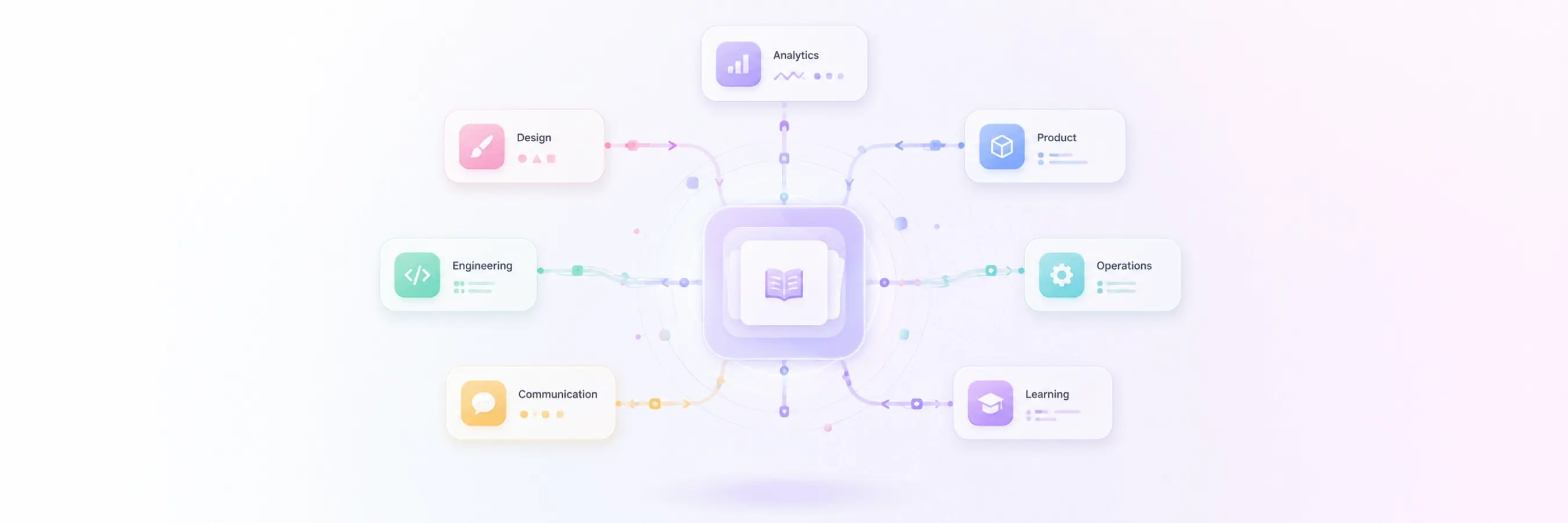
In the data team, we built a skill that helps people create their Amplitude events and properties directly from Claude. It carries all the context on our naming conventions and rules, and makes sure people follow them by the book. We wanted to share it widely, well beyond the developers who first needed it. And it's not just us. Skills are popping up everywhere at Photoroom. Engineers write them, but so do product managers, marketers, designers, ops... Anyone who figures out a good way to get something done with Claude ends up capturing it as a skill. That's great, except every one of those skills is stuck wherever its author left it, useful to one person instead of the whole company.
Today there are only two ways to do it: either you own a shared space and are owner of the space and push skills into it, or every single person has to add the skill manually on their own side. Neither scales. There's no clean way for one person to write a skill and have everyone else discover and reuse it, so skills end up scattered, duplicated, or simply lost.
Eliot, our co-founder, built something to fix this: a skills marketplace. The idea is simple. Everyone adds their skills to one Notion database, and a search engine on top lets anyone find the right skill for whatever they're trying to do, just by describing it in plain language. No git commit, no friction, just a Notion database. And I think it is brilliant! I am adding the technical steps for you to implement it at the end of the article.
See it in action
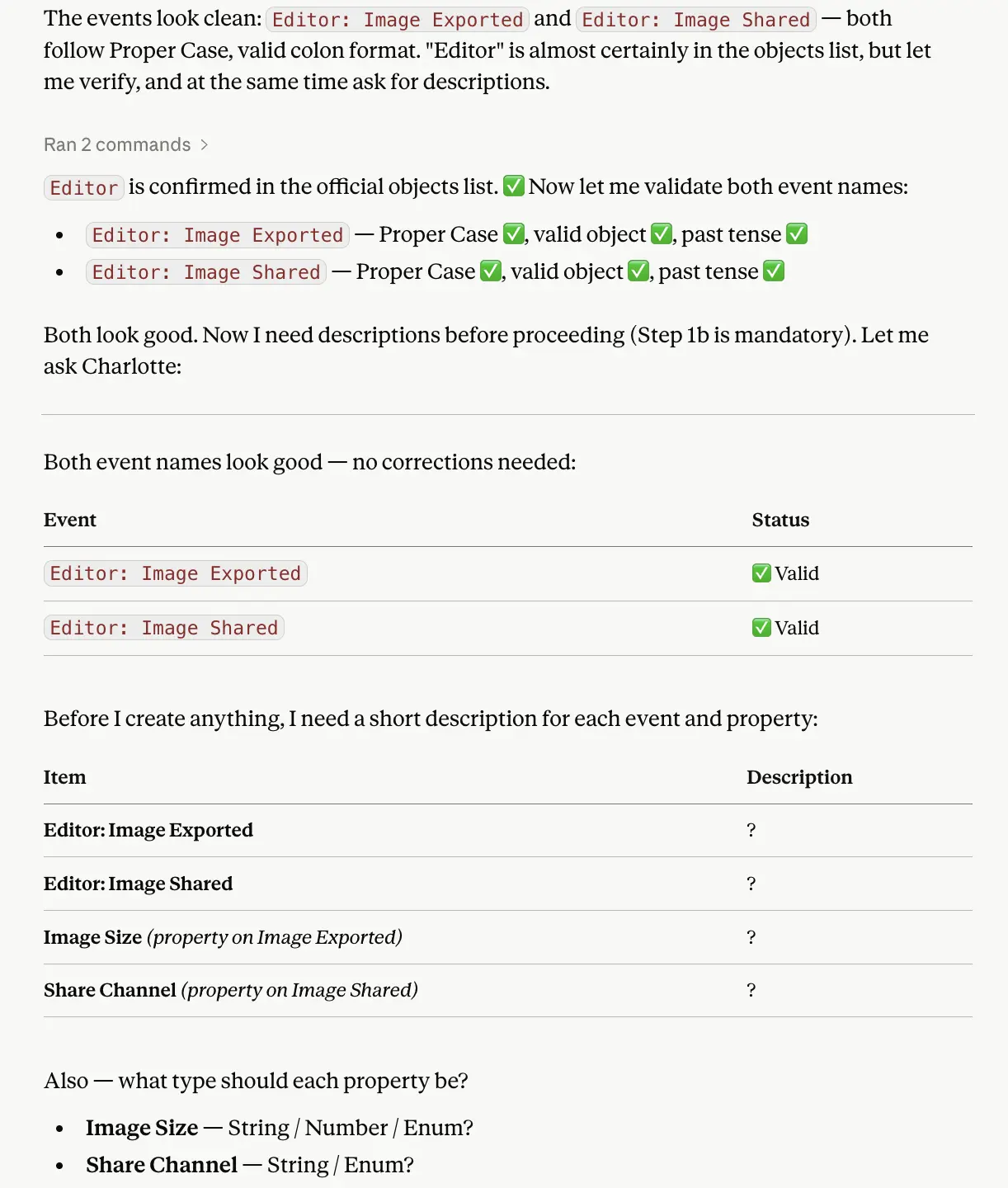
I ask Claude to create events and properties. That’s it. No additional context, not even the name of Amplitude. Claude reads the Photoroom skill marketplace right away and infers that according to my request, it will read the Amplitude event creation skill.
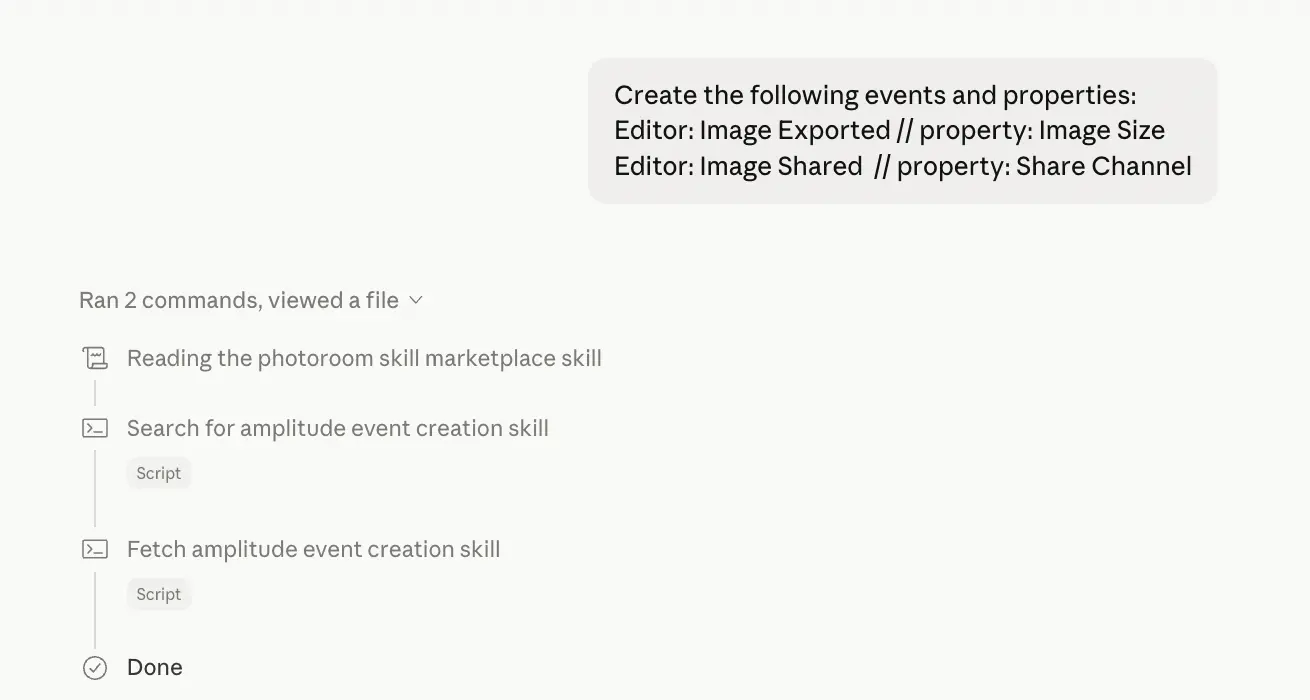
Then the skill behaves as expected and ensures I follow our strict naming convention policy, our mandatory description rule, past tense convention etc.
How does it work?
The Notion database is the source of truth
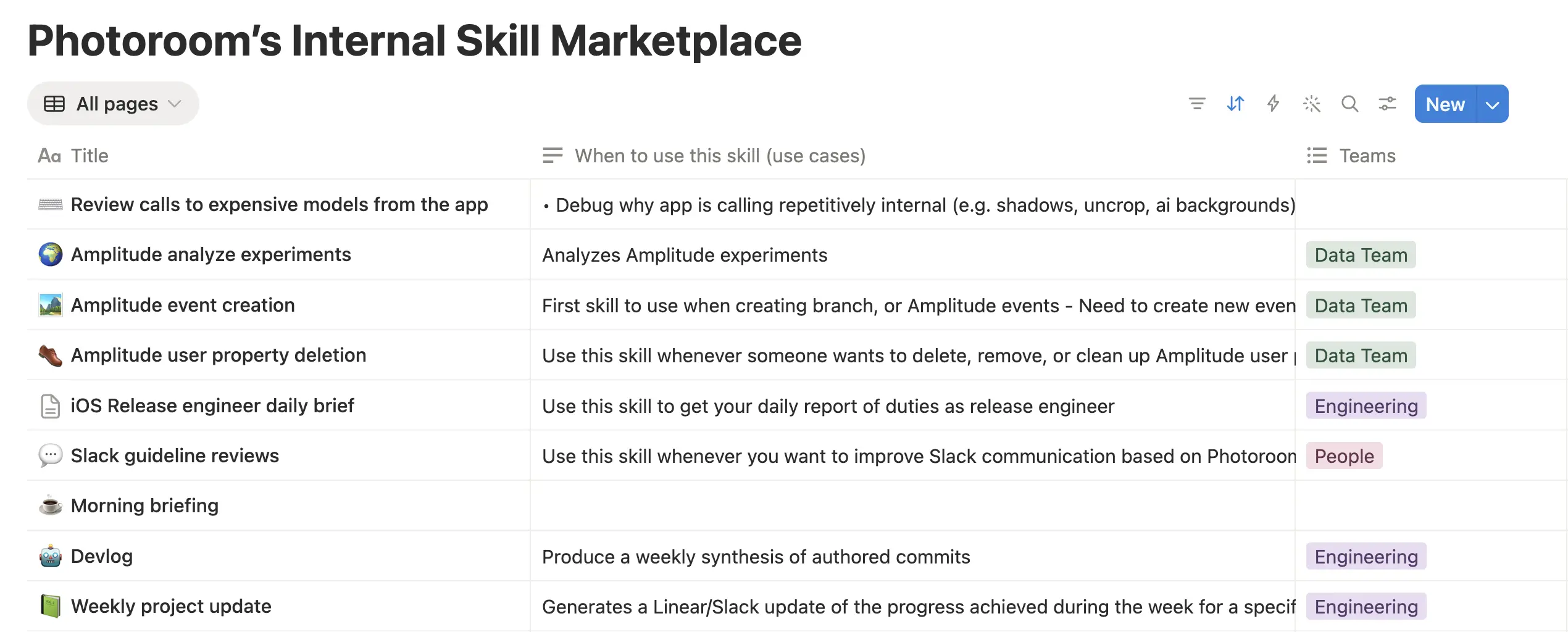
Every skill lives as a row in a single Notion database. Each row has a few intent fields: a title, a skill description, a "when to use this skill" field, the teams it's relevant to, and an owner. The actual skill instructions live in the body of the page.
That's the only thing people have to maintain. You add your skill to Notion like any other page, and the rest is automatic.
A Cloudflare Worker does the heavy lifting
Sitting between Notion and the people searching is a single Cloudflare Worker. It has two jobs:
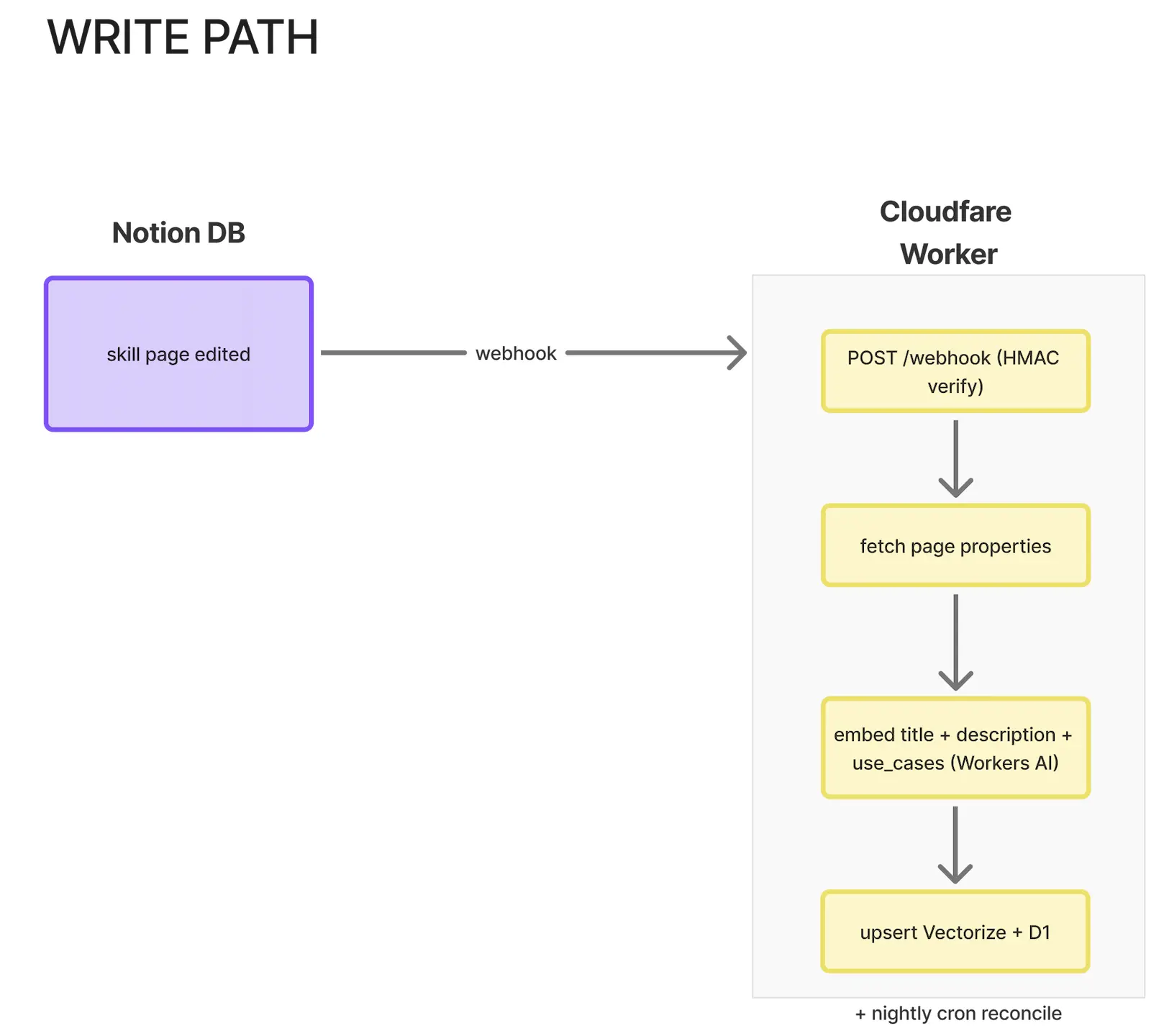
The first is keeping a search index in sync with Notion. Every time a skill page changes, Notion fires a webhook to the Worker. The Worker takes only the three intent fields (title, description, and "when to use"), turns them into a vector embedding using “Workers AI”, and stores one vector per skill in “Vectorize”, with the metadata in “D1”. Workers AI, Vectorize, and D1 are all Cloudflare products running inside the same Worker. A daily cron job re-reconciles everything as a safety net, in case a webhook ever gets dropped.
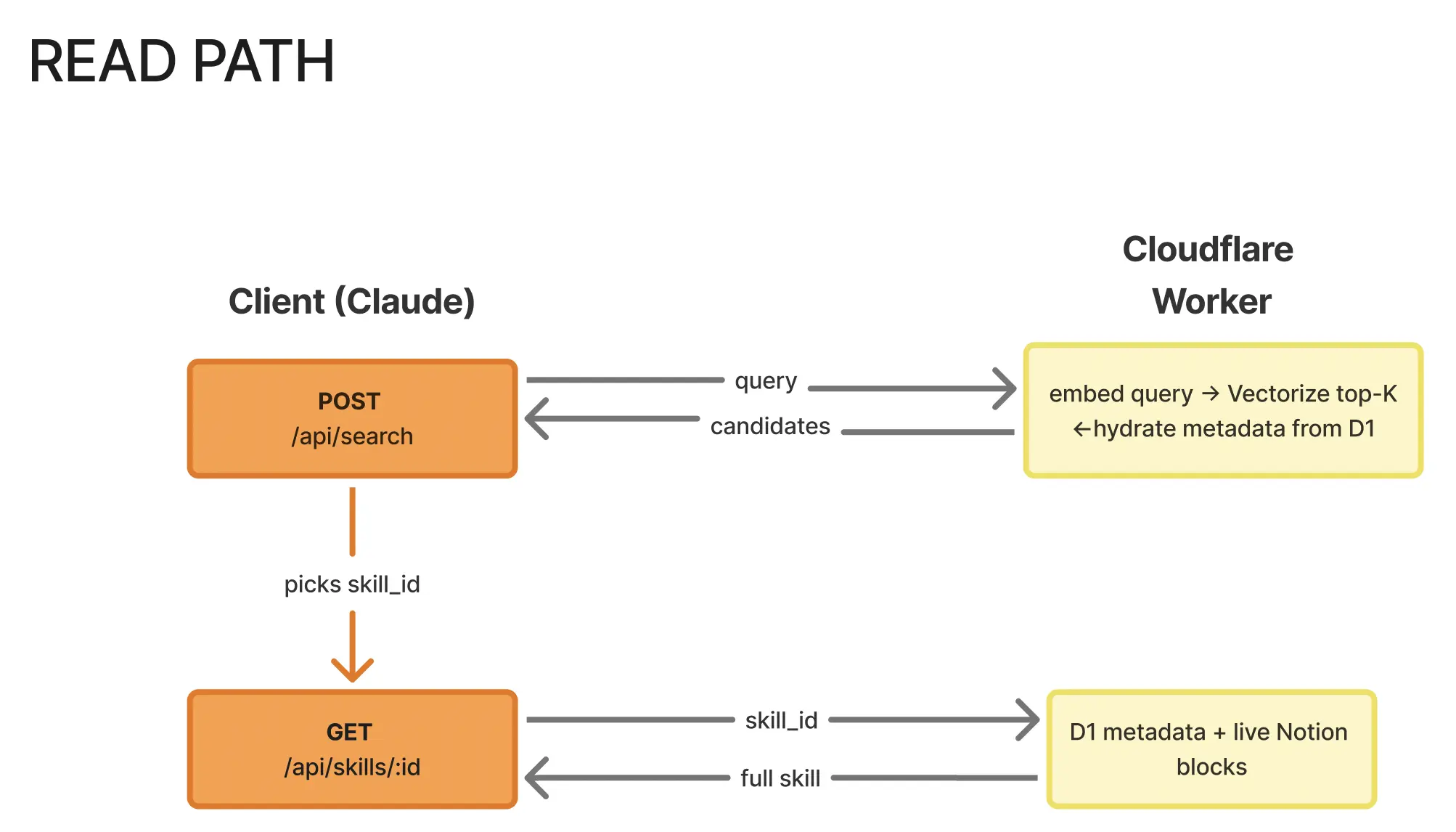
The second job is answering searches. When someone types a question, the Worker embeds the question, finds the closest skills in Vectorize, and returns a ranked list. When you pick one, it fetches the full skill body live from Notion so you always get the current version.
Why only the intent fields get embedded
This is the clever part. The Worker deliberately does not embed the skill body. Search ranks on what a skill is for, not on random keywords buried in its implementation. So a search like "I want to create these events" matches the skill that describes that intent, rather than every skill that happens to mention the word "event" somewhere in its code.
The body is never indexed, only fetched on demand. That keeps results clean and the content always fresh.
The one skill that unlocks the rest
There's one thing to set up first: the marketplace lets us share skills, but Claude needs to know the marketplace exists before it can search it. We solved that with a single bootstrap skill.
Eliot, who is space owner of our Claude Team, added the single skill Photoroom skill marketplace stated above to our shared Claude Team. That skill is what knows how to reach the marketplace, and it was installed once, for the whole company. Nobody else has to install anything. The moment you add a skill to the Notion database, it's reachable by everyone straight away. One skill to find all the others.
Finding a skill mostly happens from Claude, and you don't do anything special. Whenever you ask Claude how something is done internally at Photoroom (a workflow, a tool, a policy, who to contact, a past playbook), it searches the marketplace on its own, finds the most relevant skill, and pulls back its full content to answer you. You just ask in plain language. Under the hood it's the two-step read path: Claude searches by intent, gets a ranked list with a similarity score, then fetches the full body of the best match live from Notion. If nothing scores high enough, it won't force a match, so you won't get an irrelevant skill dressed up as an answer. If you'd rather browse by hand, the search UI is also embeddable directly in Notion.
Adding a skill is just adding a row to the Notion database. Fill in the title, description, and "when to use" fields properly, because those three are what search runs on. Drop the actual instructions in the body of the page. The index updates itself within seconds via the webhook, and your skill is instantly discoverable by everyone.
What this changes
The quiet but important part is that Claude doesn't only reach for the marketplace when you explicitly ask for a skill. It also checks it whenever it's about to give you Photoroom-specific advice it can't verify on its own. So if someone asks how we name Amplitude events, how a hiring loop runs, or which vendor we use for something, Claude looks for a captured skill before answering, instead of guessing. You are now basically using skills without invoking them and without knowing it even exists.
That's the shift. Claude stops being a generic assistant and starts answering with our actual internal know-how, written by the person who already hit the gotchas in that domain. And it works the other way too: the moment you capture something you know in a skill, everyone's Claude knows it. This is a very simple but powerful way to share instructions across the company, without any Git commit.
Known limitations
There's no auth on the search endpoint yet in v1, so it's fronted with Cloudflare Access (our Google Workspace) before being shared more widely. And the embedding model is English-tuned for now. If we start writing skills in French, we'll swap in a multilingual model.
Takeway
That's the whole idea: one Notion database as the source of truth, one Cloudflare Worker to index and search it, and a single skill so Claude knows the marketplace exists. No git commits, no per-person setup, no scattered skills. You write something down once, and everyone's Claude can find it.
If your company uses Claude, you probably have the same problem we did: real know-how stuck in people's heads or buried in docs, with no clean way to put it where Claude will actually reach for it. This is one way to fix that, and the best part is how little it takes to reproduce. The rest of this article is the exact recipe, so you can build your own in an afternoon.
Technical steps
One-time setup
# 0. Install deps
npm install

# 1. Create the D1 database. Copy the printed `database_id` into wrangler.toml.
wrangler d1 create skill_marketplace

# 2. Apply migrations (remote = real CF account; local = dev sandbox)
npm run migrate:remote
npm run migrate:local

# 3. Create the Vectorize index (768 dims, cosine — matches bge-base-en-v1.5)
wrangler vectorize create skill-marketplace \\
  --dimensions=768 --metric=cosine

# 4. Add metadata indexes so the query handler can return useful metadata
wrangler vectorize create-metadata-index skill-marketplace \\
  --property-name=page_id --type=string
wrangler vectorize create-metadata-index skill-marketplace \\
  --property-name=title --type=string
wrangler vectorize create-metadata-index skill-marketplace \\
  --property-name=teams --type=string
wrangler vectorize create-metadata-index skill-marketplace \\
  --property-name=url --type=string

# 5. Set secrets
wrangler secret put NOTION_TOKEN
# (Workspace integration token; needs Read content capability)

# 6. Deploy (we need a public URL before we can register the webhook)
npm run deploy
After step 6 you'll have a URL like https://skill-marketplace.<account>.workers.dev.
Register the Notion webhook
Go to https://www.notion.so/profile/integrations and open the
Skill Marketplace integration.Webhooks tab → Create a subscription.
URL:
https://skill-marketplace.<account>.workers.dev/webhookEvents: check
page.createdpage.properties_updatedpage.content_updatedpage.deletedpage.undeleted(optional, for restores)
Click Subscribe. Notion POSTs
{ verification_token }to the URL.Stream Worker logs to grab it:
Look for:[webhook] verification_token received — paste into Notion UI ...npm run tailPaste the token back into the Notion UI and store it as the Worker
secret so signatures can be verified:wrangler secret put NOTION_WEBHOOK_SECRETClick Verify in Notion. The subscription becomes active.
Backfill the index once (webhooks only cover future changes):
curl -X POST "https://skill-marketplace.<account>.workers.dev/admin/reconcile" \\
  -H "X-Admin-Token: $NOTION_WEBHOOK_SECRET"
Endpoints
Method | Path | What it does |
|---|---|---|
GET |
| The search UI, embeddable in Notion |
POST |
| Step 1: send a question, get ranked skills back |
GET |
| Step 2: fetch one skill's full content |
POST |
| Receives Notion change events |
POST |
| Re-sync a single page (admin only) |
POST |
| Re-sync everything (admin only) |
Cron (0 5 * * * UTC) also runs reconcileAll daily as a safety net for any
dropped webhook events.
Local dev
# Use a real Notion token but the local D1/Vectorize sandbox.
echo 'NOTION_TOKEN = "ntn_..."' > .dev.vars
echo 'NOTION_WEBHOOK_SECRET = "dummy-for-local"' >> .dev.vars
npm run dev

# In another shell, re-sync one page into the local index:
curl -X POST "<http://localhost:8787/admin/sync/><page_id>" \
  -H "X-Admin-Token: dummy-for-local"

# Then search against it:
curl -X POST "<http://localhost:8787/api/search>" \
  -H "Content-Type: application/json" \
  -d '{"q":"how do I create an amplitude branch?"}'
Vectorize is not available in
wrangler devlocal mode by default — pass--remoteto run against the live index while iterating.
Calling the API directly
The marketplace is a small HTTP API in front of the Notion database. Two steps: search by intent, then fetch the full skill.
Search returns the top matches for a natural-language query:
curl -sS -X POST "<https://skill-marketplace.xxx.workers.dev/api/search>" \
  -H "X-API-Key: <api-key>" \
  -H "Content-Type: application/json" \
  -d '{"q":"<user intent in natural language>","top_k":5}'
Each result carries a score (cosine similarity, 0 to 1). Below ~0.5 usually means nothing relevant exists, so don't force a match.
Fetch returns the full skill body in the content field for a given skill_id
curl -sS "<https://skill-marketplace.xxx.workers.dev/api/skills/><skill_id>" \
  -H "X-API-Key: <api-key>"